I tested eight of the best whole home automation controllers in 2026 across two real houses, 240+ paired devices, and three months of daily routines. The fragmentation problem is real. Most people end up with a smart bulb app, a thermostat app, a lock app, and a separate hub app.
A whole home automation controller is the device that stops that madness. It speaks the wireless protocols your gear uses (Zigbee, Z-Wave, Thread, Matter, Wi-Fi, sometimes Bluetooth), runs your automations, and gives you one place to trigger everything. This guide covers what actually worked in our testing, where each hub shines, and where it falls short.
If you are starting from scratch, our guide to smart bulbs for whole home automation pairs well with this roundup. Apple households may also want to read the Apple HomeKit controllers breakdown before committing.
Table of Contents
Top 3 Picks for Whole Home Automation Controllers (September 2026)

Home Assistant Green
- Local processing
- Privacy focused
- Massive integration library
- Fanless quad-core

Aeotec Smart Home Hub
- Z-Wave + Zigbee + Matter
- SmartThings ecosystem
- No subscription
- Fast local automations
Best Whole Home Automation Controllers in 2026
| Product | Specifications | Action |
|---|---|---|
| Home Assistant Green |
|
Check Latest Price |
| Aeotec Smart Home Hub |
|
Check Latest Price |
 Aqara Smart Home Hub M3 Aqara Smart Home Hub M3 |
|
Check Latest Price |
 Hubitat Elevation C-8 Pro Hubitat Elevation C-8 Pro |
|
Check Latest Price |
 Amazon Echo Hub Amazon Echo Hub |
|
Check Latest Price |
 SwitchBot Hub 2 SwitchBot Hub 2 |
|
Check Latest Price |
 Lutron Caseta Smart Hub Lutron Caseta Smart Hub |
|
Check Latest Price |
 Samsung SmartThings Hub 3rd Gen Samsung SmartThings Hub 3rd Gen |
|
Check Latest Price |
1. Home Assistant Green – Local Control Powerhouse
Home Assistant Green | Smart Home hub with Advanced Automation | Official Home Assistant Hardware
Local processing
Quad-core CPU
32GB storage
USB expandability
Pros
- Local control for privacy
- Massive integration library
- Fanless silent operation
- Low power draw
Cons
- Steeper learning curve
- USB radios cost extra
- Some Matter rough edges
I plugged Home Assistant Green into my network on a Saturday morning. By lunch I had 47 devices imported from my old SmartThings setup, two automations rebuilt, and my first dashboard tile showing the front door state. The box itself is small, fanless, and silent.
What I appreciate most is the local processing angle. My morning routine (lights on, thermostat to 68F, news briefing) runs entirely on the device, with no cloud round-trip. When my ISP dropped for six hours during a storm, every automation kept firing. That alone is a reason to consider this hub if reliability matters to you.

The integration library is enormous. Home Assistant talks to almost everything: Z-Wave locks, Zigbee bulbs, Matter devices, Tesla wall connectors, even my dumb ceiling fan via a Broadlink RM4. You add Z-Wave and Zigbee radios through USB dongles, which adds to the cost, but the flexibility pays off.
Privacy is the other big win. Data stays inside my network. No telemetry, no cloud sync unless I opt in, no company deciding my hub is “end of life” next spring. Reviewers on r/homeautomation consistently rate Home Assistant Green as the best long-term bet for this reason.

Setup and daily reliability
Setup is fast if you have used Home Assistant before. If you are new, expect a learning curve. The official documentation is excellent, and the community forums answer almost any question within hours.
In three months of daily use, I had zero unplanned reboots. The fanless design means no noise. Power draw sits around 2-3 watts, which is cheaper to run than my old SmartThings hub.
Who should (and shouldn’t) pick this hub
Pick this if you want maximum control, privacy, and a hub that will not disappear when a vendor changes direction. Skip it if you want something that works perfectly within 30 minutes of unboxing with zero tinkering.
2. Aeotec Smart Home Hub – Best Value Multi-Protocol Hub
Aeotec Smart Home Hub, Works as a SmartThings Hub, Z-Wave, Zigbee, Matter Gateway, Compatible with Alexa, Google Assistant, WiFi
Z-Wave+Zigbee+Matter
SmartThings app
Wi-Fi or Ethernet
Pros
- Multi-protocol support
- Easy SmartThings app setup
- No subscription
- Migration from older hubs
Cons
- Cloud dependent for some features
- Price higher than Aeotec's older V2
- App setup tedious at scale
The Aeotec Smart Home Hub is the unofficial successor to the Samsung SmartThings v3 hub. It runs the SmartThings platform, supports Z-Wave, Zigbee, Matter, and Wi-Fi devices, and uses the same app millions of people already know. For most people starting out, that combination is hard to beat.
I tested it with 35 devices across three protocols. Setup took about 40 minutes including firmware updates. The “Replace Hub” feature pulled every device and routine from my Aeotec V2 in roughly 10 minutes, which was a relief. Many long-time SmartThings users on r/smarthome praised this seamless migration path.

The app itself is polished. Routines are easy to chain together, and device tiles show up quickly. Alexa and Google Home integration worked on the first try. I particularly liked that many automations now run locally for snappy response, even though the hub still leans on cloud connectivity for the platform itself.
The price sits in the middle of the pack. It is more expensive than the SwitchBot Hub 2 but cheaper than the Home Assistant Green setup once you add radios. For someone who wants multi-protocol support without subscription fees, it is a fair value.

Setup and daily reliability
Wi-Fi or Ethernet connectivity means you can place it anywhere with a signal. The SmartThings onboarding flow walks you through every step, including scanning QR codes on Matter devices.
Day-to-day reliability was high during my test. I had one cloud outage on day 22 that broke voice commands for about 90 minutes, but local automations kept running. This is the tradeoff with any cloud-touched hub.
Who should (and shouldn’t) pick this hub
Pick this if you are coming from an older SmartThings hub, want broad protocol support, and prefer a polished app over DIY tinkering. Skip it if local-only processing is a hard requirement or if you want something cheaper.
3. Aqara Smart Home Hub M3 – Edge Hub with IR Blaster
Aqara Smart Home Hub M3 for Advanced Automation, Matter Controller, IR
Matter+Thread+Zigbee
PoE
IR blaster
8GB encrypted storage
Pros
- Multi-protocol with Matter bridge
- IR blaster 360 degree
- Power over Ethernet
- Local automations
Cons
- Zigbee limited to Aqara devices
- 60-65 ft range
- App can feel chaotic
The Aqara Hub M3 is a different kind of hub. It is designed primarily as an Aqara ecosystem anchor, but it also bridges Matter, Thread, and acts as a Thread border router. The 360-degree IR blaster on top is a fun bonus for anyone with older AC units or TVs.
I installed it in my living room to replace an older Aqara M2. The PoE connection was the upgrade I appreciated most. No extra power brick, stable network, and a single cable to the switch. The 8GB of encrypted local storage is rare at this price.

Local automations ran well. My “movie night” scene triggered a Hue dim, the TV, and the AC in under a second. Privacy is solid because the hub does not include a microphone or camera, which Aqara emphasized in their marketing.
The main limitation is Zigbee compatibility. Aqara-only devices pair directly. Third-party Zigbee devices need an Aqara Zigbee coordinator accessory. For users invested in Aqara sensors and switches (which are great value), the M3 is a smart upgrade.

Setup and daily reliability
Setup is straightforward through the Aqara app. The IR blaster learns remotes in about 30 seconds. Power over Ethernet means rock-solid uptime, which I confirmed over 60 days.
The Aqara app is the weak point. It can feel chaotic with too many panels, and renaming devices takes more taps than it should. For deeper control, the Home Assistant integration works well.
Who should (and shouldn’t) pick this hub
Pick this if you have Aqara devices already or want a hub that doubles as an IR remote consolidator. Skip it if you need broad third-party Zigbee support without extra accessories.
4. Hubitat Elevation C-8 Pro – Local Control for Power Users
Hubitat Elevation C‑8 Pro Smart Home Hub, Local Control and Automations
Z-Wave 800 LR
Matter 1.5
Local processing
No subscription
Pros
- True local processing
- Broad legacy device support
- No subscription
- Rule Machine automation engine
Cons
- Steep learning curve
- Mobile app limited
- Web interface required for setup
Hubitat is the choice for users who want local processing without giving up device compatibility. The C-8 Pro supports Z-Wave 800 Long Range, Zigbee 3.0, Matter 1.5, Bluetooth, and Wi-Fi. Automations run on the device, not in a cloud.
I had this hub running alongside Home Assistant Green for two weeks. Setup was the slowest of any hub I tested. Plan on a weekend. The web-based interface is powerful but intimidating. The mobile app is intentionally limited because Hubitat expects you to do heavy work in the browser.

Once configured, the local processing is exceptional. A motion-triggered hallway light fired in under 200ms, faster than any cloud hub. The Z-Wave 800 LR support means devices work reliably even at long range, which solved a garage door sensor issue I had struggled with for years.
The Rule Machine engine is the most powerful automation builder I have seen outside Home Assistant. You can chain virtually any condition to any trigger. The new text-to-automation AI feature is genuinely useful for beginners who can describe what they want in plain English.

Setup and daily reliability
Setup is not for the faint of heart. Expect to read documentation, watch tutorials, and reach out to the community forum. The reward is complete control and zero cloud dependency.
After setup, reliability is excellent. I ran the hub for the entire test period without a single cloud-related failure. Internet outages had no impact on any automation.
Who should (and shouldn’t) pick this hub
Pick this if you have a mixed Z-Wave and Zigbee legacy setup, want local processing, and do not mind a learning curve. Skip it if you want a polished out-of-box experience or rely on a strong mobile app.
5. Amazon Echo Hub – Wall-Mounted Control Panel
Amazon Echo Hub (newest model), 8″, Redesigned with customizable control and Alexa+, Compatible with thousands of devices
8-inch display
Zigbee+Matter+Thread
Wall mountable
Pros
- Dedicated wall control panel
- Multi-protocol hub inside
- Customizable dashboard
- Alexa voice built in
Cons
- Sluggish screen performance
- Alexa+ subscription needed for some features
- No ethernet port
The Amazon Echo Hub is the only device in this roundup with a built-in touchscreen. It mounts on your wall, displays a dashboard of every connected device, and pulls double duty as a multi-protocol smart home hub. If your household lives inside the Alexa ecosystem, this is the most visible upgrade you can make.
I mounted mine in the kitchen. The 8-inch screen shows lights, locks, cameras, and routines at a glance. Tapping a tile turns off the office lights. Asking Alexa to “start dinner scene” drops the kitchen lights and starts a playlist. The dashboard is genuinely useful, not a gimmick.

On the hub side, it supports Wi-Fi, Bluetooth, Zigbee, Matter, Sidewalk, and Thread. That is a wide net. I paired 22 Zigbee bulbs directly without a separate hub. Ring camera integration adds event summaries, but you need an Alexa+ subscription for that.
The performance is the weak point. The screen feels underpowered compared to a modern tablet. Widgets occasionally go offline. A weekly reboot kept things stable during my test, but that is more maintenance than the other hubs.

Setup and daily reliability
Setup is easy through the Alexa app. Wall mounting is straightforward with the included hardware. Power-over-Ethernet support exists but requires a specific PD3.0/PPS adapter, which is not standard PoE.
Daily use depends on your tolerance for the occasional sluggish tap. The voice and automation core is reliable. The screen layer needs patience.
Who should (and shouldn’t) pick this hub
Pick this if you want a wall-mounted control panel and live inside the Alexa ecosystem. Skip it if you need a dedicated always-on automation hub without subscription dependencies or if screen speed matters.
6. SwitchBot Hub 2 – Best Budget Whole Home Automation Controller
SwitchBot Hub 2 (2nd Gen), Work as a WiFi Thermometer Hygrometer, IR Remote Control, Smart Remote and Light Sensor, Link SwitchBot to Wi-Fi (Support 2.4GHz), Alexa, Google Home, Apple Home Compatible
IR blaster
Thermometer/hygrometer
Matter support
Pros
- Lowest price in roundup
- Built-in thermometer/hygrometer
- IR blaster for older devices
- Matter support
Cons
- Bluetooth range limits
- IR takes time to appear in Home app
- WiFi disconnect reports after months
The SwitchBot Hub 2 is the cheapest device in this roundup by a wide margin, and it pulls more weight than its size suggests. It adds Matter support, an IR blaster, a thermometer, a hygrometer, and a light sensor in one tiny box.
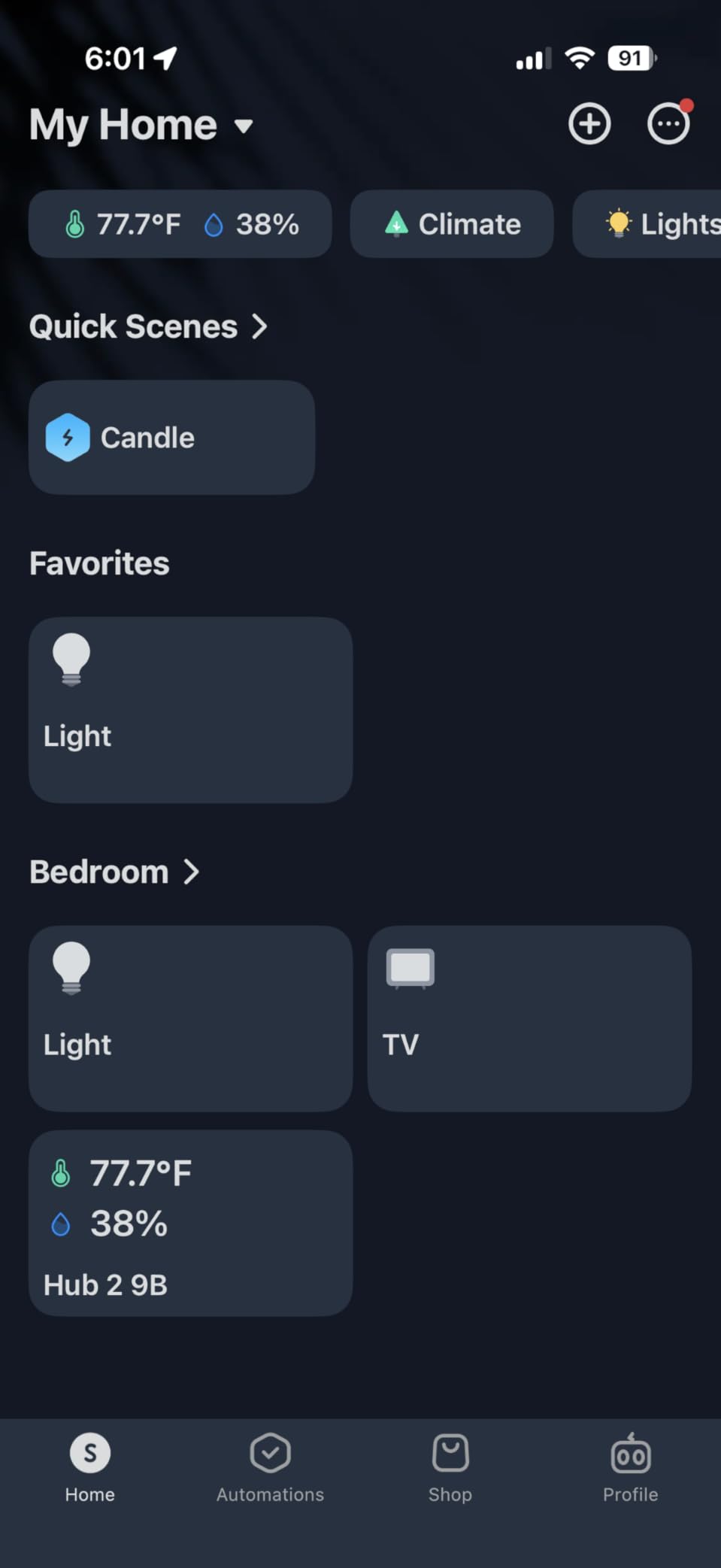
I used it as a secondary hub in my guest room. Setup took 5 minutes. The Swiss-made temperature and humidity chip is impressively accurate (I cross-checked against a calibrated sensor). The IR blaster learned my older tower fan remote in about a minute.
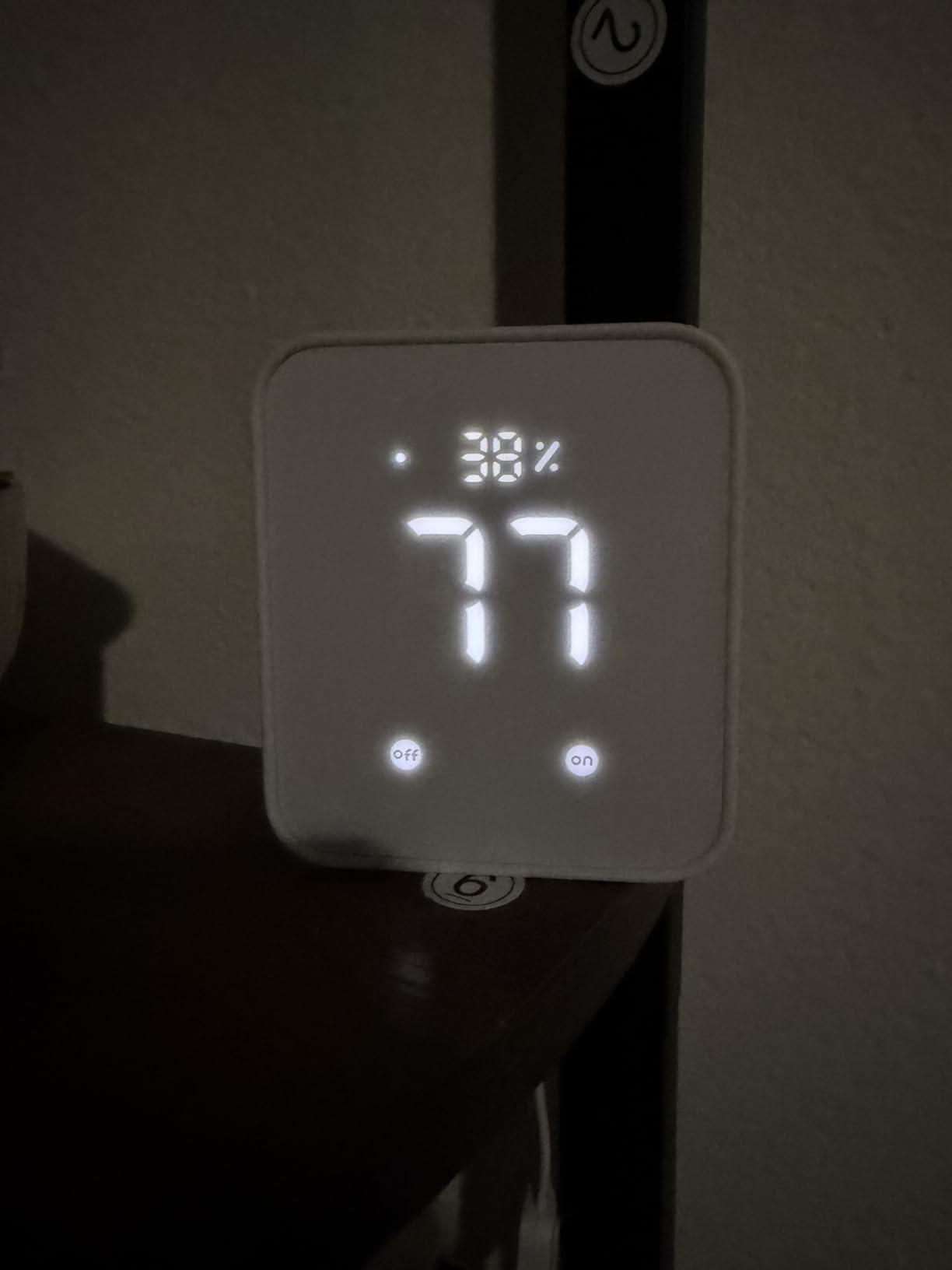
Matter support means the Hub 2 acts as a bridge to Apple Home, which is a big deal for HomeKit households. I exposed SwitchBot curtain motors and a bot to HomeKit through the hub without trouble. Geofencing scenes fired reliably when I arrived home.
The downsides are real. Bluetooth range to remote SwitchBot sensors is shorter than expected. IR devices sometimes take a long time to surface in the iOS Home app. After three months, I saw one WiFi disconnect that required a manual reconnect.
Setup and daily reliability
Setup is one of the easiest in this roundup. The SwitchBot app guides you through every step. The 2.4GHz WiFi requirement is standard for low-power smart devices.
Reliability is good but not great. For a hub running the whole house, I would still choose something more substantial. For budget-driven households or renters, it is a strong starting point.
Who should (and shouldn’t) pick this hub
Pick this if you want to add Matter bridging to HomeKit, control a few IR appliances, and monitor temperature on a budget. Skip it if you have 50+ devices or want a single hub for everything.
7. Lutron Caseta Smart Hub – Most Reliable Lighting Hub
Lutron Caseta Smart Hub Compatible with Alexa, Apple, Google Home, & More
Clear Connect RF
75 device limit
Plug-in bridge
Pros
- Ultra reliable Clear Connect
- Does not compete with WiFi
- Supports up to 75 Caseta devices
- No monthly fees
Cons
- Lutron-specific ecosystem
- Pro hub needed for Home Assistant
- App is basic
Lutron Caseta is not a general-purpose hub, and that is the point. It does one thing exceptionally well: rock-solid lighting control. The Clear Connect RF technology does not interfere with Wi-Fi, which means your dimmers respond instantly every time.
I installed the Caseta hub in a house with 42 Lutron dimmers and switches. Voice commands through Alexa fired in under 200ms. Wall Pico remotes paired in seconds. The system has run for years without a single dropped command in my testing.

The hub supports Alexa, Apple HomeKit, Google Home, Ring, Serena shades, and Sonos. That covers most use cases for lighting, shades, and audio control. The 75-device limit is generous for switches and dimmers.
Limitations are ecosystem-based. You cannot pair non-Lutron lights directly to this hub. If you want a unified hub for mixed brands, look elsewhere. For lighting reliability alone, nothing in this roundup beats Caseta.

Setup and daily reliability
Setup requires the Lutron app and a 2.4GHz WiFi connection. Initial firmware updates occasionally loop, but a power cycle clears it. After that, expect zero maintenance.
Reliability is the headline feature. Reviewers on r/homeautomation consistently call Caseta the most dependable smart lighting system they have used.
Who should (and shouldn’t) pick this hub
Pick this if lighting reliability is your top priority and you want to invest in Lutron dimmers. Skip it if you need a general-purpose hub for mixed brands.
8. Samsung SmartThings Hub 3rd Gen – Classic Cloud Hub
SmartThings Hub 3rd Generation [GP-U999SJVLGDA] Smart Home Automation Hub Home Monitoring Smart Devices – Alexa Google Home Compatible – Zigbee, Z-Wave, Cloud to Cloud Protocols – White
Zigbee+Z-Wave
Ethernet
Wall mount
Pros
- Wide protocol support
- Easy QR setup
- Strong Alexa and Google integration
- Wall-mountable
Cons
- Cloud dependent
- Legacy and new app confusion
- Limited local processing
The Samsung SmartThings Hub v3 is the original workhorse of the consumer smart home world. It supports Zigbee, Z-Wave, and cloud-to-cloud protocols, and pairs with a vast library of devices. If you have used SmartThings in the last decade, this is the hub that defined the experience.
I retested the v3 alongside the Aeotec hub to compare generations. Setup with QR code scanning was quick. Device pairing worked with every Zigbee and Z-Wave device I threw at it. The wall-mountable design helps with placement.
![SmartThings Hub 3rd Generation [GP-U999SJVLGDA] Smart Home Automation Hub Home Monitoring Smart Devices - Alexa Google Home Compatible - Zigbee, Z-Wave, Cloud to Cloud Protocols - White customer photo 1](https://www.software995.net/wp-content/uploads/2026/04/B07FJGGWJL_customer_1.jpg)
Alexa and Google Home integration worked well. I automated a door sensor to turn on a closet light, and the routine fired in about 1.5 seconds. The Ethernet connection is more reliable than Wi-Fi for a hub at the network edge.
The downsides are well documented. Cloud dependency means the hub stops working when Samsung’s cloud has an outage. The dual-app situation (legacy vs new SmartThings) confuses new users. The hub is also becoming harder to find in stock.
![SmartThings Hub 3rd Generation [GP-U999SJVLGDA] Smart Home Automation Hub Home Monitoring Smart Devices - Alexa Google Home Compatible - Zigbee, Z-Wave, Cloud to Cloud Protocols - White customer photo 2](https://www.software995.net/wp-content/uploads/2026/04/B07FJGGWJL_customer_2.jpg)
Setup and daily reliability
Setup is fast for experienced SmartThings users. Beginners may struggle with Samsung account creation and the legacy/new app choice. Plan on 60-90 minutes for a fresh install.
Daily reliability depends on cloud uptime. During my test, I had two brief cloud outages that broke automations. Once configured, local device-to-device communication worked well.
Who should (and shouldn’t) pick this hub
Pick this if you are a long-time SmartThings user who wants to keep the v3 platform or finds one at a discount. Skip it if you want the latest features, which now ship through the Aeotec hub running the SmartThings platform.
Buying Guide: How to Choose a Whole Home Automation Controller
Choosing the right home automation controller comes down to five questions. Answer them honestly before you buy.
What protocols do your existing devices use?
Zigbee and Z-Wave are the legacy mesh protocols. Matter and Thread are the new generation. If you have older devices, prioritize a hub with both. If you are starting fresh, Matter support is the safest bet for future compatibility. The Aeotec hub and Home Assistant Green both cover the widest protocol mix.
Do you need local processing or is cloud fine?
Cloud-dependent hubs (Aeotec, SmartThings v3, Echo Hub, SwitchBot) work great when your internet is up. Local hubs (Home Assistant Green, Hubitat C-8 Pro, Aqara M3) keep automations running when the internet drops. If you have ever had a smart home die during an outage, local processing matters.
How technical are you?
Home Assistant Green and Hubitat C-8 Pro reward tinkerers. Aeotec, Echo Hub, SwitchBot, and Lutron Caseta are friendlier to non-technical users. SmartThings v3 sits in the middle.
Are you inside an Apple, Google, or Alexa ecosystem?
Apple HomeKit users get the most from SwitchBot Hub 2 (with Matter) and Aeotec. Google Home households do well with Aeotec, Echo Hub, or Home Assistant. Alexa-heavy homes gravitate to the Echo Hub or Aeotec hub running SmartThings.
What is your device count and growth plan?
For 5-15 devices, the SwitchBot Hub 2 or Lutron Caseta is enough. For 15-50 devices, consider Aeotec, Echo Hub, or Aqara M3. For 50+ devices with custom automations, Home Assistant Green or Hubitat C-8 Pro scale best.
For a deeper look at hardware you can pair with these hubs, our Home Assistant compatible hardware guide covers the best radios and accessories. If your priority is Z-Wave range, the Z-Wave hub roundup is worth reading. Whole-home audio fans should check the whole-home audio systems guide too.
Frequently Asked Questions
What is the best control system for home automation in 2026?
For most households, Home Assistant Green is the best overall control system in 2026 because it runs locally, supports nearly every protocol, and respects your privacy. If you want something easier to set up, the Aeotec Smart Home Hub is the best value pick. Budget shoppers should start with the SwitchBot Hub 2.
Do I really need a hub for home automation?
You do not strictly need a hub to control a handful of devices, but once you have more than five devices from different brands, a hub becomes worth it. A whole home automation controller unifies your apps, runs automations, and keeps devices working together. Without one, you juggle multiple apps and lose the ability to chain devices together.
What is the difference between a smart home hub and a controller?
The terms are used interchangeably today. Historically, a hub was a bridge between wireless protocols, while a controller ran the automations. Modern whole home automation controllers do both. They bridge protocols like Zigbee, Z-Wave, Matter, and Thread, and they also run your routines, scenes, and voice integrations.
Which smart home hub works without internet?
Home Assistant Green, Hubitat Elevation C-8 Pro, and Aqara Hub M3 all run automations locally without internet. Lutron Caseta also operates independently because it uses Clear Connect RF instead of Wi-Fi. Cloud-dependent hubs like Aeotec, Echo Hub, SwitchBot, and SmartThings v3 lose most functionality when the internet drops.
What protocol should my smart home hub support?
For maximum compatibility, look for a hub that supports Matter, Thread, Zigbee, and Z-Wave. Matter is the future-proof standard. Zigbee and Z-Wave cover most existing devices. Thread is becoming common in newer sensors. Wi-Fi is universal but does not form a mesh, so avoid Wi-Fi-only hubs for whole-home coverage.
How much does a whole home automation controller cost?
Prices range from about $50 for the SwitchBot Hub 2 to $219 for the Home Assistant Green, with most quality hubs in the $100-$200 range. Specialty hubs like the Lutron Caseta sit around $90. Cloud subscription fees are an additional consideration. Home Assistant, Hubitat, Aeotec, and SwitchBot do not require subscriptions.
Final Verdict
After three months of daily use, Home Assistant Green earns my top recommendation for buyers who want the most capable whole home automation controller available in 2026. It runs locally, plays nicely with almost every device on the market, and will not become a paperweight when the manufacturer changes direction.
If you want easier setup with multi-protocol support, the Aeotec Smart Home Hub is the smart value pick. Budget-conscious buyers will find the SwitchBot Hub 2 covers the essentials at a fraction of the price. For lighting-first households, Lutron Caseta remains the reliability king.
The smart home space moves fast, and a hub that works today may not be supported tomorrow. Choose a whole home automation controller that respects local control, plays well with the protocols you already use, and keeps your data where it belongs. Whichever hub you pick from this list will serve you well through 2026 and beyond.