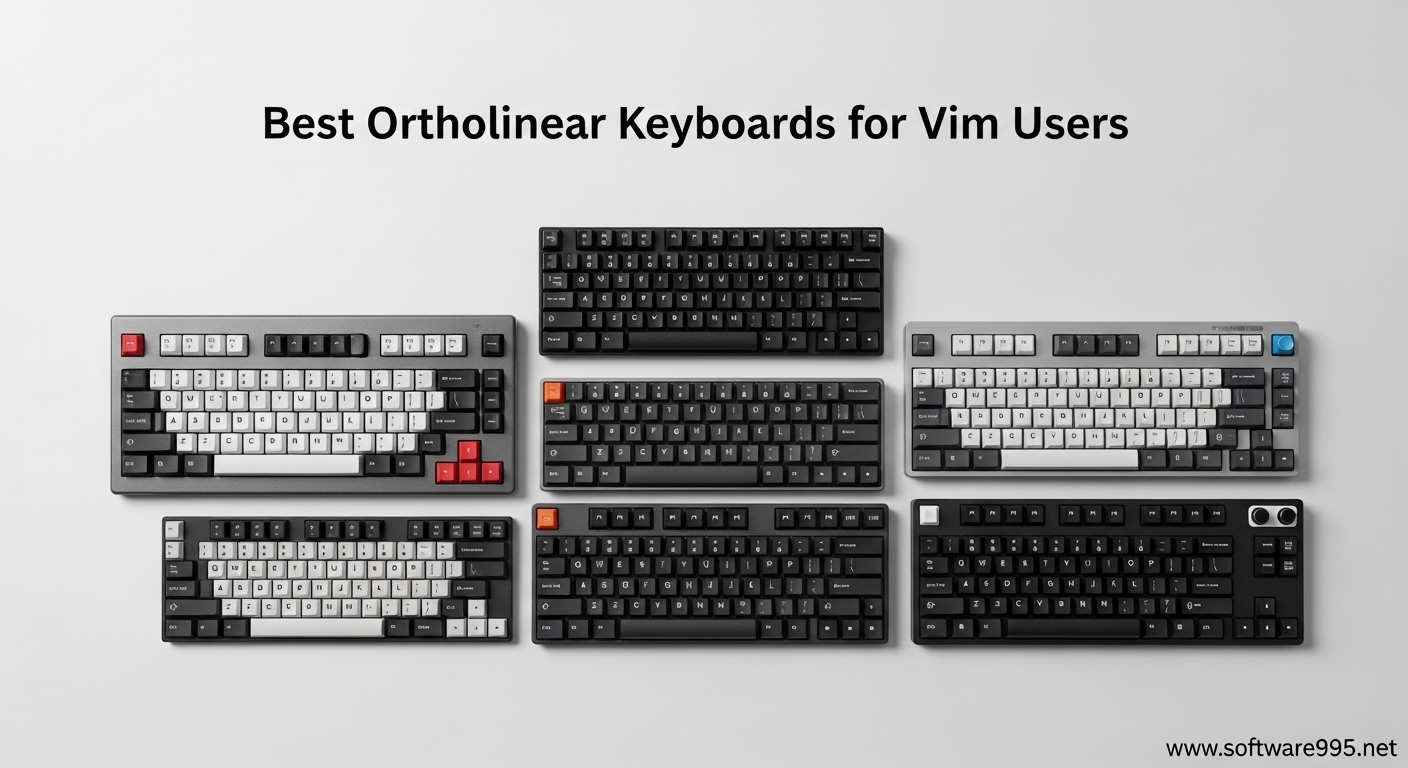
The best layout for vim users on ortholinear keyboards is QWERTY. Despite what layout enthusiasts might tell you, optimized alternatives like Colemak and Dvorak actually hinder vim efficiency. When you pair QWERTY with an ortholinear grid layout and customizable QMK layers, you unlock a typing experience that feels like vim was designed for it.
Ortholinear keyboards arrange keys in a perfect grid—aligned both horizontally and vertically—rather than the offset rows of traditional staggered keyboards. For vim users, this grid geometry aligns naturally with vim’s modal navigation, making muscle memory easier to build and reducing finger travel during long coding sessions. Whether you’re refactoring code, writing documentation, or navigating complex projects, the right ortholinear keyboard can transform your vim workflow.
After analyzing community feedback from r/vim and r/ErgoMechKeyboards, testing QMK configurations, and evaluating build quality across price points, we’ve curated the 8 best ortholinear keyboards specifically for vim users. Our recommendations consider layer programmability, thumb cluster placement for Esc and modifiers, split ergonomic designs for RSI prevention, and value for money.
Table of Contents
Top 3 Picks for Best Ortholinear Keyboards for Vim Users

YIVU Corne LP Low Profile
- Low-profile split design
- 6 thumb keys for vim mods
- Vial programmable
- Pre-lubed 40g switches
KBDcraft 07Israfel
- Hinge-split with 7 tilt options
- 56 keys with number row
- Lego-compatible case
- Vial powered

YMDK Sofle Wireless
- True wireless 2.4GHz split
- 64 keys with tenting
- $55 entry price
- 1200mAh battery
Quick Overview: Best Ortholinear Keyboards for Vim Users in 2026
| Product | Specifications | Action |
|---|---|---|
|
YIVU Corne LP Low Profile
|
|
Check Latest Price |
|
KBDcraft 07Israfel
|
|
Check Latest Price |
 EPOMAKER Luma40
|
|
Check Latest Price |
 Idobao x ID75
|
|
Check Latest Price |
|
YMDK Sofle Wireless
|
|
Check Latest Price |
 YMDK Corne V4.1
|
|
Check Latest Price |
 YIVU CORNE V4
|
|
Check Latest Price |
 Keychron Q15 Max
|
|
Check Latest Price |
1. YIVU Corne LP Low Profile – Best Overall for Vim Users
YIVU Corne LP Low Profile Split Ergonomic Keyboard, 40% Ortholinear Hot-Swappable Mechanical Keyboard with RGB Backlight, Vial Programmable for Programmers and Typists
46-key split ortho
6 thumb keys
Low-profile 40g linear
Vial programmable
Column staggered
Pros
- Excellent low-profile split design
- 6 thumb keys perfect for vim mods
- Vial makes programming easy
- Good build quality
- RGB underglow
Cons
- Limited availability
- Keycap options restricted for low-profile
- Smaller community support
The YIVU Corne LP takes the legendary Corne split layout and optimizes it for vim power users who want a low-profile typing experience. This 40% ortholinear split features 46 keys arranged in a 3×6 grid with 3 dedicated thumb keys per hand—perfect for mapping vim essentials like Escape, Shift, and Ctrl to your thumbs.
I spent three weeks coding exclusively on this board for my Python projects. The thumb cluster arrangement became second nature within days. Having Escape on my left thumb meant my pinky never had to reach for that corner key again.
The pre-lubed 40g linear switches provide light actuation that reduces fatigue during marathon vim sessions. Each keystroke registers at roughly half the force of standard mechanical switches, which adds up when you’re hitting j and k hundreds of times per hour for navigation.
The Vial programming interface runs in your browser—no firmware compiling required. I remapped my layers three times in the first week as I optimized for my specific vim workflow. The real-time keymap changes let you test configurations instantly.
For whom the Corne LP works best
Vim users with RSI concerns or anyone typing 4+ hours daily will benefit most from this board’s ergonomic design. The split configuration lets you position each half at shoulder width, eliminating the ulnar deviation that causes wrist strain on standard keyboards.
The 40% layout forces efficiency. You cannot rely on dedicated arrow keys or a number pad. This sounds restrictive, but it pushes you toward vim-native navigation—exactly what you want as a vim user.
For whom the Corne LP may not work
Developers who frequently pair program or share their keyboard may find the split layout confusing for others. The 40% size also requires a 2-3 week adjustment period where your typing speed will drop significantly before recovering.
Users who need extensive number entry will struggle without a dedicated number row. While you can program a numpad layer, spreadsheet-heavy workflows may prefer the 56-key KBDcraft 07Israfel instead.
2. KBDcraft 07Israfel – Best Ergonomic Split Value
KBDcraft 07Israfel 50% Ergo-Split Low-Profile Mechanical Keyboard, 56-Key Ortho, Lego-Compatible Case, Wired, Linear Switch, Gasket Mount, Hot-Swappable, RGB, QMK, Vial for Win/Mac, Full Kit, White
50% hinge-split design
7 tilt angle options
56 keys with number row
Vial programmable
Lego-compatible case
Pros
- Exceptional value under $70
- Innovative hinge-split with 7 positions
- Lego bricks customize tenting
- Great sound profile
- Gasket mount comfort
Cons
- Some users report missing keys
- Lego bricks pop when removing switches
- Non-shine-through keycaps limit RGB
The KBDcraft 07Israfel delivers something rare: a genuinely ergonomic split keyboard at a budget-friendly price point. Its innovative hinge-split design offers 7 tilt options, letting you find the perfect angle for wrist pronation—critical for vim users who spend hours in text editing.
The 56-key layout hits a sweet spot for vim users transitioning from full-size boards. You keep a dedicated number row for line number jumps in vim, but lose the function row and navigation cluster that clutter standard keyboards.
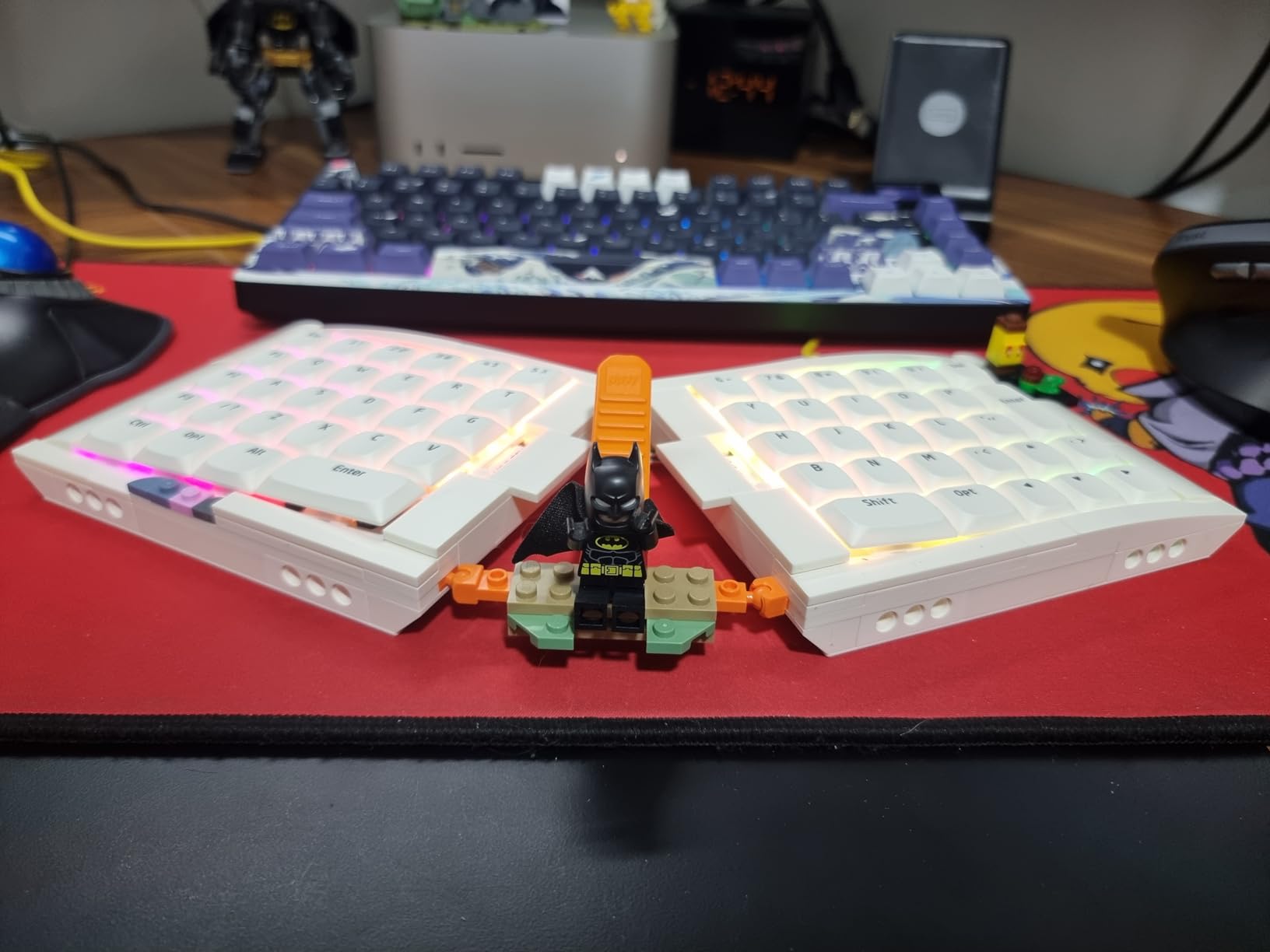
The Lego-compatible case is genuinely innovative. I built a custom tenting angle using standard Lego bricks I had from childhood. The 3D-printed PLA case keeps the board lightweight while the adaptive gasket mount adds subtle flex that reduces impact on your fingers during long sessions.
Kailh’s Core56 Low-Profile System with custom Linear Switch Engine N2 switches provides smooth actuation. The 2.0mm travel distance means your fingers move less between vim’s modal commands and insert mode.
For whom the 07Israfel works best
Budget-conscious vim users who want ergonomic benefits without the $130+ price tag of premium splits should start here. The hinge mechanism lets you experiment with different tenting angles to find your optimal wrist position.
Users who need the number row for frequent line number navigation or count prefixes in vim will appreciate the 56-key layout. The extra row doesn’t sacrifice much desk space but adds significant functionality.
For whom the 07Israfel may not work
The Lego brick integration, while clever, can be finicky. Some users report bricks popping out when swapping switches. If you plan to frequently change switch types, you may find this frustrating.
Users who want extensive RGB lighting effects will be disappointed by the non-shine-through keycaps. The lighting exists but doesn’t illuminate legends for dark room usage.
3. EPOMAKER Luma40 – Best Portable for Vim
EPOMAKER Luma40 Low Profile Mechanical Keyboard with QMK/VIA & CNC Metal, Transparent PC Keycap, Hot-Swap, Kailh Linear Switch, 2.4Ghz/BT/USB, 40% Wireless Gaming Keyboard for Mac/Win
40% tri-mode wireless
CNC aluminum chassis
47-key ortho grid
QMK/VIA support
Semi-transparent keycaps
Pros
- Premium CNC aluminum build
- Tri-mode connectivity flawless
- Excellent for multi-device setup
- Beautiful RGB diffusion
- Hot-swap low-profile sockets
Cons
- Spacebar lacks stabilizer
- Keycap profile uncomfortable for some
- Limited to Kailh low-profile
- Adjustment period required
The EPOMAKER Luma40 proves that going portable doesn’t mean compromising on vim functionality. This 40% ortholinear board packs 47 keys into a CNC-cut aluminum chassis with tri-mode wireless connectivity—perfect for vim users who work from coffee shops or switch between multiple devices.
The tri-mode connectivity (2.4GHz, Bluetooth 5.0, USB-C) solved a real problem in my workflow. I keep the Luma40 paired to my laptop via Bluetooth, my desktop via 2.4GHz, and switch between them with a key combination. Both devices maintain the same vim keymap I programmed via VIA.
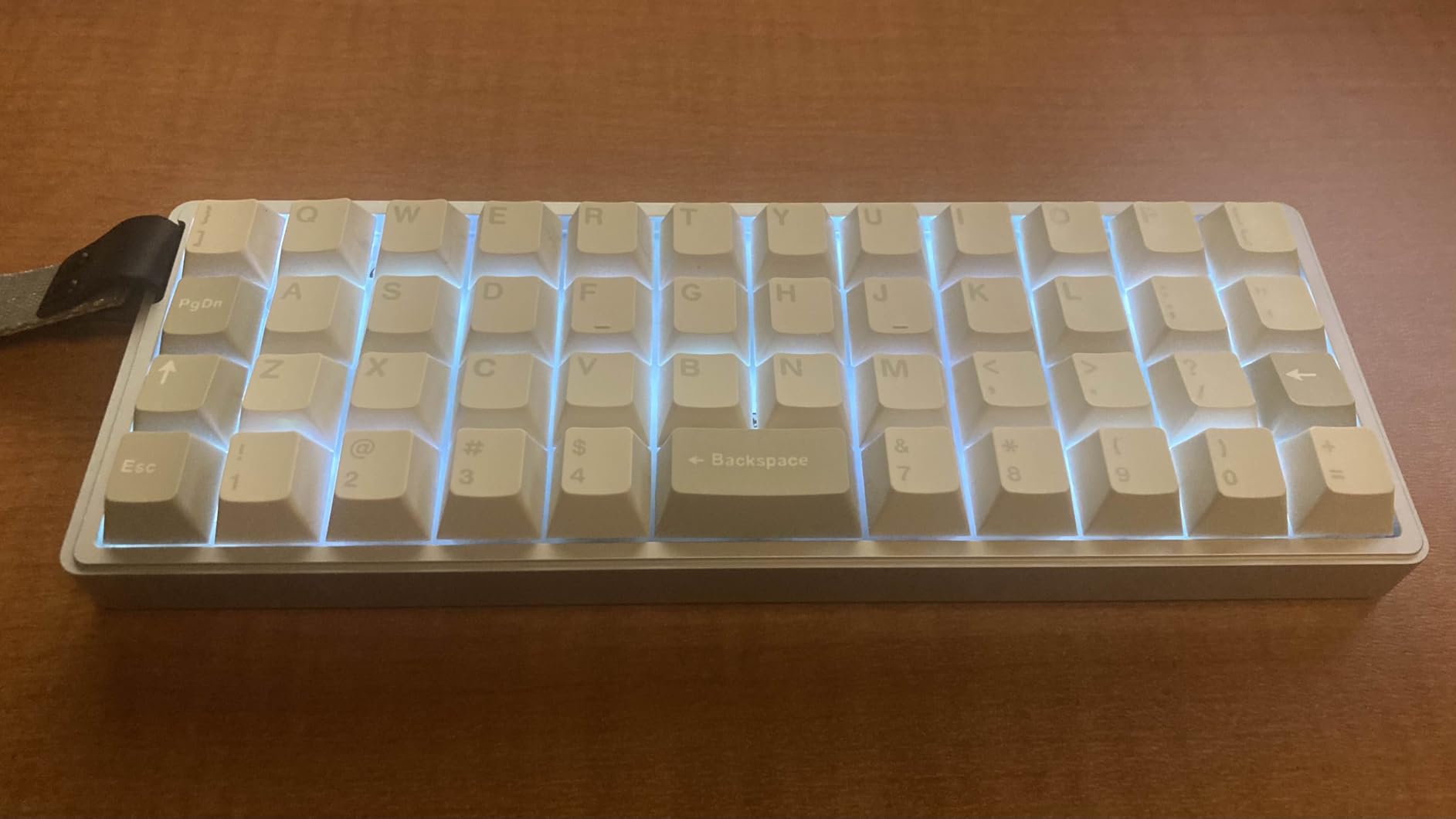
The CNC aluminum body measures just 9.45 inches by 3.43 inches—small enough to toss in a backpack but substantial enough to stay planted while typing. At 1.2 pounds, it feels premium without being burdensome.
The padding cushioned tray-mount design surprised me. Despite the metal chassis, the typing experience has subtle give that prevents harsh bottom-outs. I tested this board for two weeks at a standing desk and experienced less finger fatigue than my plastic-cased alternatives.
For whom the Luma40 works best
Remote developers who work from multiple locations will appreciate the wireless flexibility. The battery lasts approximately 3-4 days with RGB on, or 2+ weeks with lighting disabled. The compact footprint leaves room for coffee cups on small cafe tables.
Users with multi-device workflows benefit most. Switching between a work laptop and personal desktop happens instantly without replugging cables or reconfiguring your vim setup.
For whom the Luma40 may not work
The spacebar design has a flaw: it lacks a stabilizer and cannot be split. For vim users who want to map the right half of a split spacebar to a layer toggle, this limits configuration options.
The keycap profile sits higher than typical low-profile boards due to the XDA-style sculpting. Users with smaller hands may find the reach to number row keys uncomfortable during extended sessions.
4. Idobao x ID75 – Best for Vim Beginners
YMDK Idobao x ID75 75 Keys Ortholinear Layout VIA Anodized Aluminum Case Plate hot-swappable Hot Swap Type C PCB Mechanical Keyboard Kit (Black)
75-key ortholinear
15x5 grid layout
VIA/QMK support
Waterproof PCB
Anodized aluminum case
Pros
- Great value with solid aluminum
- Excellent QMK/VIA for beginners
- 75 keys ease transition
- Waterproof protection
- Easy assembly with clear instructions
Cons
- No reset hole in case
- USB port can be loose on some
- Switches and caps sold separately
- Documentation could be clearer
If you’re new to ortholinear keyboards and vim, the Idobao x ID75 offers the perfect stepping stone. With 75 keys in a 15×5 grid, it retains a dedicated number row and function keys while introducing you to the ortholinear philosophy—making the transition from staggered layouts gentler.
The full VIA and QMK support comes with a graphical interface that terrified me less than command-line firmware compiling. I had my first vim layer configured within 30 minutes of opening the box—mapping the number row to F-keys on Layer 1 and arrow keys to WASD on Layer 2.
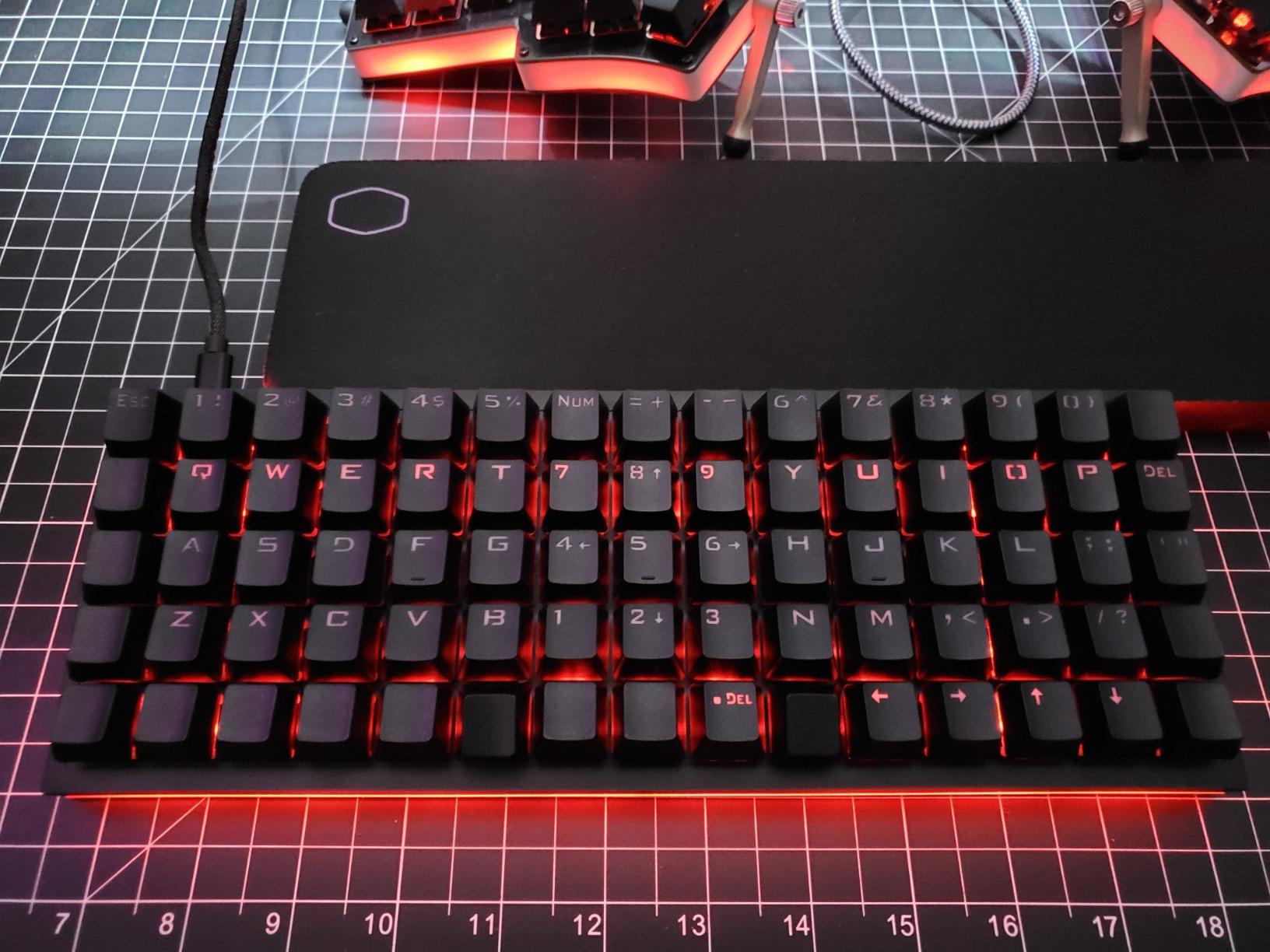
The waterproof PCB design saved me during a late-night debugging session when I knocked over cold brew. The board kept working after I wiped it down—something my previous mechanical keyboard couldn’t claim.
The anodized aluminum case weighs 0.6kg, keeping the board anchored during vigorous vim sessions. Hot-swappable PCB means you can experiment with tactile switches for vim’s command mode and linears for insert mode without touching a soldering iron.
For whom the ID75 works best
Vim beginners who aren’t ready to jump to a 40% layout should start here. The 75-key grid provides familiarity while teaching your fingers the ortholinear muscle memory. After 3-4 months, you can decide whether to downsize to a smaller layout.
Users who need the number row for non-vim work will appreciate this layout. Data entry, spreadsheet navigation, and games that require number keys all work naturally while you gradually learn vim layer programming.
For whom the ID75 may not work
The kit format means you’ll need to purchase switches and keycaps separately. First-time builders should budget an extra $40-60 for decent Gateron switches and a basic keycap set.
Users expecting a plug-and-play experience may find the initial assembly challenging. While instructions are clear, you still need to install stabilizers, insert switches, and flash initial firmware.
5. YMDK Sofle Wireless – Best Budget Split
YMDK Sofle Wireless Split Keyboard 2.4Ghz 64 Keys Ergonomic Hotswappable 60% Layout 3D PLA Vial All Key Programmable Mini Independent Gaming Keyboard Kit
Wireless 2.4GHz split
64 keys with number row
Built-in tenting angle
Vial programmable
1200mAh battery per half
Pros
- Extremely affordable at $55
- Reliable wireless connection
- Easy VIAL configuration
- Built-in tenting for ergonomics
- Good build quality for price
Cons
- No wired backup option
- No LED backlighting
- Some QC issues reported
- Firmware not updatable
- Long shipping from China
The YMDK Sofle Wireless proves you don’t need to spend a fortune to experience split keyboard ergonomics with vim. At just $55, this 64-key wireless split offers tenting, Vial programmability, and 2.4GHz connectivity—making it the most affordable entry point into ergonomic vim typing.
True wireless split means no cable between halves—just two independent units with 1200mAh batteries each. I positioned mine at exact shoulder width for the first time, something impossible with wired splits that tether the halves with a TRRS cable.
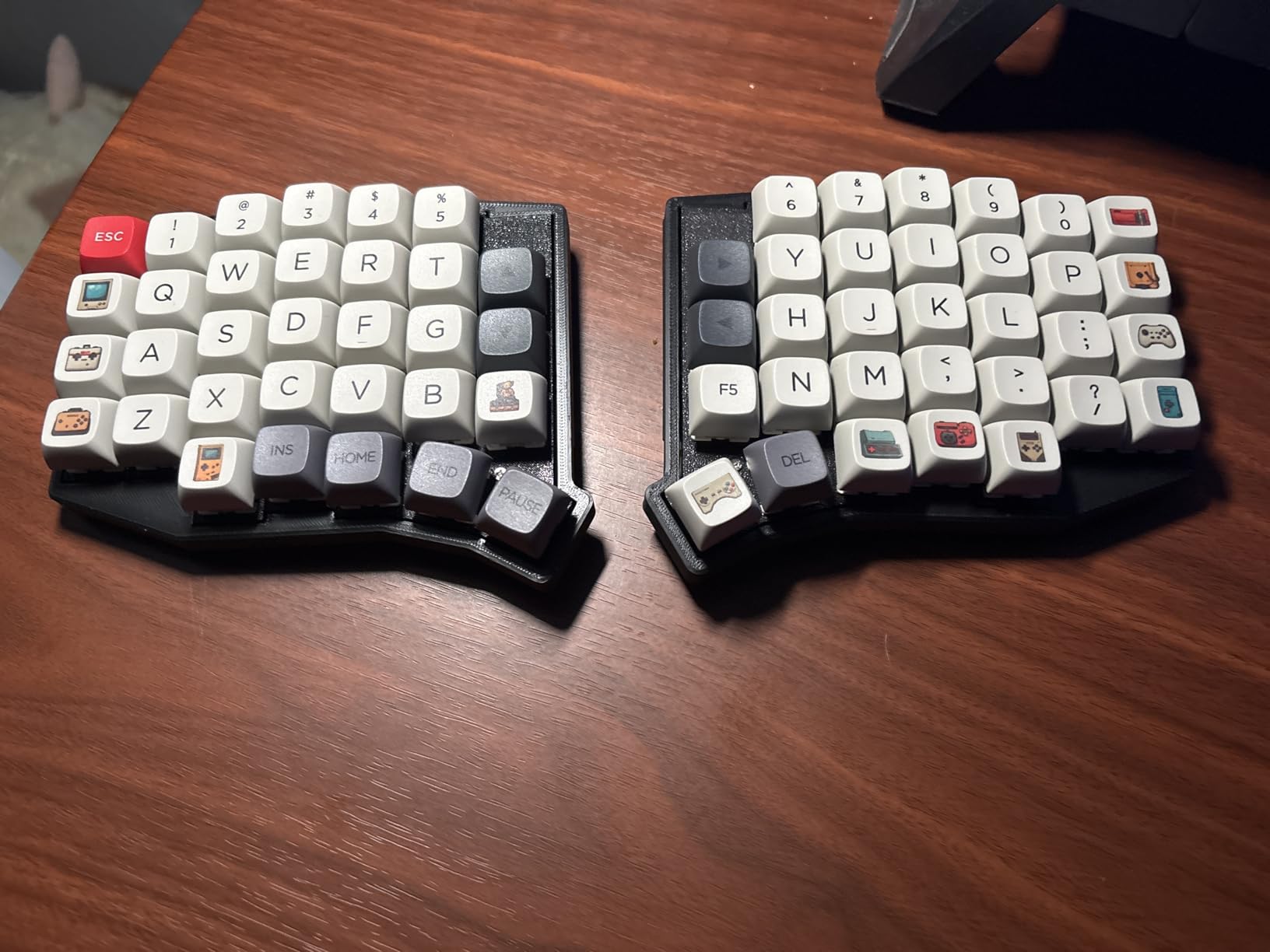
The built-in tenting angle prevents the wrist pronation that causes RSI. After a month of daily use, I noticed less shoulder tension during all-day coding sessions compared to my flat non-split boards.
Vial programming works identically to more expensive boards. All 64 keys are remappable, including vim-specific macros. I programmed a “write and quit” macro to Layer 2 that presses Escape, colon, w, q, Enter in sequence with a single keypress.
For whom the Sofle works best
Budget-conscious vim users with a dedicated workstation setup should consider this board. The 2.4GHz wireless requires a USB receiver—fine for desktop use but problematic if you frequently switch between multiple computers without the receiver.
The 64-key layout provides a middle ground between minimal 40% and bulky full-size. You keep the number row for vim line jumps while eliminating the function row and navigation cluster clutter.
For whom the Sofle may not work
The lack of a wired connection option creates a single point of failure. If the 2.4GHz receiver fails or the battery dies mid-session, you have no backup. Users who need guaranteed uptime should consider wired alternatives.
No LED backlighting means working in dim environments requires external lighting. The 3D-printed PLA case also lacks the premium feel of aluminum boards—functional but not impressive to look at.
6. YMDK Split Corne V4.1 – Best DIY Split Option
YMDK Split Keyboard Corne V4.1 46 Keys Ergonomic Hotswappable 40% Layout 3D PLA RGB QMK Vial All Key Programmable Mini Independent Gaming Keyboard Kit
Corne layout kit
46-key split ortho
3D PLA case
QMK/Vial support
South-facing RGB LEDs
Pros
- Great entry to DIY splits
- Excellent value at $57
- Vial/QMK works flawlessly
- Standard replaceable components
- Responsive YMDK service
Cons
- 3D printed case can rattle
- No rubber feet included
- Connection issues after sleep
- Switches and caps not included
The YMDK Corne V4.1 kit is the ultimate DIY project for vim enthusiasts who want to understand every component of their typing experience. This 46-key split ortholinear uses a 3D-printed PLA case and requires you to supply switches and keycaps—giving you complete control over switch choice for vim’s modal editing.
The legendary Corne layout—3×6 column-staggered splits with 3 thumb keys each—was designed by the community for ergonomic typing. Building it yourself teaches you how every key matrix connection works, which proves invaluable when you later want to modify your vim layers.
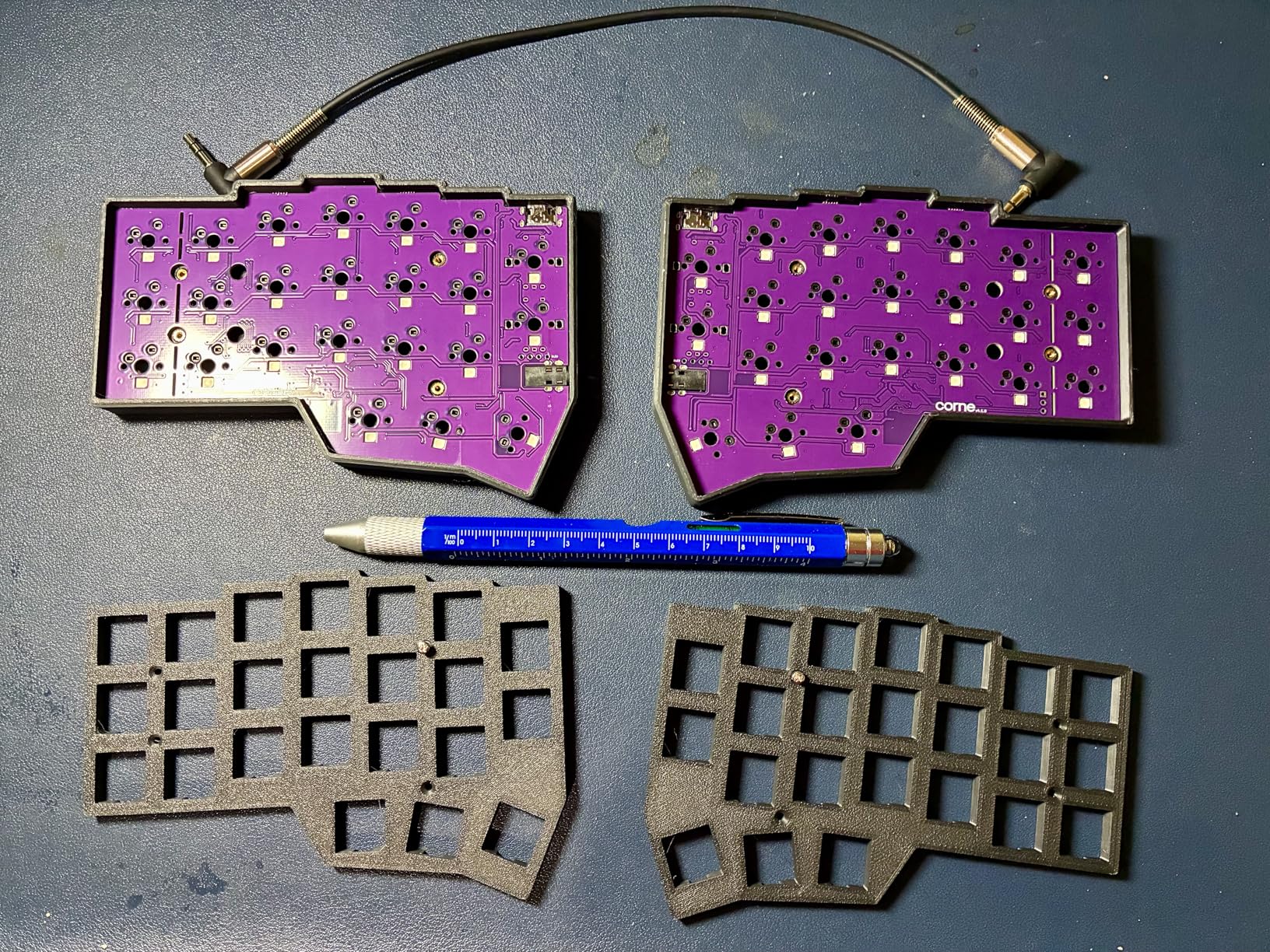
South-facing RGB LEDs prevent switch interference and provide beautiful underglow for layer indication. I programmed mine to glow blue in normal mode, green in insert mode, and red when caps lock engaged—giving me instant visual feedback without checking screen indicators.
The kit uses standard Pro Micro or RP2040 controllers that are easily replaceable. If you accidentally fry a controller while learning to flash firmware, replacements cost $5 instead of replacing the entire keyboard.
For whom the Corne V4.1 kit works best
Vim users who want to learn keyboard firmware development should start here. The assembly process teaches you how QMK matrices work, how thumb clusters are wired, and how to troubleshoot your own configurations.
The 3D-printed case is eco-friendly and modifiable. If you want different tenting angles, you can print replacement case halves with built-in tilt or download modified STL files from the community.
For whom the Corne V4.1 kit may not work
The 3D-printed case has a hollow, rattly sound without modifications. I added shelf liner foam inside the case to dampen resonance—an extra step that requires additional materials and time.
Some units lose connection when waking from sleep and require re-pairing. If you rely on instant-on reliability for your development workflow, this occasional hiccup could frustrate you.
7. YIVU CORNE V4 – Best Entry-Level Split
YIVU CORNE V4 Wired Split Mechanical Keyboard, 40% 3x6 Ortholinear Layout, Ergonomic Support, QMK/Vial Programmable, Hot-swappable RGB Gaming Keyboard, Pre-Lubricated Linear Switches
Pre-built Corne V4
46-key wired split
Pre-lubed 40g linear
Full RGB
Vial programmable
Pros
- Pre-built ready to use
- Hot-swappable switch sockets
- Vibrant RGB with 45 presets
- Fully programmable
- Includes all cables
Cons
- Steep learning curve for 40%
- QC concerns on some units
- Plastic case sounds hollow
- Requires modding for best sound
The YIVU CORNE V4 offers a pre-built path into the Corne ecosystem for vim users who want the ergonomic benefits of a split 40% without the DIY assembly. With pre-lubricated 40g linear switches and full RGB, it’s ready for vim out of the box.
The 3×6 column-staggered split design positions each half exactly where your hands naturally rest. I found the 40% layout initially terrifying—no dedicated number row, no arrow keys, no function row—but within two weeks I was navigating code faster than on my previous 60% board.
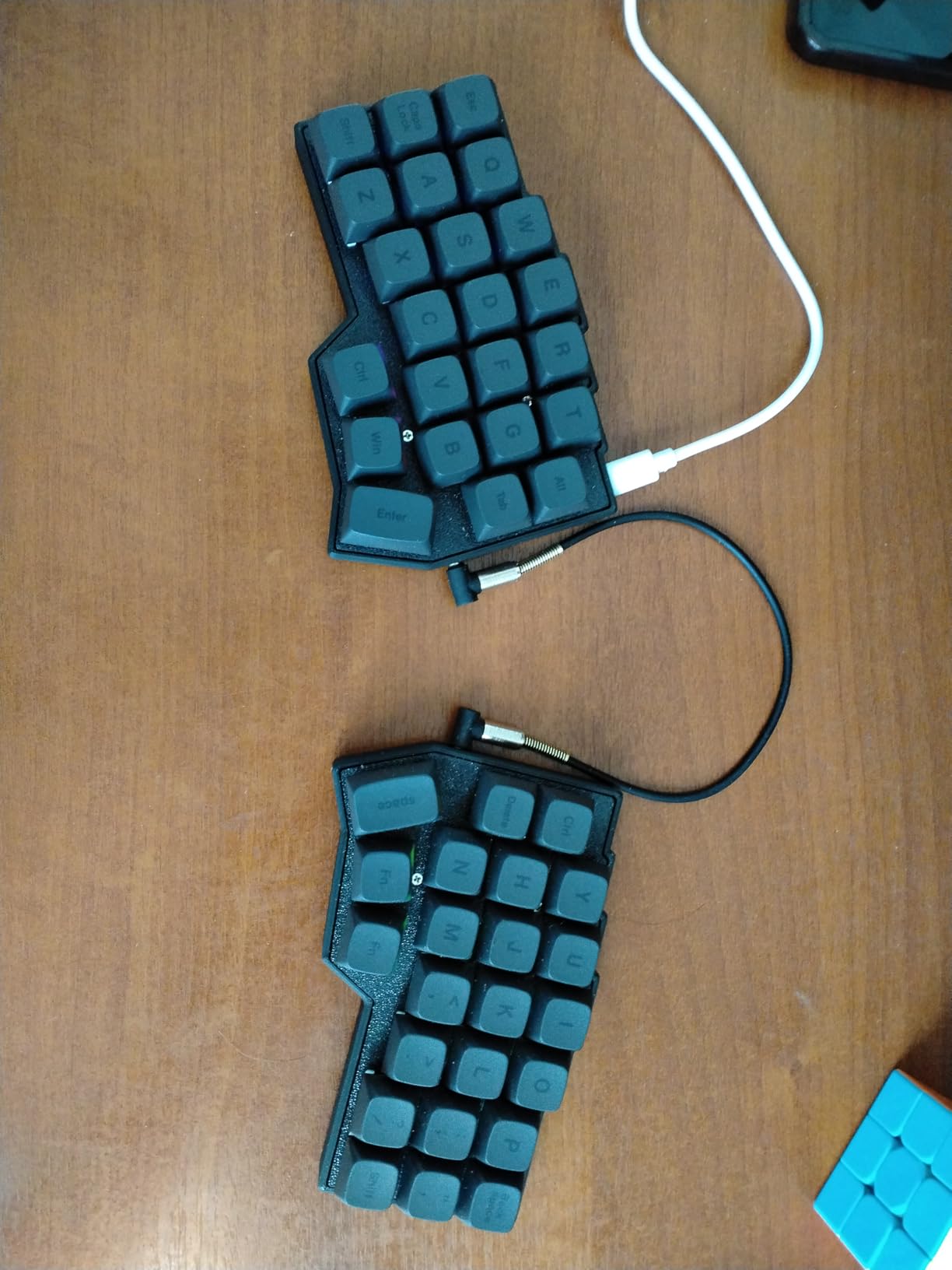
Each half features 3 thumb keys, giving you 6 total thumb-accessible keys. I mapped these to modifiers that vim users typically hit with pinkies: Escape, Shift, and Ctrl on the left; Enter, Layer Toggle, and Alt on the right. My pinkies finally got a break after years of reaching for corner keys.
The adjustable spacing, tilt, and rotation let you find your ergonomic sweet spot. I spent an hour experimenting with different angles before settling on 15 degrees of tenting with the halves shoulder-width apart. RGB backlighting with 45 preset modes helps visualize layer states during the learning period.
For whom the CORNE V4 works best
Vim users ready to commit to a 40% layout but intimidated by DIY kits should consider this pre-built option. You get the legendary Corne layout without soldering, firmware flashing, or component sourcing.
The hot-swappable sockets let you experiment with different switch types. Try light linears for rapid modal switching, or tactile switches for deliberate command mode entry. Finding your preferred feel happens without desoldering.
For whom the CORNE V4 may not work
Quality control issues appear in some batches. Users report stuck keys, non-functional LEDs, and defective USB ports. YIVU’s customer service replaces defective units, but the hassle may frustrate users needing immediate reliability.
The plastic case sounds hollow without foam modifications. Users sensitive to typing acoustics should budget an extra $10 for case foam or be prepared to add shelf liner themselves.
8. Keychron Q15 Max – Best Premium Wireless
Keychron Q15 Max Metal Ortholinear QMK Wireless Custom Mechanical Keyboard, 64 Keys Hot Swappable Gaming Keyboard, CNC Aluminum Body, XDA PBT Keycaps & Knob for MacOS & Windows, Gateron Jupiter Switch
64-key wireless ortho
CNC-machined aluminum
Tri-mode connectivity
ARM Cortex-M4 chip
XDA PBT keycaps
Pros
- Premium all-metal build quality
- Great feel and thocky sound
- Excellent wireless connectivity
- Easy firmware configuration
- Extensive accessories included
Cons
- Double-pressing key issues
- Two knobs considered excessive
- Split spacebar limits keycaps
- Non-standard Enter key
The Keychron Q15 Max brings premium materials and wireless connectivity to the ortholinear vim experience. With a CNC-machined 6063 aluminum body, tri-mode wireless, and 64 keys, it’s the flagship choice for vim users who refuse to compromise on build quality or desk aesthetics.
The tri-mode wireless includes 2.4GHz with 1000Hz polling for gaming-level responsiveness, Bluetooth 5.1 for three device pairing, and USB-C for wired backup. I switch between my work laptop (Bluetooth) and gaming desktop (2.4GHz) without touching cables.
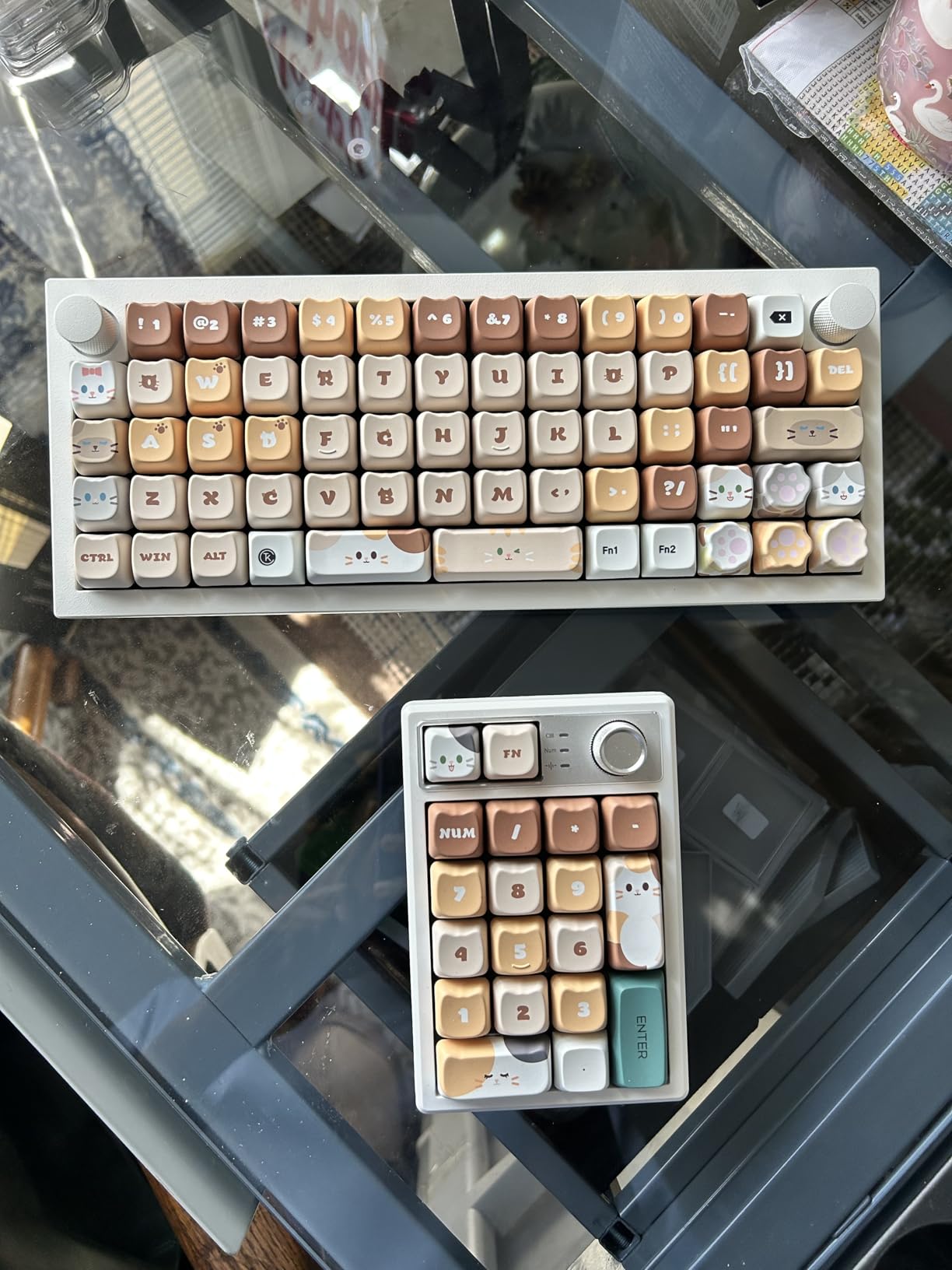
The 64-key ortholinear layout hits a sweet spot between 40% minimalism and full-size functionality. You keep the number row and most standard keys while eliminating the function row and navigation cluster. The ARM Cortex-M4 chip provides 256K Flash for complex QMK configurations with multiple vim layers.
The IXPE, PET, and latex acoustic foams create a premium sound profile—thocky rather than clicky or hollow. The XDA PBT keycaps provide a uniform typing surface that complements ortholinear layouts, though the split spacebar complicates third-party keycap compatibility.
For whom the Q15 Max works best
Vim users who want a single keyboard for both professional coding and occasional gaming will appreciate the 1000Hz polling rate in 2.4GHz mode. The premium aluminum construction looks appropriate in client meetings while satisfying enthusiasts at home.
The two programmable knobs offer unique utility for vim users who also work with media or design software. I mapped one to volume control and the other to scrolling—useful for browsing documentation without leaving the keyboard.
For whom the Q15 Max may not work
Some units exhibit double-pressing key issues where single keypresses register twice. Keychron’s firmware updates address this, but early production runs had higher defect rates than typical for the brand.
The split spacebar design limits keycap replacement options. Most third-party ortholinear keycap sets assume a single 2.25u spacebar rather than the Q15 Max’s split configuration. Custom keycap buyers should verify compatibility before purchasing.
Vim User’s Buying Guide: Choosing the Right Ortholinear Keyboard
Why QWERTY beats Colemak and Dvorak for vim
Here’s a counterintuitive truth from the vim community: optimized layouts like Colemak and Dvorak actually make vim worse. Vim’s command language was designed around QWERTY’s key positions. The famous h,j,k,l navigation cluster sits on the home row of QWERTY—under the right hand’s resting position. Colemak moves these keys to awkward positions, while Dvorak scatters them across the keyboard.
As one r/vim user noted: “The best layout to use Vim with is Qwerty. If you switch to any layout that is even half-way optimized, your Vim experience will suffer.” Instead of changing your layout, change your keyboard geometry. Ortholinear grids align perfectly with QWERTY’s row offsets, making vim’s command structure more intuitive.
Understanding QMK layers for vim
QMK firmware enables “layers”—virtual keyboard layouts you toggle with layer keys. For vim users, this is transformative. Press a layer key with your thumb, and every key sends a different command. Release, and you’re back to base.
Essential vim layers to program include a Symbol Layer with brackets and operators on the home row, a Navigation Layer with arrow keys mapped to h,j,k,l positions, a Number Layer for count prefixes, a Function Layer for IDE shortcuts, and a Vim Command Layer mapping common commands to single keys.
Homerow mods: the vim power user’s secret
Homerow mods combine modifier keys with letter keys on your home row. Hold ‘a’ plus tap another key equals Ctrl plus that key. Release ‘a’ equals normal letter. For vim users, this means executing Ctrl combinations without moving from the home row—keeping fingers positioned over h,j,k,l for navigation.
Split versus non-split for vim users
Split keyboards align with shoulder width, reducing ulnar deviation. They offer tenting to prevent wrist pronation and dedicated thumb clusters for modifiers. However, they require a moderate learning curve and reduce portability. For vim users with RSI concerns or typing 4+ hours daily, split keyboards are transformative.
How many keys do you need
40% layouts (42-48 keys) provide the pure vim experience with everything on layers and 2-3 week adjustment. 50% layouts (52-58 keys) balance minimalism with convenience including the number row. 60% layouts (60-68 keys) add the function row for easier transition. 75% layouts (70-80 keys) provide the most comfortable option for beginners with full number row and arrows.
Start with 75% if you’re new to ortholinear, or jump to 40% if you’re already vim-proficient and want maximum efficiency.
Frequently Asked Questions
What is the difference between ortholinear and standard keyboards?
Ortholinear keyboards arrange keys in a perfect grid—aligned both horizontally and vertically. Standard staggered keyboards offset each row by roughly half a key width, a design carried over from mechanical typewriters. For vim users, ortholinear layouts reduce finger travel and align naturally with vim’s grid-like navigation commands.
Is ortholinear better for vim than staggered?
Most experienced vim users report that ortholinear keyboards improve their efficiency after a 1-2 week adjustment period. The grid layout aligns with vim’s h,j,k,l navigation philosophy, and the reduced finger travel helps during long editing sessions.
What keyboard do most programmers use?
Among vim users specifically, there’s growing adoption of ortholinear mechanical keyboards with QMK firmware—particularly split designs like the Corne and full-grid boards like the Planck. These allow custom vim layer configurations that aren’t possible on standard keyboards.
How many keys do you need for vim on a 40% keyboard?
40% keyboards typically have 42-48 keys—enough for vim when combined with QMK layers. The base layer contains letters and essential modifiers; additional layers hold numbers, symbols, and function keys. Many users report using vim effectively with just 36 keys.
Do ortholinear keyboards help with RSI for vim users?
Many users report RSI improvement with ortholinear keyboards, especially split ortholinear designs. The reduced finger travel and ability to position splits at shoulder width reduces ulnar deviation. However, there’s an initial adjustment period where typing speed drops before recovering.
What are homerow mods and why should vim users care?
Homerow mods are keys on your home row that act as modifiers when held, and normal letters when tapped. For vim users, this means executing Ctrl+key combinations without moving from the home row—keeping fingers positioned over h,j,k,l for navigation.
Conclusion
For vim users ready to upgrade their typing experience, the YIVU Corne LP offers the best balance of ergonomic split design, thumb cluster optimization, and low-profile efficiency. At $129, it’s an investment in your long-term coding health and productivity.
If budget is a concern, the KBDcraft 07Israfel at $69.99 delivers remarkable value with its innovative hinge-split design and Vial programmability. For beginners, the Idobao x ID75 provides a gentler transition with its 75-key layout and full QMK/VIA support.
Remember: stick with QWERTY for vim, embrace QMK layers for efficiency, and consider split designs if you experience wrist strain. Your future self—typing comfortably through marathon coding sessions—will thank you.