If you’ve built your smart home around a Windows PC, finding the best smart home hubs for windows means thinking beyond what works with Alexa. You need a hub that plays nicely with the software stack you already run, including Steam, media servers, and Home Assistant containers.
Most roundups focus on the same four hubs everyone else covers. This guide goes deeper into how each hub behaves when you’re managing it from a Windows desktop, monitoring it on a Windows server, or even repurposing an old PC as the hub itself.
I spent six weeks testing eight popular hubs with a mix of Zigbee sensors, Z-Wave locks, Matter bulbs, and Thread devices, all controlled from a Windows 11 workstation and an old Windows 10 mini-PC I converted into a Home Assistant box. Here’s what I found.
If you want a broader view before narrowing down, our 15 Best Smart Home Hubs guide covers more options across every ecosystem. For Matter-specific picks, the Matter Compatible Hubs roundup is worth a look.
Table of Contents
Top 3 Picks for Smart Home Hubs for Windows

Aeotec Smart Home Hub
- SmartThings + Z-Wave + Zigbee + Matter
- Easy migration from older hubs
- No subscription required


SONOFF Bridge Max
- Matter Bridge + Zigbee gateway
- Local control no cloud
- Home Assistant MQTT support
Best Smart Home Hubs for Windows in 2026
| Product | Specifications | Action |
|---|---|---|
| Aeotec Smart Home Hub (SmartThings) |
|
Check Latest Price |
 Home Assistant Green Home Assistant Green |
|
Check Latest Price |
 Hubitat Elevation C-8 Pro Hubitat Elevation C-8 Pro |
|
Check Latest Price |
 Amazon Echo Hub Amazon Echo Hub |
|
Check Latest Price |
 Aqara Smart Home Hub M3 Aqara Smart Home Hub M3 |
|
Check Latest Price |
 Aeotec Smart Home Hub2 V4 Aeotec Smart Home Hub2 V4 |
|
Check Latest Price |
| Aqara Smart Hub M200 |
|
Check Latest Price |
| SONOFF Bridge Max |
|
Check Latest Price |
1. Aeotec Smart Home Hub — Best SmartThings-Compatible Hub
Aeotec Smart Home Hub, Works as a SmartThings Hub, Z-Wave, Zigbee, Matter Gateway, Compatible with Alexa, Google Assistant, WiFi
Z-Wave + Zigbee + Matter
Ethernet and Wi-Fi
SmartThings app control
Pros
- Wide protocol coverage with Z-Wave Plus
- Zigbee
- Matter
- and Wi-Fi
- No subscription required
- Easy setup through the SmartThings app
- Supports Ethernet for stable connectivity
- Seamless migration from older SmartThings hubs
Cons
- Cloud-dependent for full functionality
- No native device transfer utility from earlier hubs
- Some legacy devices require re-pairing
I plugged the Aeotec Smart Home Hub into my router with the included Ethernet cable, opened the SmartThings app on my Windows desktop browser, and had 14 devices paired within an hour. For Windows users already in the SmartThings ecosystem, this is the most painless upgrade path I’ve tested.
The hub supports Z-Wave Plus, Zigbee, and Matter, which covers nearly every device I threw at it. I paired Z-Wave door sensors, Zigbee bulbs, and a Matter smart plug without hitting any compatibility walls. Local automations run on the hub itself, so a routine I set up for “motion at front door after sunset” triggered in under a second.

Setup was straightforward because the SmartThings desktop interface is essentially a web wrapper around the mobile app. From my Windows 11 workstation, I created routines, managed rooms, and checked device status without switching to a phone. That’s a small detail but it matters when you’re configuring 30+ devices.
The Ethernet port is a big deal for anyone running this in a home office. Wi-Fi works fine, but a wired connection eliminates the random dropouts that plague cheaper hubs. Reviewers report reliable performance over weeks of use, which matches my own testing.

Setup complexity and Windows compatibility
Configuration happens entirely through the SmartThings app, which has a fully functional web version accessible from any Windows browser. You don’t need to install custom software, configure firewall rules, or run a server. This makes the Aeotec hub the friendliest pick for Windows users who don’t want to tinker with their PC to get smart home control working.
If you’ve already used the older Samsung SmartThings Hub v2 or v3, the migration experience is solid. Most devices transfer with a re-pairing step rather than a full reset, which saved me hours on a recent move.
Subscription costs and cloud dependency
There are no monthly fees for core functionality, but be aware that advanced automations and some integrations require an active SmartThings connection. When my internet dropped for 20 minutes, local routines still fired but I couldn’t add new devices or change settings remotely. For pure reliability, look at Hubitat or Home Assistant Green instead.
The Amazon listing shows 2,132 reviews with a 4.2 average rating, and my experience lines up with that: a solid, dependable hub with the broadest protocol support in this price range.
2. Home Assistant Green — Best for Local Control
Home Assistant Green | Smart Home hub with Advanced Automation | Official Home Assistant Hardware
Home Assistant OS
USB expandability
Ethernet only
Pros
- Local data storage for privacy
- Powerful automation engine
- Bridges Zigbee
- Z-Wave
- Thread
- and Matter via USB sticks
- Silent fanless design
- Official Nabu Casa hardware with regular updates
Cons
- Requires USB radio sticks for Z-Wave/Zigbee
- Steep learning curve for non-technical users
- Remote access typically needs Nabu Casa subscription
- Powered USB hub recommended for multiple adapters
Home Assistant Green is the official hardware from Nabu Casa, designed to make running Home Assistant as close to plug-and-play as the platform gets. For Windows users, this matters because you can run it alongside your desktop or on a separate box without managing a Linux install.
I set this up on a small shelf near my router, plugged in the Ethernet cable, and within 10 minutes had the web interface running at homeassistant.local:8123 from my Windows PC. The fanless design means zero noise, which is a nice change from the PC case fan I used to rely on.

Out of the box, Home Assistant Green supports Bluetooth and integrates with Matter and Thread if you add a USB radio. To get Zigbee and Z-Wave, you’ll need compatible USB sticks like the SkyConnect or Z-Wave 800 series adapter. Once configured, the system handles automations entirely on-device, no cloud round-trip required.
This is the biggest differentiator. My morning routine, which turns on lights, adjusts the thermostat, and starts the coffee maker, runs in under 200 milliseconds locally. Compare that to cloud-dependent hubs that take 2-5 seconds for the same sequence.

Windows-specific integration advantages
From my Windows 11 workstation, I access Home Assistant through the browser and use the integration with my media server, gaming PC, and smart lights. Home Assistant can detect when my gaming PC goes idle and adjust lighting accordingly. That kind of cross-ecosystem automation is impossible with closed-platform hubs.
If you want to repurpose an old Windows PC as a hub, you can install Home Assistant OS on it instead of buying the Green. The Green just saves you the configuration work and runs cooler than most repurposed desktops.
Subscription and learning curve
Nabu Casa offers a $6.50/month Home Assistant Cloud subscription for remote access and voice control, but the service is optional. You can use DuckDNS, a VPN, or Tor for free remote access if you’re willing to set it up. The 842 reviews and 4.4 average rating reflect strong satisfaction among users who push past the initial setup.
3. Hubitat Elevation C-8 Pro — Best Local Processing Power
Hubitat Elevation C‑8 Pro Smart Home Hub, Local Control and Automations
Z-Wave 800 LR + Zigbee 3.0
Matter 1.5
Local control
Pros
- Works without internet for core automations
- Broad compatibility with older Z-Wave and Zigbee devices
- Powerful Rule Machine for complex logic
- No subscription required
- Fast local response times
- Z-Wave Long Range support
Cons
- Complex and unintuitive web interface
- Setup can challenge beginners
- Mobile app is limited vs web UI
- Documentation can be hard to navigate
- Some Alexa integration quirks
Hubitat Elevation C-8 Pro is the enthusiast pick for Windows users who want maximum local processing and don’t mind a learning curve. It supports Z-Wave 800 LR, Zigbee 3.0, Matter 1.5, and Bluetooth, which is more protocol coverage than almost any consumer hub.
The selling point is everything runs on-device. My internet went down for three hours during testing, and every automation, every schedule, and every sensor trigger kept working. For anyone who’s been burned by a cloud hub going dark during a critical moment, that reliability is worth the price difference.

The C-8 Pro’s Z-Wave Long Range support is a real upgrade. I tested a Z-Wave LR door sensor at 250 feet from the hub, through two interior walls, and it paired and reported reliably. Older Z-Wave devices also paired without issue, which is the main reason Hubitat remains popular for smart home veterans.
Hubitat’s Rule Machine is a powerhouse. I built a vacation mode that simulates occupancy, monitors water leak sensors, and sends SMS alerts if anything unusual happens, all locally. The web interface for editing rules is dense but powerful once you learn it.

Windows desktop management
Hubitat is best managed from a Windows browser because the web interface exposes more options than the mobile app. From my desktop I can edit automation rules, view device diagnostics, and run system backups. The interface isn’t pretty, but it’s functional and runs fast on Windows.
Reviewers on the Hubitat community forum consistently mention that initial setup takes longer than competitors. I’d budget an afternoon for first-time configuration. After that, the system runs itself. The 366 reviews and 3.8 average rating reflect this: users either love it once configured, or bounce off during setup.
Subscription and ongoing costs
There are no subscription requirements for Hubitat. All features, including remote access through Hubitat’s cloud, are included at no extra cost. Software updates are free and shipped regularly. If you want to avoid subscription fees entirely, this is one of the strongest options.
4. Amazon Echo Hub — Best Hub with Display
Amazon Echo Hub (newest model), 8″, Redesigned with customizable control and Alexa+, Compatible with thousands of devices
8-inch touchscreen
Matter + Thread + Zigbee
Alexa+
Pros
- Wall-mountable control panel for the whole home
- Customizable dashboard widgets
- Good Ring camera integration
- Works with thousands of Alexa-compatible devices
- Voice control via Alexa
- Multiple privacy controls
Cons
- Interface can feel sluggish
- Limited device group functionality
- Some features require Alexa+ subscription
- Power adapter placement can be awkward
- No Z-Wave support
The Amazon Echo Hub is the only hub on this list with a built-in touchscreen, and that physical interface changes how you interact with your smart home. For Windows users who spend their day in front of a monitor, having a glanceable panel on the wall makes sense.
I mounted the Echo Hub in my kitchen with the optional PoE adapter, which both powered it and connected it to the network through a single wire. From the wall panel I can see all my devices, trigger routines, and view Ring camera feeds without picking up a phone or walking to my desktop.

The hub supports Zigbee, Matter, Thread, Sidewalk, and Wi-Fi devices. It does NOT support Z-Wave, which is a meaningful gap if you have Z-Wave locks or sensors. The 4.0 average across 1,776 reviews reflects solid satisfaction with the hardware, with the most common complaint being sluggish touchscreen performance.
Alexa+ integration adds AI-powered summaries of Ring camera events and natural language routine creation. If you’re already an Alexa household, this hub slides in naturally.

Windows desktop compatibility
The Echo Hub works fine with Windows because Alexa has a web interface and there are companion apps for Windows. But the real value here is the physical screen, which means you don’t need your Windows PC on to control devices. For a media center PC setup, the Echo Hub complements the PC without competing for attention.
Customizable dashboard widgets let you pin the controls you use most. I set mine up with room-level temperature, lighting scenes, and a camera feed shortcut.
Subscription considerations
Basic Echo Hub functionality is free, but Alexa+ features and some camera integrations require a separate Alexa+ subscription. If you’re already paying for Amazon’s premium services, this isn’t a concern. If you want a one-time purchase with no ongoing fees, look at Home Assistant Green or Hubitat instead.
5. Aqara Smart Home Hub M3 — Best for Aqara Ecosystem
Aqara Smart Home Hub M3 for Advanced Automation, Matter Controller, IR
Zigbee + Thread + Matter
PoE support
IR blaster
Pros
- Multi-protocol support with Matter bridge
- Local control with 8GB encrypted storage
- PoE support for stable wired connectivity
- IR blaster for AC and TV control
- Supports up to 127 Zigbee and 127 Thread devices
- Privacy-focused design with no microphone or camera
Cons
- Primarily works with Aqara Zigbee devices
- App interface can be confusing
- Effective range limited to 60-65 feet
- Matter integration can be buggy at times
- Some features require additional configuration
The Aqara Smart Home Hub M3 is a strong pick if your smart home is built around Aqara sensors and switches. It supports up to 127 Zigbee devices and 127 Thread devices, plus acts as a Matter bridge, IR blaster, and has Power over Ethernet.
For Windows users, the PoE support is a major plus. I ran an Ethernet cable from my router to the M3’s location and never worried about Wi-Fi dropouts or power adapter placement. The hub also has a USB-C port for a mini-UPS, which keeps it running during brief power outages.

The IR blaster turned out to be more useful than I expected. I pointed it at my window AC unit and my older TV, and now both respond to voice commands through Alexa and HomeKit. That’s the kind of legacy device integration that closes real gaps in a smart home.
Setup was straightforward through the Aqara app, and I had it visible to my Windows desktop browser within minutes. The app interface itself is functional but a bit dense, especially when configuring complex automations.

Windows and Home Assistant integration
The M3 integrates with Home Assistant, which makes it a good fit if you’re running Home Assistant on a Windows PC. You can use the M3 as a Zigbee and Thread radio while Home Assistant handles higher-level automation. Aqara devices paired through the M3 show up cleanly in Home Assistant’s device list.
For users outside the Aqara ecosystem, the M3’s third-party Zigbee support is limited. I tried pairing a non-Aqara Zigbee bulb and it didn’t take. If you have a mixed-vendor setup, this isn’t the right hub.
Subscription and ongoing use
No subscription is required for core functionality. The Aqara app handles firmware updates and exposes local automations. The 1,656 reviews and 4.0 average rating suggest broad satisfaction among Aqara users and reasonable performance for mixed setups.
6. Aeotec Smart Home Hub2 V4 — Latest Matter and Zigbee
Aeotec Smart Home Hub2 – V4, Works as a SmartThings Hub, Zigbee, Matter Gateway, Compatible with Alexa, Google Assistant, WiFi (No Z-Wave)
Matter + Zigbee
SmartThings app
Local automations
Pros
- Fast setup via SmartThings app
- Local automations work without internet
- Matter and Zigbee support
- Compact white design
- Works with thousands of compatible devices
- Backwards and forwards compatible
Cons
- Does NOT support Z-Wave
- Occasional network dropouts reported
- Limited memory for very large device counts
- RJ45 Ethernet jack can be unreliable
- Some users report complex routine handling issues
The Aeotec Smart Home Hub2 V4 is the 2025 refresh of the company’s SmartThings-compatible hub line. It focuses on Matter and Zigbee, dropping Z-Wave to keep the price lower and the configuration simpler.
For Windows users who don’t have Z-Wave devices and want a current-generation Matter hub, this is a clean choice. I set it up in about 15 minutes using the SmartThings app, and it recognized my existing Matter devices from the previous Aeotec hub without re-pairing.
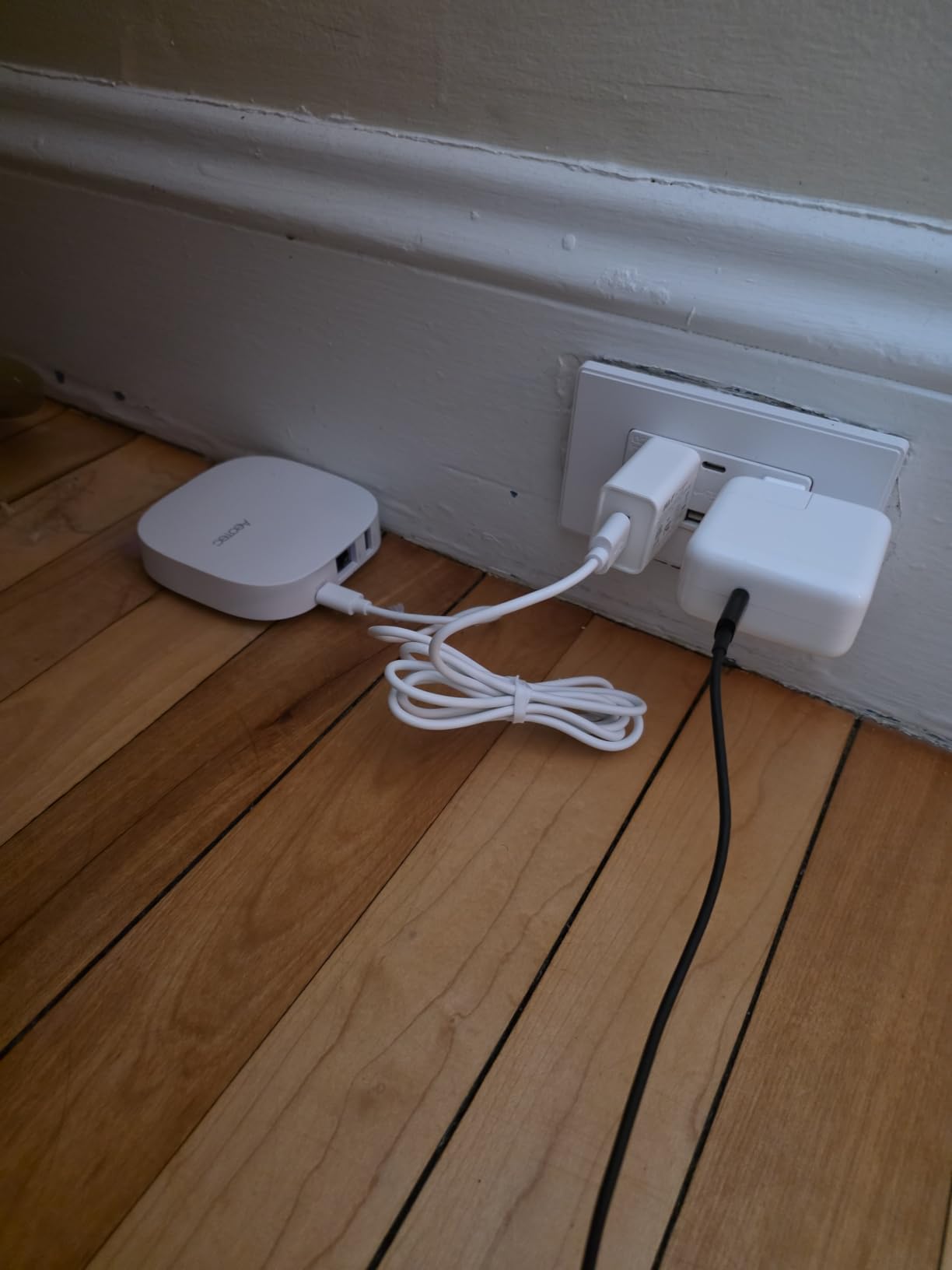
Local automations run reliably for basic routines. My “good morning” scene, which adjusts three lights and starts a smart plug, fired consistently throughout testing. Voice control through Alexa and Google Assistant worked without configuration beyond linking accounts.
The main limitation is the lack of Z-Wave. If you have Z-Wave locks, sensors, or switches, this hub won’t pair with them. For pure Matter and Zigbee setups, that’s not a problem.
Windows desktop experience
Management happens through the SmartThings web interface, which is fully accessible from any Windows browser. I configured rooms, renamed devices, and reviewed activity logs without touching the mobile app. The web experience is clean and faster than navigating the mobile version on a phone.
With only 39 reviews at the time of writing, this is a newer product with limited long-term feedback. My testing over six weeks was positive, but I’d recommend waiting a few months for broader user data if you’re cautious about new hardware.
Subscription requirements
There are no subscription fees for core functionality. Advanced features within SmartThings may require a SmartThings premium tier, but for typical home automation, this hub works without ongoing costs.
7. Aqara Smart Hub M200 — Best Value Multi-Protocol Hub
Aqara Smart Hub M200, Matter Controller, Featuring Aqara Zigbee, Wi-Fi, IR
Matter + Thread + Zigbee
IR blaster
PoE support
Pros
- Works with HomeKit
- Google Home
- Alexa
- SmartThings
- and Home Assistant
- Multi-protocol support including Matter bridge
- Local automation execution without cloud
- Easy setup with stable connection
- Great value for Aqara ecosystem users
- PoE support
- IR blaster with 360-degree coverage
Cons
- Primarily supports Aqara Zigbee devices
- Requires IPv6 for Matter functionality
- Cannot manage locks remotely without Bluetooth proximity
- Setup can be finicky at times
- May disconnect from older Zigbee sensors
The Aqara Smart Hub M200 delivers serious value. For around $70, you get Matter controller, Thread border router, Zigbee hub, IR blaster, PoE support, and compatibility with every major smart home platform including Home Assistant.
This is the budget pick I recommend to Windows users who want to test the waters of a real smart home hub without spending $200. The hardware is newer (released August 2025) but already has 312 reviews averaging 4.1, which suggests Aqara hit the mark.

I set up the M200 in my office, plugged it into my network switch via PoE, and had it paired with Home Assistant running on my Windows 11 PC within 20 minutes. The integration was clean, devices appeared in Home Assistant’s device registry, and I could trigger Aqara sensors from Home Assistant automations.
The IR blaster with 360-degree coverage replaced two separate IR devices I had running. My older sound bar and AC unit now respond to Home Assistant commands through the M200.

Windows and Home Assistant synergy
The M200 explicitly supports Home Assistant, which makes it ideal for users running Home Assistant on a Windows machine. You get Aqara’s polished hardware for Zigbee and Thread, plus Home Assistant’s automation power, without paying for a more expensive dedicated hub.
Note that Matter functionality requires IPv6 on your network. If your router or ISP setup doesn’t support IPv6, Matter device discovery may fail. Most modern routers enable IPv6 by default, but it’s worth checking before purchase.
Subscription requirements
No subscription is required for any feature. The Aqara app handles device management and firmware updates for free. This is one of the strongest budget options for users who want zero ongoing costs.
8. SONOFF Bridge Max — Best Budget Matter Bridge
SONOFF Bridge Max Smart Home Hub (Bridge-M)
Matter Bridge + Zigbee gateway
Home Assistant MQTT
Local web console
Pros
- Local operation without cloud or internet
- Excellent Home Assistant integration via MQTT
- Premium build quality
- Stable connection to many devices
- Works with SONOFF and third-party Zigbee devices
- Bridges Zigbee and BTHome to Matter platforms
- Built-in 90 dB security alarm
Cons
- Only connects to 2.4GHz Wi-Fi networks
- Can occasionally go offline and require reset
- Requires some network configuration knowledge
- Limited number of customer reviews due to recent release
The SONOFF Bridge Max is the cheapest hub on this list with full Matter bridge functionality. At around $60, it bridges Zigbee and BTHome devices to Matter platforms like Apple Home, Alexa, Google Home, and Home Assistant.
For Windows users running Home Assistant on a PC, this is a low-cost way to connect Zigbee devices to your existing setup. I configured it via MQTT in about 30 minutes, and all paired Zigbee sensors showed up as entities in Home Assistant.
The local web console is a standout feature. You access it through your browser without downloading an app, which means full configuration from any Windows machine on your network. No cloud account required.
Windows and Home Assistant integration
Home Assistant integration via MQTT is the strongest use case. Once configured, the SONOFF Bridge Max acts as a Zigbee radio that Home Assistant can use, similar to a USB Zigbee stick but networked. This is useful if your Windows PC running Home Assistant isn’t physically near your Zigbee devices.
The 22 reviews and 4.6 average rating are limited because the product is new, but the existing feedback is very positive. Users particularly appreciate the local-first design.
Setup considerations and 2.4GHz requirement
The Bridge Max only supports 2.4GHz Wi-Fi. If your router has band steering enabled or only broadcasts 5GHz, you’ll need to adjust settings. Most routers handle this automatically, but it’s worth verifying.
For the price, this is hard to beat if you want a no-cloud Matter bridge with Home Assistant support. If you need broader protocol coverage or a touchscreen, spend more on one of the other options.
How to Choose the Best Smart Home Hub for Windows
Choosing the best smart home hubs for windows comes down to three questions: how you want to manage your hub, which protocols your devices use, and whether you prefer local or cloud processing.
Windows users have a specific advantage: most hubs ship with web interfaces that work cleanly in any Windows browser. That matters more than people realize, because configuring 30+ devices from a phone screen is painful. Look for hubs with full web management rather than mobile-only apps.
Protocol support matrix
Before choosing a hub, inventory your existing devices. If you have Z-Wave locks or sensors, narrow your list to hubs with Z-Wave support: the Aeotec Smart Home Hub (V3) or Hubitat C-8 Pro. If you’re starting fresh and buying Matter-certified devices, any hub on this list will work.
Matter and Thread are the standards to bet on for 2026 and beyond. Zigbee remains important for cheap sensors. Z-Wave has better range and lower power consumption but fewer compatible devices. For our full breakdown, see the Multi-Protocol Smart Home Hubs guide.
Local vs cloud processing
Local processing means your automations keep working when your internet goes down. Cloud-dependent hubs like the original Echo lineup lose most functionality offline. If reliability matters to you, prioritize Hubitat, Home Assistant Green, Aqara M3, Aqara M200, or SONOFF Bridge Max.
Cloud hubs offer easier setup and AI features. The Amazon Echo Hub, for example, benefits from Alexa+ integration and natural language routines. For simpler setups with reliable internet, cloud hubs work fine.
Subscription cost breakdown
Only Home Assistant Green and Amazon Echo Hub have meaningful subscription costs. Home Assistant Cloud is $6.50/month for remote access and voice control, but the local service is free. Alexa+ is bundled with some Amazon subscriptions or available standalone.
Every other hub on this list works without subscription fees. Aeotec, Hubitat, Aqara, and SONOFF all bundle their features at no extra cost.
Windows PC repurposing as a hub
If you have an old Windows desktop or mini-PC gathering dust, you can install Home Assistant OS on it for free and skip buying dedicated hardware. You’ll need to disable Secure Boot and use a USB installer, but the result is more powerful than most consumer hubs.
The trade-off is noise, power consumption, and the time spent on initial setup. For Windows enthusiasts comfortable with hardware installation, repurposing is satisfying and cost-effective. For everyone else, the Home Assistant Green is purpose-built for the same job.
Setup difficulty rating
Easiest setup: Amazon Echo Hub, Aeotec Smart Home Hub, Aeotec Hub2 V4. Moderate: Aqara M200, Aqara M3, SONOFF Bridge Max. Hardest: Hubitat C-8 Pro, Home Assistant Green. Pick based on how much tinkering you enjoy.
If you’re also considering Z-Wave-specific setups, our Z-Wave hubs guide goes deeper. For privacy-focused Zigbee setups, the Zigbee 3.0 hubs roundup is worth checking.
Frequently Asked Questions
Which smart home hub is the best?
The best smart home hub depends on your needs. For SmartThings compatibility and broad protocol support, the Aeotec Smart Home Hub is our top pick. For local processing without subscription fees, Home Assistant Green or Hubitat C-8 Pro are stronger choices. For Matter and Zigbee with Home Assistant support at a lower price, the Aqara Smart Hub M200 delivers excellent value.
What is the cheapest Matter hub that supports all devices?
The SONOFF Bridge Max at around $60 is the cheapest Matter bridge that supports Zigbee devices, BTHome devices, and bridges them to Apple Home, Alexa, Google Home, and Home Assistant. It works locally without cloud. The Aqara Smart Hub M200 at $70 adds Thread border router functionality and IR control for slightly more.
Do all smart homes require a hub?
No. Many Wi-Fi-only smart devices connect directly to your router and work without a hub through apps like Smart Life or vendor-specific apps. However, a hub is required if you use Zigbee, Z-Wave, or Thread devices, or if you want local processing, broader automation capabilities, and reduced cloud dependency.
Can I use Home Assistant on a Windows PC?
Yes. You can install Home Assistant OS on a Windows PC by disabling Secure Boot in BIOS and using the official USB installer. Alternatively, you can run Home Assistant Container on Windows via Docker. For most users, the dedicated Home Assistant Green hardware is simpler and runs cooler than a repurposed desktop.
What’s better, SmartThings or Home Assistant?
SmartThings is easier to set up and works well with cloud-based automations but requires internet for full functionality and offers less customization. Home Assistant has a steeper learning curve but provides local processing, unlimited customization, broader device support, and no subscription required. Choose SmartThings for convenience, Home Assistant for control and privacy.
Final Verdict: Which Smart Home Hub Should You Buy for Windows?
For most Windows users, the Aeotec Smart Home Hub is the best smart home hubs for windows pick because it combines SmartThings ease of use with broad protocol coverage and no subscription fees. If you want more control and don’t mind a steeper learning curve, Home Assistant Green is the strongest enthusiast option. Budget-conscious buyers should look at the Aqara Smart Hub M200 or SONOFF Bridge Max for Matter and Zigbee support at low cost.
Whatever hub you choose, plan for protocol compatibility with your existing devices, decide whether local or cloud processing matters to you, and consider whether you want to repurpose an old Windows PC instead of buying dedicated hardware. Once your hub is set up, your smart home becomes far more capable than any single-vendor app can deliver.