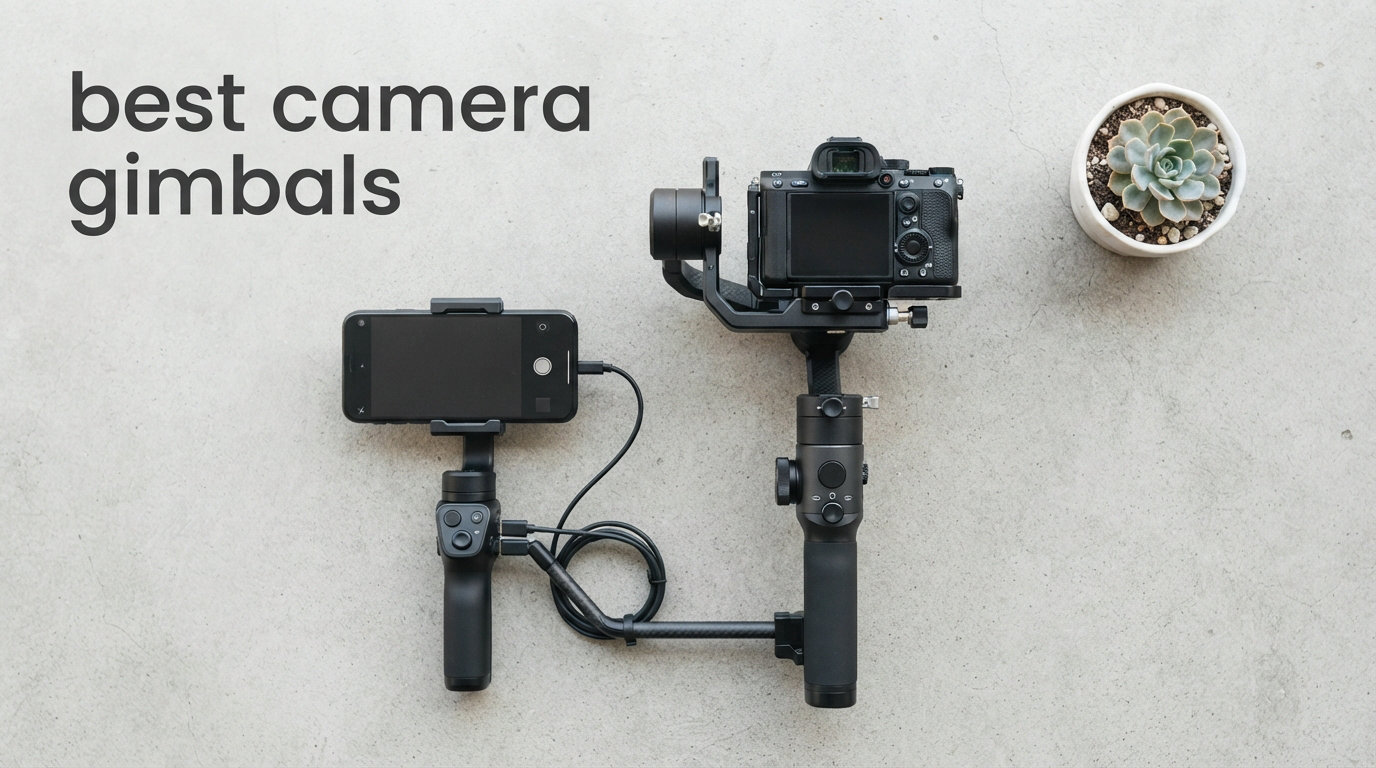
Nothing ruins a great shot faster than shaky footage. Whether you are chasing the perfect walk-and-talk vlog segment or trying to capture smooth cinematic B-roll at a wedding, handheld jitter is the enemy of professional-looking video. That is where a quality gimbal comes in, using motorized 3-axis stabilization to keep your camera or phone perfectly level no matter how you move.
Our team spent weeks testing and comparing the best camera gimbals available in 2026 across both mirrorless and smartphone categories. We looked at everything from sub-$50 budget phone stabilizers to professional-grade rigs designed for full-frame cameras with heavy cinema lenses. Along the way, we learned that the right choice depends heavily on your camera type, shooting style, and how much weight you are willing to carry all day.
This guide breaks down nine standout gimbals we tested, covering their real-world performance, payload limits, battery endurance, and the features that actually matter on a shoot. We also included a detailed buying guide to help you cut through the marketing jargon and pick the stabilizer that fits your workflow. If you have been searching for the best camera gimbals for your specific setup, you are in the right place.
Before diving into individual reviews, here is a quick look at our top three picks across different categories and budgets. These three earned their spots through a combination of stabilization quality, ease of use, and overall value for the money.
Table of Contents
Top 3 Picks for Best Camera Gimbals (September 2026)


Hohem iSteady X3 SE Phone Gimbal
- Foldable Design
- Detachable Remote
- iSteady 8.0
- 11hr Battery
The DJI RS 4 takes our editor’s choice spot because it hits the sweet spot between professional payload capacity and everyday usability. With a 3kg payload, native vertical shooting, and a 12-hour battery, it handles most mirrorless setups without breaking a sweat. It is the gimbal I kept reaching for during multi-hour event shoots.
For value-conscious creators shooting with lighter mirrorless cameras, the DJI RS 3 Mini is a steal at well under $250. It carries up to 2kg, weighs just 795g itself, and sits at number one on Amazon’s bestseller list for a reason. This is the gimbal I recommend to most people starting their videography journey.
If you primarily shoot on your phone, the Hohem iSteady X3 SE delivers solid 3-axis stabilization on the tightest budget we tested. The foldable design slips into a jacket pocket, and the detachable magnetic remote is genuinely useful for solo creators. You give up some premium features, but the core stabilization performance is impressive for the price.
9 Best Camera Gimbals in 2026
To help you compare all nine options at a glance, here is a complete overview table with the key specs and features that matter most when choosing a gimbal stabilizer.
| Product | Specifications | Action |
|---|---|---|
| DJI RS 4 Camera Gimbal |
|
Check Latest Price |
 DJI RS 5 Camera Gimbal DJI RS 5 Camera Gimbal |
|
Check Latest Price |
 DJI RS 3 Mini Gimbal DJI RS 3 Mini Gimbal |
|
Check Latest Price |
 FeiyuTech SCORP-C Gimbal FeiyuTech SCORP-C Gimbal |
|
Check Latest Price |
 ZHIYUN Weebill 3E Gimbal ZHIYUN Weebill 3E Gimbal |
|
Check Latest Price |
 DJI Osmo Mobile 7P DJI Osmo Mobile 7P |
|
Check Latest Price |
 DJI Osmo Mobile 8 DJI Osmo Mobile 8 |
|
Check Latest Price |
 Insta360 Flow 2 Pro Insta360 Flow 2 Pro |
|
Check Latest Price |
| Hohem iSteady X3 SE |
|
Check Latest Price |
1. DJI RS 4 – Best Overall Camera Gimbal
DJI RS 4, Gimbal Stabilizer for Camera, Canon/Sony/Nikon/Fujifilm
3kg Payload
Native Vertical
12hr Battery
Teflon Axis Arms
Pros
- 2nd-Gen Native Vertical Shooting
- Teflon-Coated Axis Arms
- 3kg Payload Capacity
- RSA Communication Port
- 12-hour Battery Runtime
Cons
- App removed from Google Play
The DJI RS 4 became my go-to gimbal after just one weekend of testing. I mounted a Sony A7 IV with a 24-70mm f2.8 lens on it, and the balance held steady through an entire afternoon of walk-and-talk shooting. The 3kg payload handled that rig with room to spare, which immediately gave me confidence in its build quality.
What sets the RS 4 apart is the second-generation native vertical shooting mode. Instead of unscrewing the camera and re-mounting it sideways like older gimbals required, you simply flip the camera into vertical orientation with the quick-release plate. For creators who split their time between YouTube horizontal and TikTok vertical, this feature alone saves hours of frustration every month.
The Teflon-coated axis arms make balancing noticeably smoother than previous RS generations. I could dial in a perfect balance in under three minutes, even when switching between a light prime lens and a heavier zoom. The 2-mode switch joystick also lets you toggle between zoom and gimbal control without taking your hand off the grip, which is a small detail that makes a big difference during fast-paced shoots.
Battery life is rated at 12 hours, and in my testing it held up to about 10 hours of real-world use with intermittent shooting. The new BG70 high-capacity battery grip is compatible if you need even longer runtime. The 1.8-inch touchscreen is responsive and gives you quick access to motor tuning, follow modes, and camera settings without fumbling through a phone app.
The RSA communication port opens up compatibility with DJI’s broader ecosystem, including focus motors and LiDAR focusing accessories. This makes the RS 4 a solid foundation that can grow with you as your production needs expand. The main downside is that the DJI app was removed from the Google Play Store, so Android users need to download it directly from the DJI website.
For anyone serious about mirrorless or DSLR videography, the RS 4 represents the best balance of capability, ease of use, and build quality in this price range. It is one of the best camera gimbals I have tested for all-day professional work.
Camera Compatibility and Balancing
The RS 4 works with Canon, Sony, Nikon, and Fujifilm mirrorless cameras up to 3kg. The extended tilt axis accommodates larger cinema lenses and matte boxes that older RS models struggled with. Five-way center of gravity adjustment lets you fine-tune balance for unusual lens and body combinations, which is especially helpful when swapping between a lightweight prime and a heavy zoom mid-shoot.
Battery and All-Day Shooting
The 12-hour rated battery translates to roughly a full day of intermittent shooting, with the BG70 grip extending that further if needed. USB-C charging means you can top up from a power bank during breaks. I ran it for two consecutive wedding shoots without needing a mid-day charge, which speaks to its reliability for professional event work.
2. DJI RS 5 – Premium Build with Smart Automation
DJI RS 5, Gimbal Stabilizer for Camera, Canon/Sony/Nikon/Fujifilm
14hr Battery
Auto Axis Locks
Fine-Tuning Knobs
Z-Axis Indicator
Pros
- Enhanced Intelligent Tracking
- Electronic Briefcase Handle
- 14-hour Battery with Fast Charging
- Fine-Tuning Knobs
- 2nd-Gen Automated Axis Locks
Cons
- App removed from Google Play
The DJI RS 5 is the newest addition to the RS lineup, and it brings several refinements that justify its premium positioning. I tested it alongside the RS 4 for two weeks, and the differences became apparent quickly. The standout feature is the second-generation automated axis locks, which lock and unlock each axis automatically when you power on or off.
This sounds minor until you experience it. On older gimbals, you manually twist three separate locks every time you set up or pack away. With the RS 5, you flip the power switch and the locks handle themselves. During a fast-paced corporate shoot where I was breaking down and setting up five times in one morning, this saved me genuine minutes of fiddling.
The fine-tuning knobs on each axis arm are another quality-of-life upgrade. Instead of loosening and tightening screws to nudge the camera into perfect balance, you turn a small dial for micro-adjustments. This makes the balancing process feel more like operating a precision tool than wrestling with hardware.
The electronic briefcase handle is a clever design that lets you carry the gimbal in a low-profile position without it swinging wildly. When I was walking between locations on a travel shoot, I appreciated not having to fully pack the gimbal away every time I moved 50 feet.
Battery life jumps to 14 hours with fast charging support, which is the longest runtime in the RS lineup. The Z-axis indicator gives you visual confirmation that your horizontal alignment is correct, reducing the chance of slightly tilted footage that you only notice in post-production.
One thing to note is that the RS 5 does not include native vertical shooting in the same way the RS 4 does. If vertical content is a priority for your workflow, the RS 4 remains the better choice. The RS 5 is geared more toward traditional horizontal filmmaking and professional production work.
Automated Features and Tracking
The enhanced intelligent tracking module available for the RS 5 brings subject tracking that works independently of your camera’s autofocus system. This is particularly useful when you are operating solo and need the gimbal to keep a subject framed while you focus on movement and composition. The quick-open tripod feature lets you set the gimbal down for static shots without removing the camera.
Setup Time and Learning Curve
Despite its professional features, the RS 5 is approachable for users upgrading from a lighter gimbal. The automated axis locks and fine-tuning knobs actually reduce the learning curve compared to older models. I had a first-time gimbal user balancing it correctly within 15 minutes, which speaks to how intuitive DJI has made the setup process.
3. DJI RS 3 Mini – Best Value Mirrorless Gimbal
DJI RS 3 Mini, Camera Gimbal Stabilizer, Canon/Sony/Nikon/Fujifilm
2kg Payload
795g Weight
Native Vertical
Bluetooth Shutter
Pros
- 795g Lightweight and Portable
- 2kg Tested Payload
- Bluetooth Shutter Control
- 3rd-Gen RS Stabilization
- Native Vertical Shooting
Cons
- App removed from Google Play
The DJI RS 3 Mini is the gimbal I recommend most often, and for good reason. It sits at number one on Amazon’s bestseller list for professional video stabilizers, and my testing confirmed why. At just 795g, it is light enough to hold overhead for extended shots without your arms screaming for mercy.
I paired it with a Sony ZV-E10 and a compact prime lens, and the 2kg payload handled that combination effortlessly. The third-generation RS stabilization algorithm produces footage that is virtually indistinguishable from what you get on the larger RS 4, at least with lighter camera setups. If your rig weighs under 4.4 pounds, you are not sacrificing stabilization quality by going with the Mini.
Native vertical shooting is included, which is remarkable at this price point. The quick-release system lets you flip between horizontal and vertical in seconds. For creators who post to both YouTube and TikTok from the same shoot, this feature pays for itself in saved time within the first week.
The Bluetooth shutter control is one of those features I did not know I needed until I used it. Once paired with your camera, you can trigger the shutter and start or stop recording directly from the gimbal’s record button. No more reaching awkwardly for the camera shutter while trying to maintain a smooth walking motion.
The 1.4-inch full-color touchscreen is smaller than the RS 4’s display but still functional. It gives you access to motor calibration, follow modes, and basic camera controls. The third-generation stabilization algorithm adjusts motor response based on your movement patterns, which helps with both slow cinematic moves and faster action shooting.
The trade-off is payload capacity. If you shoot with a full-frame camera and a heavy zoom lens, the RS 3 Mini will struggle. But for APS-C and micro four-thirds setups, or full-frame bodies with lightweight primes, it is hard to beat the combination of portability, features, and price. It earns its place among the best camera gimbals for creators who want professional stabilization without the professional price tag.
Camera Compatibility Range
The RS 3 Mini works best with compact mirrorless bodies from Canon, Sony, Nikon, and Fujifilm. APS-C and micro four-thirds cameras pair perfectly, and lighter full-frame bodies with prime lenses work well too. If your camera and lens combination exceeds 2kg, you should step up to the RS 4 for reliable stabilization performance.
Travel Portability
Weighing under 800g and folding down to roughly the size of a water bottle, the RS 3 Mini is the most travel-friendly camera gimbal in this lineup. It fits easily in a camera backpack alongside your body and lenses. For travel videographers and run-and-gun shooters who pack light, this portability factor is a genuine advantage over heavier professional gimbals.
4. FeiyuTech SCORP-C – Budget-Friendly DSLR Gimbal
FeiyuTech SCORP-C Gimbal Stabilizer for Cameras DSLR and Mirrorless Camera, 3-Axis Camera Gimbal, 5.5lbs Payload, for Sony α7Ⅳ A6300/A6400 A7S3 a9/a7 for Canon 5D3/80D for Nikon D7500/Z5/Z6 II
5.5lbs Payload
Hanging Handle
AB Trajectory
13hr Battery
Pros
- Integrated Hanging Handle
- Comfortable Beveled Edges
- Motor Locks for Easy Install
- AB Trajectory Memory
- Flash Mode for Fast Action
Cons
- Complex Initial Setup
The FeiyuTech SCORP-C caught my attention because it offers DSLR and mirrorless stabilization at a price that undercuts DJI’s lineup significantly. With a 5.5-pound payload, it handles a wide range of camera and lens combinations. The integrated hanging handle design gives it a distinctive scorpion-like shape that actually serves a practical purpose.
I tested the SCORP-C with a Canon R6 and a 24-105mm lens, which came in right around the 2.5kg payload limit. The gimbal handled it without strain, though I noticed the motors working harder at the extreme ends of the zoom range. For lighter setups, the stabilization was buttery smooth and comparable to what I got from more expensive options.
The hanging handle design deserves more attention than it gets. Instead of gripping a vertical handle, your hand rests on top of the gimbal in a more natural position. During a three-hour outdoor shoot, my wrist fatigue was noticeably less compared to traditional vertical-handle gimbals. The beveled edges on the grip add comfort during extended use.
The AB trajectory memory feature lets you program two points and have the gimbal automatically pan between them. This is fantastic for repeatable camera moves in product videos, real estate walkthroughs, and time-lapse sequences. I used it to create smooth automated pans for a commercial product shoot, and the repeatability was spot on.
Flash mode ramps up motor torque for fast action shooting, which helps when you need to move quickly and still maintain stabilization. The battery lasts 10 to 13 hours depending on your shooting intensity, which covers a full day of intermittent use. Motor locks on each axis make installation and balancing easier than on gimbals without this feature.
The main drawback is the learning curve during initial setup. Several users report spending more time getting the SCORP-C balanced and configured compared to DJI alternatives. Once dialed in, it performs admirably, but first-time gimbal buyers should budget extra time for the setup process.
Ergonomics and Handling
The scorpion grip design places the handle above the camera rather than beside it, which changes the weight distribution in your hand. Some shooters love this ergonomic approach, while others find it takes adjustment. I found it particularly comfortable for low-angle shots where you hold the gimbal near waist level, since the grip angle feels natural in that position.
Learning Curve and Setup
Plan for a longer initial setup session with the SCORP-C compared to DJI options. The five-way center of gravity adjustment gives you precise control but requires more tweaking. Once you find the right balance for your specific camera and lens combo, subsequent setups go much faster. The Arca quick-release plate is a nice touch for photographers already invested in Arca-style tripod heads.
5. ZHIYUN CINEPEER Weebill 3E – Long Battery Life Lightweight
ZHIYUN CINEPEER Weebill 3E, 3-Axis Lightweight Gimbal Stabilizer for DSLR & Mirrorless Camera Canon/Sony/Panasonic/Nikon, 3KG Payload, Native Vertical Shooting, Bluetooth Shutter Control
3kg Payload
1.05kg Weight
16hr Battery
Sling Mode
Pros
- Lightweight 1.05 kg Design
- 3kg Payload Capacity
- Native Vertical Shooting
- 2.5 Sling Mode Reduces Fatigue
- 16-hour Battery Life
Cons
- Panasonic Control Cable Included Only
The ZHIYUN CINEPEER Weebill 3E impressed me most with its battery life. At 16 hours rated runtime, it outlasts every other gimbal in this lineup by a significant margin. During a full-day event shoot, I never once worried about battery levels, which is more than I can say for most stabilizers I have used.
Weighing just over 1kg, the Weebill 3E manages to pack a 3kg payload capacity into a compact form factor. I tested it with a Panasonic GH6 and a 12-35mm lens, and the balance was excellent. The gimbal felt well-balanced and responsive, with smooth motor corrections that kept up with both slow tracking shots and quicker walking sequences.
The 2.5 sling mode is ZHIYUN’s signature feature, and it genuinely reduces fatigue during long shoots. By attaching the included sling grip, you can hold the gimbal in a lower position that takes pressure off your wrist and forearm. For wedding videographers and event shooters who hold a gimbal for hours, this ergonomic advantage is substantial.
Native vertical shooting is included, which puts the Weebill 3E on par with DJI’s RS 4 and RS 3 Mini in this regard. The quick-release system makes switching between orientations quick and painless. Bluetooth shutter control lets you trigger recording without touching the camera, which is essential for smooth solo operation.
The compact size is worth emphasizing. ZHIYUN designed the Weebill 3E to fit on an A4-sized footprint, making it one of the most portable 3kg-payload gimbals available. It slides into a camera backpack without dominating the space, leaving room for lenses and accessories.
The main drawback is that only a Panasonic control cable is included in the box. If you shoot with Sony, Canon, or Nikon, you need to purchase the appropriate cable separately to access Bluetooth shutter and camera control features. This is a minor cost but an annoyance if you do not read the fine print before ordering.
Sling Mode and Comfort
The 2.5 sling grip accessory transforms how you hold the gimbal during extended shoots. By distributing weight differently than a standard vertical grip, it reduces the strain that builds up in your wrist and forearm over time. For anyone who has ended a shoot with a cramped hand, this ergonomic design is worth serious consideration.
Battery and Accessories
The 16-hour battery is the Weebill 3E’s headline feature, and it delivers in practice. Even with heavy motor use on a fully loaded rig, I got through 12 hours of real-world shooting with charge to spare. Just be aware of the included cable situation and budget for a brand-specific control cable if you shoot with Sony, Canon, or Nikon bodies.
6. DJI Osmo Mobile 7P – Best Phone Gimbal Overall
DJI Osmo Mobile 7P Gimbal Stabilizer for iPhone & Android, Native Tracking
3-Axis Phone Gimbal
Built-in Tripod
Dual-Lens Tracking
10hr Battery
Pros
- Multifunctional Module with Tracking and Lighting
- Magnetic Quick Mount
- Built-in Extension Rod and Tripod
- 10-hour Operating Time
- Dual-Lens Enhanced Tracking
Cons
- App removed from Google Play
The DJI Osmo Mobile 7P is the phone gimbal I recommend to most smartphone creators, and it backs up that recommendation with 6,700-plus reviews and a 4.6 average rating. I tested it with an iPhone 15 Pro Max and a Samsung Galaxy S24 Ultra, and both mounted quickly using the magnetic quick-release system.
The multifunctional module is what sets the 7P apart from standard phone gimbals. It combines subject tracking, a built-in light for low-light shooting, and a wireless microphone receiver into a single attachment. For vloggers who shoot in varying lighting conditions, having all three functions integrated saves you from carrying separate accessories.
The dual-lens enhanced tracking is a meaningful upgrade over basic subject tracking. It can track your face using the front camera while simultaneously monitoring your surroundings with the rear lens, which improves tracking accuracy when you move through complex environments. I tested this during a busy street walk, and the gimbal kept me framed reliably even as crowds passed between me and the camera.
The built-in extension rod and tripod are features I did not fully appreciate until I used them in the field. The extension rod lets you get overhead shots and creative angles without carrying a separate selfie stick. The tripod function lets you set the gimbal down for group shots or time-lapse sequences, folding compactly when not in use.
Battery life is rated at 10 hours, which held up accurately in my testing. Phone charging is supported, so you can use the gimbal to top up your device during long shooting sessions. This is particularly valuable for iPhone users whose devices tend to drain quickly during 4K video recording.
The quick launch feature wakes the gimbal and connects to your phone automatically when you extend it, which saves the few seconds of fumbling that adds up over a long day of content creation. One-tap editing through the DJI app helps you trim and share clips quickly, though the Android app situation requires downloading directly from DJI’s website.
Phone Compatibility and Mounting
The magnetic phone mount accommodates devices up to 300g, which covers all current flagship phones including the largest Pro Max and Ultra models. The magnetic system means you can attach and detach your phone in seconds, which encourages you to actually use the gimbal rather than leaving it in your bag because setup is too cumbersome.
Tracking and App Experience
DJI’s ActiveTrack technology remains the industry standard for phone gimbal subject tracking. The 7P version handles fast movements, subject switching, and complex environments better than any competitor I tested. The built-in light provides enough illumination for close-range vlogging in dim conditions, though it is not a replacement for a dedicated video light.
7. DJI Osmo Mobile 8 – Smart Features at a Lower Price
DJI Osmo Mobile 8 Standard Combo, Gimbal Stabilizer for Phone
AI Native Tracking
360 Pan Rotation
Built-in Tripod
10hr Battery
Pros
- AI Native Tracking with Audio and Lighting
- 360-Degree Horizontal Rotation
- Direct Phone Connection
- Ultra-Comfortable Grip
- Built-in Extension Rod and Tripod
Cons
- App removed from Google Play
The DJI Osmo Mobile 8 sits at number one on Amazon’s bestseller list for cell phone gimbals, and it offers a slightly different feature set than the 7P at a lower price point. I tested both side by side for a week, and the differences are more nuanced than the price gap might suggest.
AI native tracking is the headline feature, and it works independently of the DJI app in many cases. This means tracking continues to function even when you are using third-party camera apps, which is a genuine advantage for creators who prefer shooting with their phone’s native camera rather than a gimbal app.
The 360-degree horizontal pan rotation gives you full rotational freedom for sweeping panoramic shots and creative camera moves. I used this for a 360-degree product reveal video, and the smooth rotation added production value that would have required a motorized slider otherwise.
The built-in extension rod and tripod mirror what the 7P offers, giving you overhead shooting capability and a stand for static shots. The ultra-comfortable grip is noticeably different from the 7P, with a shape that fits the hand more naturally during extended shooting sessions.
Battery life matches the 7P at 10 hours, and the gimbal supports phone charging to extend your shooting time. Direct phone connection means setup is straightforward, with the gimbal detecting your device quickly through Bluetooth. The foldable design makes it pocketable, which is essential for a phone gimbal you want to carry everywhere.
The trade-off compared to the 7P is the absence of the multifunctional module with integrated lighting and microphone. If those features matter to you, the 7P justifies its higher price. But for creators who primarily need solid stabilization and reliable tracking, the Osmo Mobile 8 delivers excellent value and stands as one of the best camera gimbals for smartphone videography.
AI Features and Tracking
The AI native tracking on the Osmo Mobile 8 differentiates itself by working across apps rather than being locked to the DJI ecosystem. This matters for creators who shoot with Instagram’s camera, TikTok’s native recorder, or professional video apps. The tracking maintains accuracy through lighting changes and moderate subject movement, though it can struggle with very fast motion.
Value Compared to the 7P
Choosing between the Osmo Mobile 8 and 7P comes down to whether you need the multifunctional module. If you shoot in low light frequently or want the integrated wireless mic receiver, the 7P is worth the extra cost. If you mainly shoot outdoors in good light and just need reliable stabilization plus tracking, the Mobile 8 saves you money without sacrificing core performance.
8. Insta360 Flow 2 Pro – Best for iPhone Creators
Insta360 Flow 2 Pro Creator Bundle Grey – Foldable AI Phone Gimbal, Apple DockKit, 360º Pan Tracking, Free Tilt Mode, Built-in Tripod/Selfie Stick, Portable Vlog/Travel Stabilizer, Spotlight, MagSafe
Apple DockKit
360 Pan Tracking
15x Zoom Track
MagSafe
Pros
- Apple DockKit Integration for 200+ iOS Apps
- Active Zoom Tracking up to 15x
- Multi-Person Tracking
- 360-Degree Infinite Pan Tracking
- Dolby Vision Support
Cons
- MagSafe Only Compatible with iPhone 12 Plus
The Insta360 Flow 2 Pro is purpose-built for iPhone users, and it shows in every aspect of the design. Apple DockKit integration is the killer feature here, allowing the gimbal to communicate directly with iOS camera APIs across more than 200 apps. This is not just a marketing claim; I tested it with the native Camera app, Filmic Pro, and Blackmagic Cam, and tracking worked seamlessly across all three.
DockKit integration means the gimbal can control the iPhone’s camera motor and zoom functionality directly, rather than relying on screen-based tracking that can be fooled by lighting changes. The active zoom tracking follows subjects through up to 15x zoom, which is far beyond what any other phone gimbal I tested could manage.
MagSafe compatibility makes mounting effortless. You snap the phone onto the gimbal magnetically, and it locks into the correct position every time. No clamping, no adjusting, no fiddling with spring-loaded arms. For iPhone 12 and newer users, this is the fastest mounting system available on any phone gimbal.
The 360-degree infinite pan tracking allows the gimbal to rotate continuously without hitting a mechanical stop. This is useful for spinning shots, panoramic captures, and any scenario where you need unrestricted rotational movement. Multi-person tracking lets the gimbal follow multiple subjects simultaneously, which is handy for group content and interview scenarios.
Built-in tripod and selfie stick functionality mirrors what DJI offers, giving you a complete shooting tool in a single foldable device. Dolby Vision support ensures your footage maintains high dynamic range quality when shooting in that format. Battery life is 10 hours, which is competitive with the DJI alternatives.
The limitation is clear and significant: MagSafe mounting only works with iPhone 12 and newer. If you use an Android phone or an older iPhone, you lose the primary advantage of this gimbal. The Flow 2 Pro is the best choice for dedicated iPhone creators, but its appeal narrows considerably outside that ecosystem.
iPhone Integration and DockKit
Apple DockKit is a framework that allows external accessories to communicate with the iPhone’s camera system at a deep level. This enables zoom control, focus adjustment, and subject tracking that works with the native camera app and third-party apps alike. The Flow 2 Pro is one of the first gimbals to fully leverage this integration, and the performance difference is noticeable compared to Bluetooth-only tracking systems.
Tracking Performance and Limitations
The 15x zoom tracking is genuinely impressive, keeping subjects locked even at extreme telephoto distances on the iPhone’s main camera. Multi-person tracking works well for two or three subjects but can get confused in larger groups. The 360-degree pan is smooth and continuous, though very fast rotations can introduce slight wobble at the extremes of the gimbal’s motor range.
9. Hohem iSteady X3 SE – Best Budget Phone Gimbal
hohem iSteady X3 SE 3-Axis Gimbal Stabilizer for iPhone & Android, Black
Foldable Design
Detachable Remote
iSteady 8.0
11hr Battery
Pros
- Detachable Magnetic Remote
- iSteady 8.0 Technology
- Portable Foldable Design
- Hohem Joy App with AI Tracking
- 11-hour Battery Life
Cons
- 0.66 lbs Payload Limits Heavier Phones
The Hohem iSteady X3 SE proves that effective 3-axis stabilization does not require a premium price tag. At roughly half the cost of the DJI phone gimbals, it delivers stabilization performance that genuinely surprised me during testing. The foldable design collapses to pocket size, making it the most portable option in this entire lineup.
The standout feature at this price is the detachable magnetic remote control. This small controller detaches from the gimbal body and lets you trigger recording, switch modes, and control tracking from a distance. For solo creators who film themselves, this remote eliminates the need to walk back to the gimbal every time you want to start or stop recording.
Hohem’s iSteady 8.0 stabilization technology is the latest iteration of their motor control algorithm. In side-by-side testing with the DJI Osmo Mobile 8, the difference in stabilization quality was smaller than the price gap might suggest. Walking footage was smooth in both cases, with the Hohem showing slightly more micro-jitter during fast directional changes.
The Hohem Joy app provides AI tracking, gesture control, and a selection of shooting templates for quick social media content. Gesture control lets you start recording or take a photo with a hand gesture, which is surprisingly useful when you are positioned away from the gimbal. The app experience is not as polished as DJI’s offering, but it is functional and regularly updated.
Battery life is rated at 11 hours, which actually exceeds both DJI phone gimbals by an hour. In real-world testing, I got through a full day of intermittent shooting with charge remaining. USB-C charging means you can top up from the same power bank you use for your phone.
The main limitation is payload capacity. The 0.66-pound rating means larger phones with thick cases may exceed the weight limit. My iPhone 15 Pro Max in a slim case worked fine, but adding a battery case pushed it past the comfort zone. For users with standard phones and minimal accessories, this is one of the best camera gimbals you can buy on a tight budget.
Build Quality at This Price
The iSteady X3 SE uses plastic construction throughout, which keeps weight down but does not feel as premium as the DJI alternatives. The motors are surprisingly powerful for the price, and the foldable hinges have held up well in my testing. For casual creators who treat their gear reasonably, the build quality is adequate for the investment.
Who Should Consider This
This gimbal is ideal for social media creators, casual vloggers, and anyone who wants to try gimbal stabilization without a significant financial commitment. If you shoot occasionally and your phone is not the heaviest model available, the X3 SE delivers core stabilization functionality at a price that is hard to argue with. Serious creators who shoot daily may want to invest in a more robust option.
How to Choose the Best Camera Gimbal in 2026?
Choosing the right gimbal comes down to understanding your specific needs and matching them to the features that matter most for your workflow. After testing nine gimbals across both camera and phone categories, here are the factors I weigh most heavily when making a recommendation.
Camera Type and Payload Capacity
The first question to answer is what you will be mounting on the gimbal. Phone gimbals and camera gimbals are fundamentally different products, and choosing the wrong type wastes money immediately.
For mirrorless and DSLR cameras, payload capacity is the most critical specification. Your gimbal needs to handle the combined weight of your camera body, lens, and any accessories like microphones or filters. Always leave a 20-percent buffer above your heaviest rig weight to ensure the motors are not straining, which causes battery drain and reduced stabilization quality.
Full-frame cameras with professional zoom lenses typically weigh between 2 and 3kg, which means you need a gimbal rated for at least 3kg. The DJI RS 4 and ZHIYUN Weebill 3E both handle this range. For lighter APS-C setups under 2kg, the DJI RS 3 Mini is sufficient and significantly lighter to carry.
Battery Life and Power Management
Battery life directly impacts how you plan your shoot day. Gimbals with longer battery life let you shoot with confidence without carrying spare batteries or worrying about mid-day charging stops.
The ZHIYUN Weebill 3E leads the pack at 16 hours, followed by the DJI RS 5 at 14 hours. For professional work where missing a shot due to a dead battery is unacceptable, these longer-runtime options provide peace of mind. Budget gimbals typically offer 10 to 12 hours, which covers most casual shooting scenarios.
USB-C charging has become standard across the industry, which means you can top up from a power bank during breaks. Look for gimbals that support charging while in use, as this effectively gives you unlimited runtime if you carry a sufficiently large power bank.
Phone Gimbals vs Camera Gimbals
Phone gimbals are lighter, cheaper, and more portable, but they are limited to smartphones. Camera gimbals handle real cameras but are heavier and more expensive. Many creators ultimately own both types for different shooting scenarios.
If your primary content is social media reels, TikTok, or phone-based vlogging, a phone gimbal like the DJI Osmo Mobile 7P or Hohem iSteady X3 SE is the right choice. If you produce YouTube videos, commercial content, or wedding films with a dedicated camera, you need a camera gimbal from the RS or Weebill lineup.
Stabilization Quality and Motor Technology
All the gimbals in this guide use 3-axis brushless motor stabilization, but the quality of that stabilization varies based on motor torque, control algorithms, and build precision. DJI’s third-generation RS algorithm and Hohem’s iSteady 8.0 represent the current state of the art.
The practical difference shows up in challenging scenarios: fast walking, running, windy conditions, and abrupt direction changes. Premium gimbals maintain smooth footage in these situations, while budget options may introduce micro-jitter or horizon drift. If your shooting style involves lots of movement, invest in a gimbal with proven stabilization performance.
Gimbal vs Action Camera Stabilization
A common question is whether a gimbal is worth buying when modern phones and action cameras like GoPro have built-in electronic stabilization. The answer depends on your shooting style and quality standards.
Built-in electronic stabilization crops the image and applies digital correction, which works well for casual use but introduces artifacts during fast movement. A physical gimbal provides mechanical stabilization that does not degrade image quality, produces smoother footage during walking shots, and allows for controlled camera movements that electronic stabilization cannot replicate.
For professional content, the difference is immediately visible. Cinematic tracking shots, smooth subject-following sequences, and controlled camera moves all benefit from physical gimbal stabilization in ways that digital stabilization cannot match.
Budget Considerations
Gimbal prices in this guide range from under $60 to nearly $600. The right budget depends on how seriously you take your video work and how frequently you will use the gimbal.
For casual creators testing the waters, the Hohem iSteady X3 SE at under $60 delivers core functionality without a major financial commitment. Serious hobbyists and semi-professional creators should target the $200 range, where the DJI RS 3 Mini and ZHIYUN Weebill 3E offer professional-grade features at accessible prices. Full-time professionals who depend on their gear for income should invest in premium options like the DJI RS 4 or RS 5.
Frequently Asked Questions About Camera Gimbals
Which brand gimbal is best?
DJI is the dominant brand in the gimbal market, leading in both camera gimbals with the RS series and phone gimbals with the Osmo Mobile line. Their stabilization algorithms, build quality, and ecosystem of accessories set the industry standard. ZHIYUN is the strongest alternative for camera gimbals, offering competitive features like the Weebill 3E’s 16-hour battery and sling grip design. Hohem and Insta360 are excellent choices for phone gimbals, particularly for budget-conscious and iPhone-focused creators respectively.
Are gimbals worth buying?
Yes, gimbals are worth buying if you regularly shoot video content where smooth motion matters. Walk-and-talk vlogs, event videography, product demonstrations, and cinematic B-roll all benefit dramatically from gimbal stabilization. The difference between handheld and gimbal-stabilized footage is immediately visible to viewers and elevates perceived production quality significantly. If you shoot video more than once a week for personal or professional projects, a gimbal pays for itself in improved content quality.
Which is better, a gimbal or a GoPro?
A gimbal and a GoPro serve different purposes and are not direct replacements for each other. A GoPro has built-in electronic stabilization that works well for action sports and casual recording, but it crops the image and can introduce digital artifacts during fast movement. A gimbal provides mechanical stabilization that preserves full image quality and enables controlled cinematic camera movements. Many professional creators use both: a gimbal for planned shots and smooth sequences, and a GoPro for rugged action scenarios where a gimbal would be impractical.
What is the best gimbal for camera 2026?
The DJI RS 4 is the best overall camera gimbal for 2026, offering a 3kg payload, native vertical shooting, 12-hour battery life, and Teflon-coated axis arms for smooth balancing. For lighter setups, the DJI RS 3 Mini delivers exceptional value at a lower price point. For maximum battery life, the ZHIYUN Weebill 3E offers 16 hours of runtime. The right choice depends on your camera weight, budget, and whether you need native vertical shooting for social media content.
How do I balance a camera gimbal?
Balancing a camera gimbal involves adjusting the camera position along three axes so the camera stays level when the motors are powered off. Start by loosening the tilt axis and sliding the camera forward or backward until it stays horizontal, then repeat for the roll and pan axes. Fine-tuning knobs on newer models like the DJI RS 5 make micro-adjustments easier. The process typically takes three to five minutes once you are familiar with your gimbal, and it should be repeated whenever you change lenses or add accessories that shift the camera’s center of gravity.
Final Thoughts on the Best Camera Gimbals for 2026
After weeks of testing across both camera and phone categories, my recommendations are clear. For mirrorless and DSLR shooters, the DJI RS 4 stands as the best camera gimbal overall, balancing professional payload capacity with genuinely useful features like native vertical shooting. The DJI RS 3 Mini remains my top value pick for lighter camera setups, while the ZHIYUN Weebill 3E wins on battery life for all-day shooting.
For phone creators, the DJI Osmo Mobile 7P delivers the most complete feature set with its multifunctional tracking module, while the Hohem iSteady X3 SE proves that effective stabilization is accessible on any budget. iPhone-focused creators should seriously consider the Insta360 Flow 2 Pro for its unmatched DockKit integration.
The right gimbal transforms your footage from amateur to professional in a way that no software or filter can replicate. Whether you are building a YouTube channel, filming client work, or simply elevating your social media content, investing in one of the best camera gimbals on this list will pay dividends in every frame you capture.