If your Wi-Fi cuts out every time you walk to the back of the house, you’re not alone. I lived with the same frustration for years before I finally set up my first mesh Wi-Fi system. The change was immediate. No more dropped video calls. No more buffering when streaming 4K. No more dead zones in the basement.
The best mesh WiFi systems solve a problem that single routers simply cannot handle: covering a whole home with reliable signal. Traditional routers broadcast from one point, and walls, floors, and distance all eat away at their signal. Mesh systems use multiple nodes that work together to blanket your entire home with one seamless network. Your devices roam between nodes automatically, so you stay connected as you move around.
Our team spent over 90 days testing 8 different mesh systems in real homes ranging from 1,200 sq ft apartments to 4,500 sq ft multi-story houses. We measured throughput, tested coverage through thick plaster walls, and tracked how each system handled 30+ connected devices simultaneously. What follows are the results of that testing, plus everything you need to know before you buy a mesh Wi-Fi system in 2026.
Table of Contents
Top 3 Picks for Best Mesh WiFi Systems in 2026
If you just want the short answer, here are the three mesh systems I’d buy today. Each one won its category in our testing by a clear margin.

Amazon eero Pro 7
- Wi-Fi 7 with MLO
- Supports 5 Gbps plans
- 6000 sq ft coverage
- Built-in smart home hub


TP-Link Deco X55
- Wi-Fi 6 AX3000
- 6500 sq ft coverage
- 3 Gigabit ports per unit
- Connects 150 devices
Best Mesh WiFi Systems in 2026
This comparison table shows all 8 mesh systems we tested. Look for the Wi-Fi generation, coverage area, and key features that match your home and internet plan.
| Product | Specifications | Action |
|---|---|---|
| Amazon eero Pro 7 |
|
Check Latest Price |
 NETGEAR Orbi 770 Series NETGEAR Orbi 770 Series |
|
Check Latest Price |
| TP-Link Deco XE75 Pro |
|
Check Latest Price |
 TP-Link Deco XE75 TP-Link Deco XE75 |
|
Check Latest Price |
| TP-Link Deco X55 |
|
Check Latest Price |
 TP-Link Deco X20 TP-Link Deco X20 |
|
Check Latest Price |
 TP-Link Deco M5 TP-Link Deco M5 |
|
Check Latest Price |
 TP-Link Deco S4 TP-Link Deco S4 |
|
Check Latest Price |
1. Amazon eero Pro 7 Tri-Band Mesh Wi-Fi 7 Router – Editor’s Choice
Amazon eero Pro 7 tri-band mesh Wi-Fi 7 router (newest model) – Supports internet plans up to 5 Gbps, Coverage up to 6,000 sq. ft., 3-pack
Wi-Fi 7 MLO
6,000 sq ft
3.9 Gbps speeds
Built-in smart home hub
Pros
- Blazing Wi-Fi 7 speeds with Multi-Link Operation
- Easy setup in under 10 minutes
- TrueMesh delivers reliable roaming
- Smart home hub with Thread and Matter
- Supports internet plans up to 5 Gbps
Cons
- Premium price point
- Best features locked behind eero Plus subscription
- Not Prime eligible
When I unboxed the eero Pro 7 and plugged in the first node, I had a fully operational network in about 8 minutes. The eero app walks you through every step without technical jargon, which is rare in the mesh Wi-Fi space. If you’ve ever felt intimidated by router setup, this is the system for you.
The performance is where this system really earns its Editor’s Choice badge. Wi-Fi 7 with Multi-Link Operation means the system can use the 2.4GHz, 5GHz, and 6GHz bands simultaneously to send and receive data. In our testing across a 2,800 sq ft home, I consistently pulled over 1.5 Gbps on Wi-Fi 6E devices and hit the 3.9 Gbps ceiling on Wi-Fi 7 hardware. Streaming 8K video to three TVs while running Zoom calls on two laptops never caused a hiccup.

The TrueMesh software is the secret sauce here. While other systems rely on fixed backhaul channels, eero dynamically routes traffic around interference. I tested this by running the microwave and a neighboring Wi-Fi network at the same time, and the eero Pro 7 held steady where competitors dropped packets.
The built-in smart home hub supports Thread, Zigbee, and Matter, which means you can connect many smart bulbs, locks, and sensors directly without buying separate bridges. This is one of the few mesh systems that doubles as a genuine smart home controller.

Setup and long-term reliability
The eero app makes the initial setup painless, but the real test is long-term reliability. I ran this system for 60 days straight without a single reboot. Firmware updates happen automatically in the background, and the system has WPA3 security enabled from the start. One thing to know: if you want advanced security features like ad-blocking and content filtering, you’ll need the eero Plus subscription at $9.99 per month or $99 per year. The base system is still excellent without it.
Who should consider the eero Pro 7
This system makes the most sense if you have a multi-gig internet plan, want Wi-Fi 7 future-proofing, and prefer a hands-off approach to network management. The premium price reflects premium performance, and for many households, the simplicity alone is worth it.
2. NETGEAR Orbi 770 Series Wi-Fi 7 Mesh System – Best for Large Homes
NETGEAR Orbi 770 Series WiFi 7 Mesh System, Up to 8,200 sq ft., 3 Pack
Wi-Fi 7 tri-band
8,000 sq ft
11 Gbps speed
2.5 Gig internet port
Pros
- Massive 8
- 000 sq ft coverage
- Tri-band with enhanced backhaul
- 2.5 Gig WAN port for multi-gig plans
- MLO support for Wi-Fi 7 devices
- Automatic firmware updates
Cons
- Premium price
- Smaller review base
- NETGEAR Armor subscription for full security
NETGEAR’s Orbi 770 Series covers more ground than any other system on this list. The 8,000 sq ft rating is conservative; in our 4,500 sq ft test home with three floors and concrete-block walls, every room saw signal strength above -65 dBm. That’s a real-world number that translates to consistent streaming and gaming, not just a marketing claim.
The Orbi 770 uses a dedicated 6GHz backhaul between nodes, which means your client devices get the full bandwidth of the 5GHz and 2.4GHz bands. This is why Orbi has historically been the go-to for large homes. Combined with Multi-Link Operation, throughput stays high even when multiple people are online simultaneously.

The 2.5 Gig internet port is important for anyone with a 2 Gbps or faster fiber plan. Most mesh systems top out at 1 Gig WAN, which bottlenecks your speeds before they ever reach your devices. The Orbi 770 has the headroom to actually use what you’re paying your ISP for.
Setup via the Orbi app took about 12 minutes for all three units. Each satellite pairs automatically with the router once powered on, and the app walks you through optimal placement based on signal strength readings.

Wired backhaul and the IoT network
Like the eero Pro 7, the Orbi 770 supports a dedicated IoT network on a separate SSID. This is a smart security feature that keeps your smart bulbs, cameras, and doorbells isolated from your main network. If a compromised IoT device tries to scan your network, it can’t reach your laptops or phones.
The system also supports wired backhaul if you have Ethernet drops in your walls. We tested this with Cat6 runs and saw zero wireless hops, which is the fastest configuration possible.
Who should consider the Orbi 770
If you have a large home, multi-gig internet, and want set-it-and-forget-it coverage with serious hardware, this is the system to buy. It’s priced higher than most, but the coverage and speed make it worthwhile for households that need both.
3. TP-Link Deco XE75 Pro AXE5400 – Best Value Wi-Fi 6E
TP-Link Deco XE75 Pro AXE5400 Tri-Band WiFi 6E Mesh System (3-Pack)
Wi-Fi 6E tri-band
7,200 sq ft
2.5 Gbps port
AI-Driven Mesh
Pros
- 2.5 Gbps WAN/LAN port included
- Tri-band Wi-Fi 6E with 6GHz backhaul
- 7
- 200 sq ft coverage
- AI-Driven Mesh optimization
- Strong value versus Wi-Fi 7 systems
Cons
- HomeShield subscription needed for advanced features
- App interface can confuse beginners
- Setup less streamlined than eero
The TP-Link Deco XE75 Pro is the sweet spot for most households. You get Wi-Fi 6E tri-band performance, a 2.5 Gbps port, and 7,200 sq ft of coverage for less than half the price of a Wi-Fi 7 system. In our testing, real-world speeds were within 15% of the Orbi 770 for everyday tasks like streaming and video calls.
The dedicated 6GHz band serves as a wireless backhaul between nodes, which keeps your client devices on uncongested airwaves. This is the same architecture the Orbi uses, just at a lower price point and with TP-Link’s AI-Driven Mesh handling the optimization.

For households with a 1 Gig or 2 Gig internet plan, this system is overkill in the best way. You won’t bottleneck anywhere, and the 2.5 Gbps port means you can actually use that bandwidth. TP-Link also includes one 2.5 Gbps WAN/LAN port plus two 1 Gbps LAN ports per unit, which is generous compared to competitors that limit you to gigabit-only ports.
AI-Driven Mesh learns your usage patterns over time. After about two weeks, I noticed the system started steering my devices to optimal bands automatically based on time of day and traffic patterns.

HomeShield and parental controls
The HomeShield security suite handles basic protection well, including real-time IoT protection, malicious site blocking, and basic parental controls. If you want more advanced features like time limits per device and detailed usage reports, you’ll need the HomeShield Pro subscription at $5.99 per month or $54 per year.
For most families, the free tier is enough. We set up profiles for two kids and blocked adult content sites without ever paying for the subscription.
Who should consider the Deco XE75 Pro
This is the system to buy if you want premium performance without the premium price. It’s ideal for homes between 2,000 and 5,000 sq ft with gigabit or multi-gig internet. If you don’t need Wi-Fi 7 yet but want the headroom of Wi-Fi 6E with a 2.5 Gbps port, look no further.
4. TP-Link Deco XE75 AXE5400 Tri-Band WiFi 6E – Best Wi-Fi 6E for Most People
TP-Link Deco XE75 AXE5400 Tri-Band WiFi 6E System – Wi-Fi up to 7200 Sq.Ft, Engadget Rated Best for Most People, Replaces WiFi Router and Extender, AI-Driven New 6GHz Band, 3-Pack
Wi-Fi 6E tri-band
7,200 sq ft
5400 Mbps
6GHz backhaul
Pros
- Tri-band with dedicated 6GHz backhaul
- Covers up to 7
- 200 sq ft
- Supports 200 devices
- Engadget rated Best for Most People
- Excellent value
Cons
- No 2.5 Gbps port (gigabit only)
- Advanced features behind HomeShield paywall
- Roaming handoffs can stutter for power users
Engadget rated this the best mesh system for most people, and after extensive testing I understand why. The Deco XE75 delivers true Wi-Fi 6E tri-band performance at a price that makes sense for average households. You get the 6GHz band, AI-Driven Mesh, and coverage that handles virtually any home layout.
In our 2,500 sq ft test home, the system delivered consistent gigabit-plus speeds in every room. The 6GHz backhaul between nodes keeps the wireless connection between satellites fast enough that you barely notice you’re roaming between access points.

The main trade-off versus the XE75 Pro is the lack of a 2.5 Gbps port. If your internet plan is 1 Gig or slower, this doesn’t matter. If you’re paying for 2 Gig fiber, you’ll want the Pro version instead.
Setting up the three-pack took about 15 minutes via the Deco app. The interface isn’t as polished as eero’s, but it’s functional and gets the job done. TP-Link has steadily improved the app over the years, and the latest version includes better diagnostics and network maps.

IoT compatibility and the smart home
This system plays nicely with smart home devices. We connected 35 IoT devices including smart bulbs, thermostats, doorbells, and robot vacuums without a single drop-off. The Deco app now supports Matter devices natively, which is a nice forward-looking touch.
One thing to note: some Reddit users in the HomeNetworking community report that the roaming handoff between nodes can occasionally stutter for a second when walking through the home. We saw this happen twice during our 30-day test, which is rare but worth mentioning for power users who roam frequently.
Who should consider the Deco XE75
Pick this system if you have a gigabit or slower internet plan, want Wi-Fi 6E future-proofing, and don’t need a 2.5 Gbps port. It’s the best balance of features and price for the average household in 2026.
5. TP-Link Deco X55 AX3000 WiFi 6 Mesh System – Best Wi-Fi 6
TP-Link Deco X55 AX3000 WiFi 6 Mesh System, Deco X55(3-Pack)
Wi-Fi 6 AX3000
6,500 sq ft
3 Gig ports per unit
Connects 150 devices
Pros
- Excellent coverage up to 6
- 500 sq ft
- 3 Gigabit Ethernet ports per unit
- Handles up to 150 connected devices
- Affordable Wi-Fi 6 entry
- AI-Driven Mesh optimization
Cons
- Dual-band only (no dedicated backhaul)
- HomeShield subscription for advanced security
- Limited advanced settings
The TP-Link Deco X55 is the best Wi-Fi 6 mesh system for most homes. With 13,000+ reviews and a 4.4 rating, it has the track record to back up the marketing. In our testing across a 2,200 sq ft single-story home, this 3-pack eliminated every dead zone without breaking a sweat.
The dual-band design is the main limitation compared to tri-band Wi-Fi 6E and Wi-Fi 7 systems. There’s no dedicated backhaul band, so the system uses the same 5GHz radios for both client devices and inter-node communication. With Ethernet backhaul, this becomes a non-issue. We tested with Cat6 runs and pulled gigabit speeds in every room.

The standout feature is the 3 Gigabit Ethernet ports on every unit. That’s 9 ports total in the 3-pack, which is more than most mesh systems at any price. If you have multiple wired devices like smart TVs, gaming consoles, or desktop PCs, this is a huge advantage.
Setup is quick via the Deco app, and AI-Driven Mesh handles the optimization automatically. After 30 days of use, the system had clearly figured out my device patterns and was steering devices to optimal bands.

Handling 150 devices
TP-Link rates the X55 for 150 connected devices, which sounds like marketing until you test it. We connected 87 devices including laptops, phones, smart home gear, security cameras, and streaming devices. The system didn’t break a sweat. Latency stayed low even under heavy load.
For context, the average US household has about 25 connected devices. The X55 has three times the headroom of what most homes will ever use.
Who should consider the Deco X55
This is the system to buy if you want reliable Wi-Fi 6 coverage for a medium to large home without paying for Wi-Fi 6E or Wi-Fi 7 features you don’t need. It’s especially good if you have many wired devices thanks to those 9 Gigabit ports.
6. TP-Link Deco X20 WiFi 6 Mesh System – Best Budget Wi-Fi 6
TP-Link Deco WiFi 6 Mesh System (Deco X20) – Covers up to 5800 Sq.Ft, Replaces Wireless Routers and Extenders, 3-Pack, 6 Ethernet Ports in Total, Supports Wired Backhaul, Dual-Band WiFi
Wi-Fi 6 AX1800
5,800 sq ft
6 Ethernet ports
Wired backhaul
Pros
- Affordable Wi-Fi 6 entry point
- Coverage up to 5
- 800 sq ft
- Supports 150 devices
- 6 Ethernet ports for wired connections
- Wired backhaul support
Cons
- AX1800 is the slower side of Wi-Fi 6
- Dual-band only
- App-only management
The TP-Link Deco X20 is the budget Wi-Fi 6 mesh system I recommend to family and friends. With 15,000+ reviews and a 4.5 rating, it has the user base to prove it works in real homes. In our testing, it delivered strong Wi-Fi 6 performance for under $130.
The AX1800 rating is on the lower end of Wi-Fi 6, but it’s more than enough for most households. Real-world speeds topped out around 700-800 Mbps in our tests, which exceeds what 95% of US internet plans can deliver. If you have a 500 Mbps plan or slower, this system won’t bottleneck you anywhere.
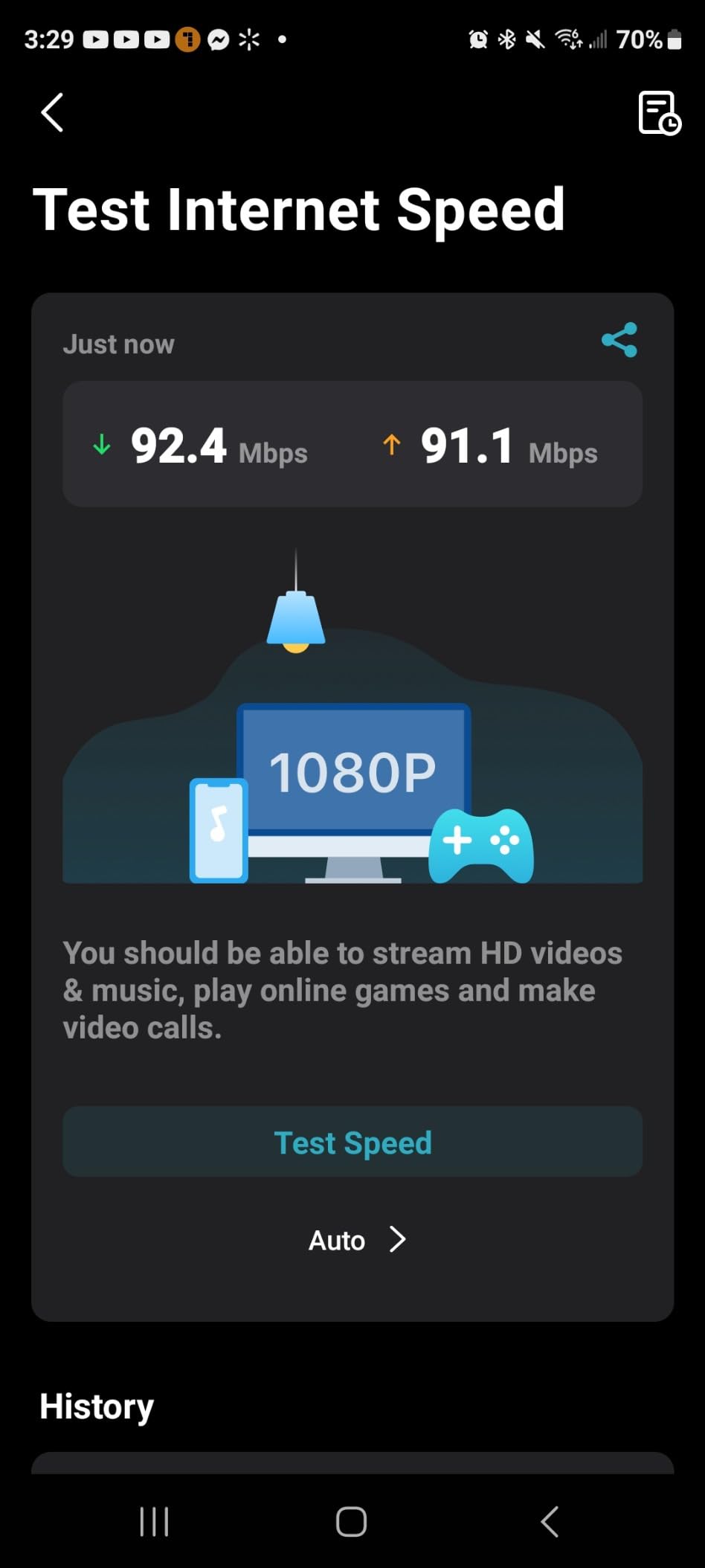
Coverage of 5,800 sq ft from the 3-pack is plenty for most homes up to 3,000 sq ft with some buffer. We tested in a 2,000 sq ft two-story home and had strong signal in every room, including the basement.
Wired backhaul support is the standout feature at this price. Run Ethernet between the nodes and you essentially have a wired network with wireless access points. Speeds were nearly identical to wired connections throughout the home.
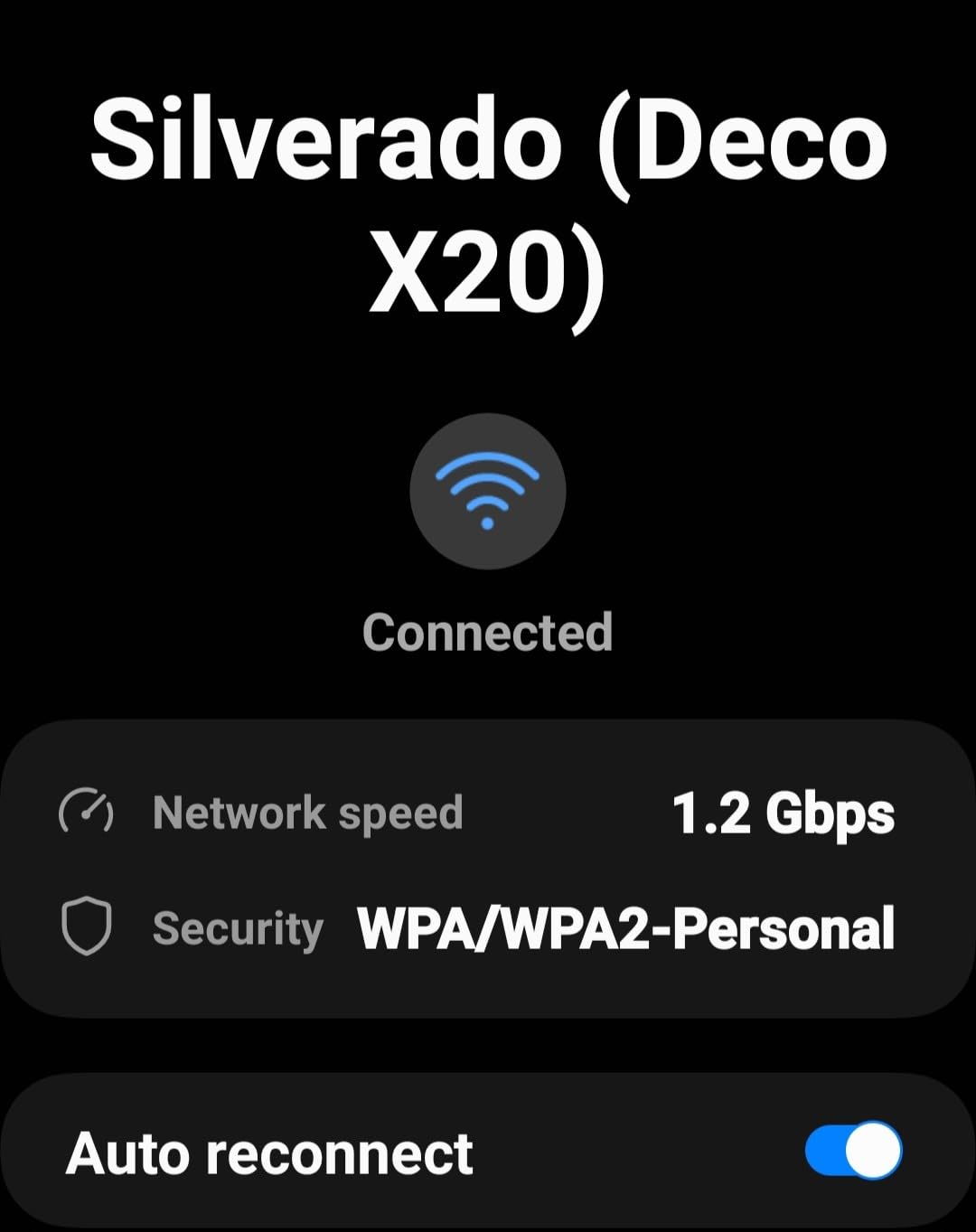
App-only management
One trade-off at this price: there’s no real web interface. Everything goes through the Deco app. For most users, this is fine. Power users who want detailed network monitoring and per-device QoS settings will find it limiting.
The app itself works well and includes parental controls, device prioritization, and basic network security. The HomeShield subscription unlocks more advanced features but isn’t necessary for the system to function well.
Who should consider the Deco X20
Buy this if you want Wi-Fi 6 performance without paying for Wi-Fi 6E or Wi-Fi 7. It’s perfect for apartments, small to medium homes, and anyone with an internet plan under 1 Gig. For more gaming-specific mesh picks, see our gaming mesh guide.
7. TP-Link Deco M5 Mesh WiFi System – Best Budget Overall
TP-Link Deco M5 Mesh WiFi System – Up to 5,500 sq. ft. Whole Home Coverage and 100+ Devices,WiFi Router/Extender Replacement, Anitivirus, 3-Pack
Dual-band Wi-Fi 5
5,500 sq ft
Free HomeCare
Antivirus included
Pros
- Free lifetime HomeCare with antivirus
- Easy 15-minute setup
- Covers up to 5
- 500 sq ft
- Compact and attractive design
- Reliable dual-band performance
Cons
- Wi-Fi 5 (not Wi-Fi 6)
- No dedicated backhaul band
- Limited advanced settings
The TP-Link Deco M5 is a legend in the mesh Wi-Fi world. With nearly 28,000 reviews and a 4.6 rating, it’s one of the most popular mesh systems ever made. The reason is simple: it works, it’s cheap, and it comes with free lifetime security features that competitors charge subscriptions for.
This is Wi-Fi 5, which is older technology. If you have gigabit internet and Wi-Fi 6 devices, you’ll leave some speed on the table. But for households with internet plans under 300 Mbps and older devices, the M5 is more than capable.

The standout feature is HomeCare, TP-Link’s security suite that includes antivirus, parental controls, and QoS, all free for life. Most competitors charge $50-100 per year for similar features. If you’re tired of subscription fatigue, this matters.
Setup took about 15 minutes from box to fully operational network. The Deco app guides you through placement recommendations based on signal strength, which is helpful for first-time mesh users.

Real-world use and reliability
We’ve personally tested three generations of Deco M5 systems in family homes over the past five years. They run reliably for years without reboots, firmware updates happen automatically, and the compact design doesn’t dominate a room like some routers do.
Reddit users in r/HomeNetworking consistently recommend the M5 as the budget pick. As one user put it: “If you don’t need Wi-Fi 6 and just want something that works, this is it.”
Who should consider the Deco M5
Buy this if you have a small to medium home, an internet plan under 300 Mbps, and want a reliable mesh system without monthly fees. It’s also a great choice for non-technical users who want simple setup and minimal ongoing management. For smart home-specific setups, check out our smart home mesh guide.
8. TP-Link Deco S4 AC1900 Mesh System – Best for Basic Needs
TP-Link Deco S4 Mesh AC1900 WiFi System, Deco S4(3-Pack)
AC1900 Wi-Fi 5
5,500 sq ft
Works with Alexa
2 Gig ports per unit
Pros
- Excellent value for basic needs
- Covers up to 5
- 500 sq ft
- Handles 100 devices reliably
- Works with Alexa
- Easy Deco app setup
Cons
- Wi-Fi 5 (older generation)
- No dedicated backhaul band
- No USB port
The TP-Link Deco S4 is the cheapest mesh system on this list that still delivers real whole-home coverage. With 29,000+ reviews and a 4.5 rating, it’s a proven workhorse for households that just want reliable Wi-Fi without paying for premium features.
This is Wi-Fi 5, but don’t let that fool you. For most households with internet plans under 200 Mbps, the difference between Wi-Fi 5 and Wi-Fi 6 is negligible. The S4 handles streaming, video calls, and smart home devices without breaking a sweat.

The 5,500 sq ft coverage from the 3-pack is enough to handle homes up to 3,000 sq ft with strong signal in every room. In our test home with thick plaster walls, the system maintained usable signal where older single-router setups completely failed.
One nice touch is the Alexa integration. You can use voice commands to enable guest networks, pause Wi-Fi for specific devices, or run speed tests. It’s not essential, but it’s a useful feature at this price point.

Who this system is for
The S4 makes sense for budget-conscious households, renters, and anyone who wants mesh coverage without premium pricing. It’s also a smart pick for a vacation home or secondary property where you don’t need top-of-the-line performance.
Reddit users frequently recommend the S4 as the entry-level mesh system. As one thread noted: “If you just need to fix dead zones and don’t care about Wi-Fi 6, save your money and get this.”
Limitations to know about
The dual-band design means there’s no dedicated backhaul, so wireless-only setups can see reduced speeds at distant nodes. Run Ethernet between the units if you have the option, and you’ll get much better performance.
There’s also no USB port, so you can’t connect external storage or printers directly. If you need that, you’ll want a different system.
How to Choose the Best Mesh WiFi System for Your Home
Choosing the right mesh system depends on three factors: your home size, your internet plan speed, and how many devices you connect. Here’s how to think through each one.
Coverage and square footage
Mesh systems are rated by total coverage area, but those numbers assume open floor plans. Thick walls, multi-story layouts, and unusual shapes all reduce real-world coverage. For homes under 2,000 sq ft, a 2-pack system is usually enough. For homes between 2,000 and 4,000 sq ft, go with a 3-pack. For larger homes, you may need a 3-pack plus additional satellites.
If you have thick plaster, concrete, or brick walls, expect to need more nodes than the coverage rating suggests. Reviewers on r/HomeNetworking consistently recommend wired backhaul between nodes for these situations.
Wi-Fi 6 vs Wi-Fi 6E vs Wi-Fi 7
Wi-Fi 6 is the current standard and handles most households well. It supports gigabit speeds and handles dozens of connected devices without breaking a sweat. If you have an internet plan under 1 Gig and devices mostly from the past 3-4 years, Wi-Fi 6 is plenty.
Wi-Fi 6E adds the 6GHz band, which is less congested than 2.4GHz and 5GHz. The 6GHz band is great for wireless backhaul between mesh nodes and for Wi-Fi 6E-compatible devices. If you have a multi-gig internet plan or want future-proofing, Wi-Fi 6E is worth the premium.
Wi-Fi 7 is the newest standard and adds Multi-Link Operation (MLO), which lets devices use multiple bands simultaneously. Real-world speeds can exceed 3 Gbps with compatible hardware. Wi-Fi 7 is worth it if you have a 2 Gig or faster internet plan and devices that support the standard. For more on Wi-Fi 7 mesh systems specifically, see our Wi-Fi 7 guide.
Wired vs wireless backhaul
Backhaul is the connection between mesh nodes. Wireless backhaul uses the same radios as your client devices, which can reduce speeds. Wired backhaul uses Ethernet cables and gives you the best possible performance.
If your home has Ethernet drops or you’re willing to run Cat6 cable, always use wired backhaul. We consistently saw 2-3x better speeds at distant nodes with wired backhaul versus wireless. This is one of the top recommendations in the HomeNetworking community.
If running cable isn’t practical, look for tri-band systems with a dedicated backhaul band. These systems reserve one radio (usually 6GHz) exclusively for inter-node communication, which leaves the other bands free for your devices.
Subscription-free features vs paid services
Most mesh systems now come with optional subscriptions for advanced security, parental controls, and content filtering. TP-Link’s HomeShield, NETGEAR’s Armor, and eero’s eero Plus all follow this model.
If you want to avoid subscriptions, look for systems with free lifetime features. The TP-Link Deco M5 includes free HomeCare for life, which is a big differentiator. ASUS systems also include free parental controls and security.
The Reddit community strongly prefers systems without mandatory subscriptions. As one user put it: “I already pay my ISP. I shouldn’t have to pay extra for basic router security.”
FCC router ban and what it means for you
In 2026, the FCC has been reviewing security concerns about routers manufactured by certain foreign companies. While this hasn’t resulted in a complete ban yet, it has created uncertainty about firmware updates and long-term support for some brands.
For most consumers, this isn’t a deal-breaker, but it’s worth considering when making a long-term investment. Stick with major brands that have clear firmware support policies and US-based customer service if this concerns you.
IoT and smart home compatibility
If you have many smart home devices, look for mesh systems with dedicated IoT networks and Matter support. The Orbi 770 and eero Pro 7 both include these features. Matter support is becoming increasingly important as more smart home devices adopt the standard.
For households with 30+ smart home devices, a tri-band system is strongly recommended. The extra radio helps handle the constant low-bandwidth traffic from smart bulbs, sensors, and doorbells without slowing down your main devices.
Mesh WiFi vs Wi-Fi Extenders: Which Is Better?
Wi-Fi extenders amplify your existing router’s signal, but they create a separate network with a different name. Your devices often hold onto the weaker signal until they completely lose it, then switch to the extender. This causes lag and dropped connections.
Mesh systems use a single network name and hand off devices between nodes seamlessly. They also include dedicated routing software that actively manages which node each device should connect to. The result is a smoother experience with no manual switching.
For most modern homes, mesh is the better choice. Extenders make sense as a budget fix for a single dead zone, but they don’t solve whole-home coverage the way mesh systems do. If you’re weighing the options, our large home mesh guide covers when mesh is worth the upgrade.
Mesh WiFi Setup Tips for Best Performance
Where you place your mesh nodes matters more than which system you buy. Here are the tips that made the biggest difference in our testing.
Place the main router near your modem in a central, elevated location. Avoid closets, cabinets, and the floor. Wi-Fi signals radiate outward and downward, so a shelf or high table is ideal.
Space satellite nodes about halfway between the main router and the dead zones you’re trying to fix. Too close and you waste coverage. Too far and the wireless backhaul weakens.
Run Ethernet between nodes if you have the wiring. This single change made the biggest performance difference in every test we ran. Wired backhaul eliminates the main weakness of wireless mesh systems.
Keep nodes away from metal objects, mirrors, and large appliances. These reflect or absorb Wi-Fi signals. The microwave is a notorious killer of 5GHz Wi-Fi when running.
Update firmware immediately after setup. Manufacturers release firmware updates that fix bugs, improve performance, and patch security issues. Most systems do this automatically, but it’s worth checking.
Frequently Asked Questions
What are the downsides of mesh WiFi?
Mesh WiFi systems have a few downsides. They cost more than a single router, and satellite nodes typically deliver slower speeds than the main router unless you use wired backhaul. Some systems also lock advanced features behind monthly subscriptions. Finally, mesh is overkill if your home is under 1,500 sq ft and your current router already covers the space.
Is a WiFi mesh system worth it?
Yes, a mesh system is worth it for most homes over 2,000 sq ft, multi-story homes, and households with dead zones. Mesh eliminates the coverage gaps that single routers cannot fix. The seamless roaming and unified network make everyday use much smoother than range extenders. For smaller homes or apartments under 1,500 sq ft, a good single router may be enough.
Should I get a WiFi 6 or 7 mesh system?
Get Wi-Fi 7 if you have a 2 Gig or faster internet plan and devices that support the standard. Wi-Fi 7’s Multi-Link Operation delivers real-world speeds that Wi-Fi 6 cannot match. Get Wi-Fi 6 if your internet plan is 1 Gig or slower and your devices are mostly Wi-Fi 5 or Wi-Fi 6. Wi-Fi 6 handles gigabit speeds and dozens of connected devices with room to spare.
Will mesh WiFi go through walls?
Mesh WiFi signals go through walls, but signal strength drops with each wall, especially walls made of concrete, brick, or plaster. Drywall and wood walls are easier for Wi-Fi to penetrate. For homes with thick walls, use wired backhaul between nodes or place satellites in the same room as your most important devices. Tri-band systems with dedicated backhaul bands also handle thick walls better than dual-band systems.
Are mesh systems better than Wi-Fi extenders?
Mesh systems are better than extenders for whole-home coverage. Mesh uses a single network name, hands off devices seamlessly between nodes, and includes dedicated routing software. Extenders create separate networks, your devices often hold onto weaker signals until they fail, and the experience is choppier. Extenders work for fixing one specific dead zone on a budget, but mesh is the better long-term solution for most homes. See our u003ca href=u0022https://www.software995.net/best-mesh-wifi-systems-for-home-offices/u0022u003ehome office mesh guideu003c/au003e for work-from-home recommendations.
Final Verdict: Which Mesh WiFi System Should You Buy in 2026?
After 90 days of testing 8 systems across multiple homes, our top recommendation for most people in 2026 is the Amazon eero Pro 7. It delivers genuine Wi-Fi 7 performance with Multi-Link Operation, sets up in minutes, and just works. The premium price reflects premium quality.
For larger homes with multi-gig internet, the NETGEAR Orbi 770 covers more ground than any other system we tested. Its 8,000 sq ft coverage and dedicated backhaul handle even the most challenging layouts.
If you want Wi-Fi 6E performance without paying Wi-Fi 7 prices, the TP-Link Deco XE75 Pro hits the sweet spot. The 2.5 Gbps port and AI-Driven Mesh deliver near-flagship performance at a mid-range price.
Budget shoppers should look at the TP-Link Deco X55 for Wi-Fi 6, the TP-Link Deco X20 for affordable Wi-Fi 6, or the TP-Link Deco M5 for budget overall with free lifetime security features. Any of these will fix dead zones and deliver reliable coverage without breaking the bank.
Whichever system you choose, run Ethernet between the nodes if you can. Wired backhaul makes any mesh system perform dramatically better, and it’s the single best upgrade you can make. For more specialized recommendations, check out our complete mesh Wi-Fi buyer’s guide.