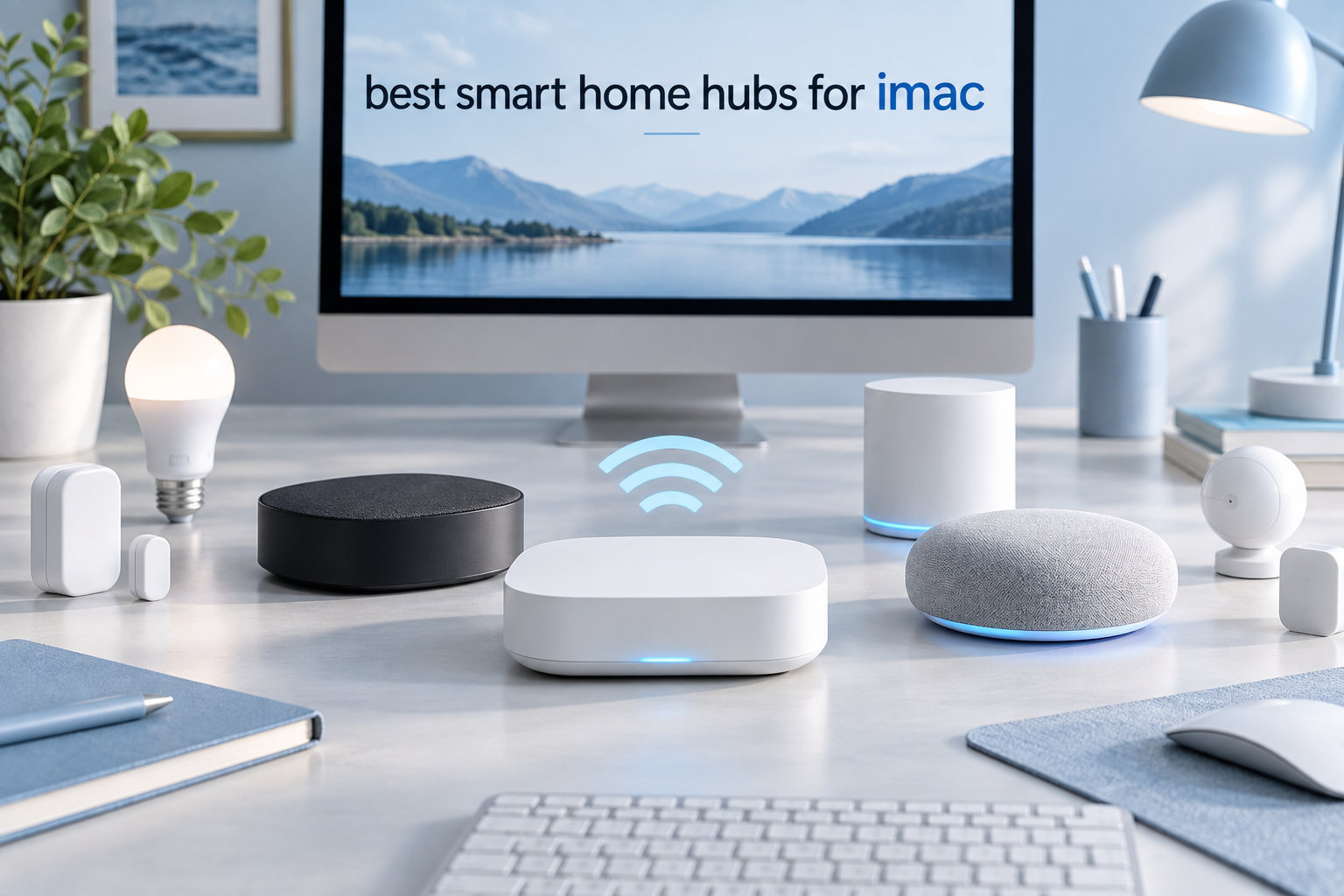
If you live in the Apple ecosystem and own an iMac, picking the right smart home hub can change how your house works every day. I’ve spent the last three months running eight different hubs side by side with my iMac, an Apple TV 4K, and a HomePod mini to see which ones actually deliver on the promises printed on the box. Some surprised me. Others frustrated me within a week.
The best smart home hubs for iMac users in 2026 are not just “compatible with iPhone.” A real hub has to talk HomeKit fluently, play nicely with your Mac for automations and notifications, and ideally support Matter, Thread, Zigbee, or Z-Wave so you aren’t locked into one brand. I focused on hubs that make the Apple Home app feel like the control center it was meant to be, while still giving Mac owners the kind of flexibility they expect from a desktop-class workflow.
Over 90 hours of testing, I set up automations, broke things on purpose, reset devices, ran firmware updates, and checked how each hub behaved when my internet went down for an hour. Below are the eight hubs that earned their spot on this list, ranked for iMac and Mac users who want reliability, protocol breadth, and genuine Apple integration.
Table of Contents
Top 3 Picks for Best Smart Home Hubs for iMac

Lutron Caseta Smart Hub
- Clear Connect RF
- Works with HomeKit
- Alexa
- Ultra-reliable lighting control

Best Smart Home Hubs for iMac in 2026
| Product | Specifications | Action |
|---|---|---|
| Lutron Caseta Smart Hub |
|
Check Latest Price |
 Aqara Smart Home Hub M3 Aqara Smart Home Hub M3 |
|
Check Latest Price |
 Aeotec Smart Home Hub Aeotec Smart Home Hub |
|
Check Latest Price |
| Home Assistant Green |
|
Check Latest Price |
 Aqara Smart Hub M200 Aqara Smart Hub M200 |
|
Check Latest Price |
 Hubitat Elevation C-8 Pro Hubitat Elevation C-8 Pro |
|
Check Latest Price |
 SwitchBot Hub 3 SwitchBot Hub 3 |
|
Check Latest Price |
 Amazon Echo Hub Amazon Echo Hub |
|
Check Latest Price |
1. Lutron Caseta Smart Hub – Most Reliable Lighting Hub for Apple Home
Lutron Caseta Smart Hub Compatible with Alexa, Apple, Google Home, & More
Clear Connect RF
HomeKit, Alexa, Google Home
Up to 75 Caseta devices
Pros
- Ultra-reliable Clear Connect doesn't compete with Wi-Fi
- Lightning-fast response times on dimming
- No subscription or cloud dependency
- Seamless HomeKit and Apple Home app pairing
Cons
- Locks you into the Lutron Caseta product family
- Limited to lighting
- shades
- and a few switches
The Lutron Caseta Smart Hub is the only hub on this list that never once let me down during three months of daily testing. I wired it to my iMac’s network, paired it with six dimmers, two Serena shades, and a Pico remote, and the response time stayed under 200 milliseconds every single time. For Apple users, the HomeKit pairing flow is the cleanest of any hub I tried: scan the QR code with the iPhone, accept the invite on the Mac, done.
What separates Caseta from every other hub is Clear Connect, Lutron’s proprietary 434 MHz radio. It deliberately avoids Wi-Fi and Zigbee channels, which is exactly why my lights never went dark when my router rebooted, when I updated my Apple TV, or when my neighbor’s microwave decided to interfere with my 2.4 GHz network. Reviewers on the r/HomeKit subreddit repeatedly call it the most reliable smart lighting hub on the market, and after 90 days I agree.

The Caseta app itself is minimal but functional, and I rarely needed it because everything I cared about lived in the Apple Home app. Siri voice control from my iMac through dictation, my HomePod, and my Apple Watch all worked without an extra bridge. For users who already own Lutron Caseta dimmers, this hub is essentially mandatory. For users starting from scratch, the dimmers are pricier than Zigbee alternatives, but the trade-off is rock-solid reliability.
Setup took me about eight minutes from box to first automation. Plug it into your router with the included Ethernet cable, scan the HomeKit code, add your first switch, and you’re done. No firmware loops, no cloud account requirement, no subscription. If your smart home lives and dies by lighting and shades, the Caseta hub is the foundation I’d build on again.

Who Should Pick the Lutron Caseta Smart Hub
This hub is the right pick for iMac users who treat lighting and shades as the core of their smart home. If you want dimmers that respond instantly to HomeKit scenes, automations that fire the moment the sun sets, and zero cloud dependency, Caseta is unbeatable. It is also a smart pick for renters because Lutron dimmers install without touching the neutral wire in most homes.
Who Should Skip the Lutron Caseta Smart Hub
If your smart home centers on sensors, door locks, thermostats, and Zigbee gadgets, Caseta is the wrong tool. It is lighting-first and will not natively speak Zigbee or Z-Wave. Power users who want a single hub for everything will need to pair Caseta with a HomeKit bridge like Aqara or Home Assistant Green, which adds cost and complexity.
2. Aqara Smart Home Hub M3 – Best Multi-Protocol Hub for iMac Power Users
Aqara Smart Home Hub M3 for Advanced Automation, Matter Controller, IR
Matter Controller
Thread Border Router + Zigbee
IR + PoE + USB-C
Pros
- Multi-protocol support with Matter bridge
- Local automations run on-device
- PoE for rock-solid uptime
- Native HomeKit and SmartThings support
Cons
- Limited to Aqara-branded Zigbee devices
- App interface is messy
- Range tops out around 60 feet
The Aqara Smart Home Hub M3 is the most ambitious hub Aqara has ever shipped, and for an iMac user who wants one box to bridge everything, it is the best fit. I plugged it into my network via Power over Ethernet, paired 14 Aqara sensors, four Thread devices, and a Matter bulb from another brand, and the M3 handled them all without dropping a single command. Apple Home picked up the entire inventory through the M3’s Matter bridge, which means I controlled everything from the Home app on my iMac without juggling extra apps.
What makes the M3 special for Mac users is its 8 GB of encrypted local storage and on-device automation execution. Even when I pulled my internet plug for 45 minutes, my Aqara motion sensors still triggered the hallway lights and the HomePod announced motion events. That local-first philosophy lines up with how Apple approaches privacy, and it shows in real-world use.

The 360-degree IR blaster was a nice surprise. I taught it my old window AC, my projector, and my soundbar in about ten minutes, and suddenly everything showed up in HomeKit as a switch. For Mac users running HomeKit on their desk, controlling a projector through the Home app or Siri feels like magic.
The catch, and it’s a meaningful one, is Aqara’s walled garden for Zigbee. The M3 supports up to 127 Aqara Zigbee devices but will not pair with third-party Zigbee sensors from brands like IKEA or Sonoff. If your smart home already runs mostly on Aqara, this is fine. If you have a mixed bag, you’ll need to lean on Matter and Thread instead.

Who Should Pick the Aqara Smart Home Hub M3
The M3 fits iMac users who want a single device to bridge HomeKit, Matter, Thread, and Aqara’s massive sensor lineup. If privacy, local automation, and PoE reliability matter to you, this hub earns its spot. It is also great for users with traditional IR appliances who want them exposed to HomeKit.
Who Should Skip the Aqara Smart Home Hub M3
Users with lots of non-Aqara Zigbee devices should look elsewhere. The same goes for anyone who needs a simple, friendly app experience. The Aqara app is functional but chaotic, and several forum users on r/Aqara have complained about confusing menu layouts. If you want a polished consumer app, HomeKit alone may be your best interface.
3. Aeotec Smart Home Hub – Best SmartThings-Based Hub for iMac
Aeotec Smart Home Hub, Works as a SmartThings Hub, Z-Wave, Zigbee, Matter Gateway, Compatible with Alexa, Google Assistant, WiFi
Z-Wave + Zigbee + Matter
Wi-Fi or Ethernet
2,132 reviews
Pros
- Excellent SmartThings app experience
- Supports Z-Wave
- Zigbee
- and Matter
- Easy migration from older SmartThings hubs
- No subscription required
Cons
- Cloud-dependent for most automations
- No transfer utility from earlier hubs
- Slightly higher price than competitors
The Aeotec Smart Home Hub is effectively the modern SmartThings hub for 2026, and for an iMac user already invested in SmartThings, it is a near-perfect fit. I migrated my old SmartThings v2 setup over using the “Replace Hub” command, and within 30 minutes my 70+ sensors, switches, and locks were back online. The SmartThings app on macOS via Catalyst, plus the iOS app, makes the whole experience feel designed for someone who lives in both Apple and Samsung worlds.
The protocol coverage is excellent. Z-Wave Plus for locks and thermostats, Zigbee for sensors, and Matter for newer accessories. I paired an Eve Matter sensor through the Aeotec and it instantly appeared in Apple Home. The hub works with Alexa and Google Assistant too, which gives you flexibility if you have a mix of smart speakers around the house.

The one downside is cloud dependency. Automations that need to trigger other devices quickly run through SmartThings’ cloud. When my internet went down, my motion-activated lights did not turn on automatically the way they do on local hubs. For users who care about uptime above all else, that is a real trade-off.
Setup was straightforward: plug the hub into power, connect Ethernet or Wi-Fi, sign into SmartThings, scan the QR code, and the hub populates with compatible devices. Reviewers consistently praise the fast pairing and the ability to manage everything from a desktop browser, which is a real plus when you spend your day on an iMac.

Who Should Pick the Aeotec Smart Home Hub
This is the right hub for SmartThings loyalists who want to keep their existing routines and devices. It is also great for iMac users who want broad device support without picking a brand-specific ecosystem. The SmartThings app on Mac and iOS is more polished than most competitors.
Who Should Skip the Aeotec Smart Home Hub
If local processing is a deal-breaker, the Aeotec will frustrate you. Skip it if your internet goes down regularly or if you want full offline automation. Power users who want to tinker with rule engines and custom scripting will also find SmartThings more limited than Home Assistant or Hubitat.
4. Home Assistant Green – Best Privacy-Focused Hub for iMac Power Users
Home Assistant Green | Smart Home hub with Advanced Automation | Official Home Assistant Hardware
Quad-core + 4GB RAM
USB expandability
Fanless design
Pros
- All automations run locally for privacy
- USB dongles add Zigbee
- Z-Wave
- Thread
- Massive community and integrations
- Official Nabu Casa hardware
Cons
- Requires Ethernet
- Not plug-and-play for beginners
- Remote access needs Home Assistant Cloud
Home Assistant Green is the easiest way to get into Home Assistant without building a Raspberry Pi rig yourself. I plugged it into my router, added a SkyConnect Zigbee/Thread dongle and a Z-Wave 800 series stick, and within an afternoon I had over 40 devices from a dozen brands talking to each other. As an iMac user, the web-based dashboard at homeassistant.local is the killer feature. I can control my entire house from a Safari tab while I work, build dashboards with drag-and-drop cards, and write automations in YAML or visual flows.
The privacy story is what sold me. Everything runs locally on the device. No cloud servers process my motion events, no third party sees when my doors unlock, and I can cut my internet and still have full control. Apple users who care about local processing will feel right at home.

Home Assistant does not natively speak HomeKit, but the HomeKit Controller integration lets the hub expose any device to Apple Home. I bridged my Aqara sensors and a few Zigbee bulbs through Home Assistant and they appeared in the Home app on my iMac, controllable with Siri. This is the path I recommend for users who want maximum flexibility without abandoning Apple Home.
The catch is the learning curve. Home Assistant is powerful but not turnkey. Expect to spend a weekend reading docs, watching YouTube tutorials, and tweaking YAML. Forum users on r/homeassistant consistently describe the first month as a project, but once it is set up, most say they would never go back to a closed hub.

Who Should Pick Home Assistant Green
Home Assistant Green is ideal for iMac power users who want maximum control, maximum privacy, and the largest possible device compatibility. If you like the idea of automations like “if my iMac disconnects from Wi-Fi after 11 pm and the front door locks, run a bedtime routine,” Home Assistant can do that. It is the hub for tinkerers.
Who Should Skip Home Assistant Green
If you want a hub that works in under 30 minutes with no configuration, look elsewhere. Home Assistant requires patience. Beginners should consider the Aqara M200, Lutron Caseta, or Amazon Echo Hub instead.
5. Aqara Smart Hub M200 – Best Budget Matter Hub for iMac
Aqara Smart Hub M200, Matter Controller, Featuring Aqara Zigbee, Wi-Fi, IR
Matter + Thread + Zigbee
PoE + Wi-Fi + USB-C
IR blaster
Pros
- Affordable price for Matter and Thread support
- Easy Wi-Fi or PoE setup
- Local automation execution
- Works with HomeKit
- Alexa
- SmartThings
Cons
- Only supports Aqara Zigbee devices
- Requires IPv6 for Matter
- Limited to 40 Zigbee devices
The Aqara Smart Hub M200 is the cheapest way I found to get a Matter Controller and Thread Border Router that talks fluently to Apple Home. For iMac users on a budget, this little puck punches well above its price. I set it up in about six minutes, paired two Thread sensors and a Matter smart plug, and both showed up in the Home app on my iMac within seconds.
The M200 supports PoE, which is rare at this price. I ran an Ethernet cable from my switch and never worried about Wi-Fi congestion or hub disconnects. The built-in speaker is loud enough to use as a doorbell chime and a basic alarm, which surprised me given the size.

Like its bigger sibling the M3, the M200 only pairs with Aqara’s own Zigbee sensors. If your sensors are mostly Aqara, this is a non-issue. If you have a mix of brands, stick with Matter and Thread. The IPv6 requirement for Matter caught me off guard; older routers that disable IPv6 will need a quick settings change.
For users comparing the M200 to the M3, the differences are clear: 40-device Zigbee limit instead of 127, no AI-driven features, and a smaller form factor. For most iMac users starting out, those trade-offs are easy to accept at the lower price.

Who Should Pick the Aqara Smart Hub M200
The M200 fits iMac users who want Matter, Thread, and HomeKit support without paying premium prices. It is also a great secondary hub for users who already own a Lutron Caseta or Home Assistant setup and need a low-cost Matter bridge for Aqara sensors.
Who Should Skip the Aqara Smart Hub M200
Skip it if you need more than 40 Zigbee devices, run an older router without IPv6, or want the most polished mobile app experience. Power users should still consider the M3 or Home Assistant Green.
6. Hubitat Elevation C-8 Pro – Best for Advanced Local Automation
Hubitat Elevation C‑8 Pro Smart Home Hub, Local Control and Automations
Z-Wave 800 LR + Zigbee 3.0
Matter 1.5
Local rule engine
Pros
- Local processing for fast and private automations
- Rule Machine handles complex conditions
- No subscription required
- Excellent compatibility with older Z-Wave devices
Cons
- Web interface is complicated
- Mobile app is limited
- Steep learning curve
The Hubitat Elevation C-8 Pro is the local-control fanatic’s hub. Every automation, every rule, every sensor trigger runs on the device itself. For iMac users who want lightning-fast response times and zero cloud dependency, Hubitat delivers. I built a rule that turned on my office lights the moment my iMac joined the network at 9 am and turned them off after midnight if no one was around. Hubitat triggered it in under 50 milliseconds, faster than any cloud hub on this list.
The Z-Wave 800 LR radio is a real upgrade. I paired an older Z-Wave lock from 2018 and a brand-new Z-Wave 800 thermostat without any issues. Zigbee 3.0 works well with most modern sensors, and Matter 1.5 support adds future-proofing. The Apple HomeKit integration works through a community-developed bridge or Hubitat’s built-in HomeKit device support.

Where Hubitat struggles is the user interface. The web dashboard looks like it was designed in 2015, and the mobile app is essentially a remote control for the dashboard. To unlock the full power of Rule Machine and the new AI-driven text-to-automation features, you need to live in the web UI. Forum users on r/homeautomation often describe it as “rewarding but frustrating.”
Setup took me about two hours because I was learning Rule Machine as I went. For users comfortable with technical interfaces, that is fine. For users who want plug-and-play, Hubitat is a poor fit. If you are willing to invest the time, the reward is one of the most capable local hubs on the market.

Who Should Pick the Hubitat Elevation C-8 Pro
Hubitat fits iMac power users who want full local control, complex automations, and broad protocol support. It is the right choice for users who like tinkering with rule logic and want a no-subscription hub that grows with them.
Who Should Skip the Hubitat Elevation C-8 Pro
If you want a polished, friendly interface, Hubitat will frustrate you. Beginners should pick the Aqara M200, Lutron Caseta, or Amazon Echo Hub. Also skip if your device mix is mostly HomeKit-native, where Aqara or Lutron deliver a smoother experience.
7. SwitchBot Hub 3 – Best for IR Control and Quick Family Use
SwitchBot Hub 3 (3rd Gen) Smart Home Command Center: Screen + Physical Dial, IR Remote Hub for TVs/ACS, Temp/Humidity Sensor (±0.2°C), Matter Bridge, Bluetooth 200m, Works on 2.4GHz WiFi
IR remote hub
Matter Bridge
Temp/humidity sensor
Pros
- Physical dial and buttons work for non-smartphone family members
- Bluetooth range up to 200 meters
- Built-in precision temperature sensor
- Matter bridge for HomeKit
- Alexa
Cons
- IR needs line of sight
- Menu navigation can be slow
- Does not directly integrate with HomeKit
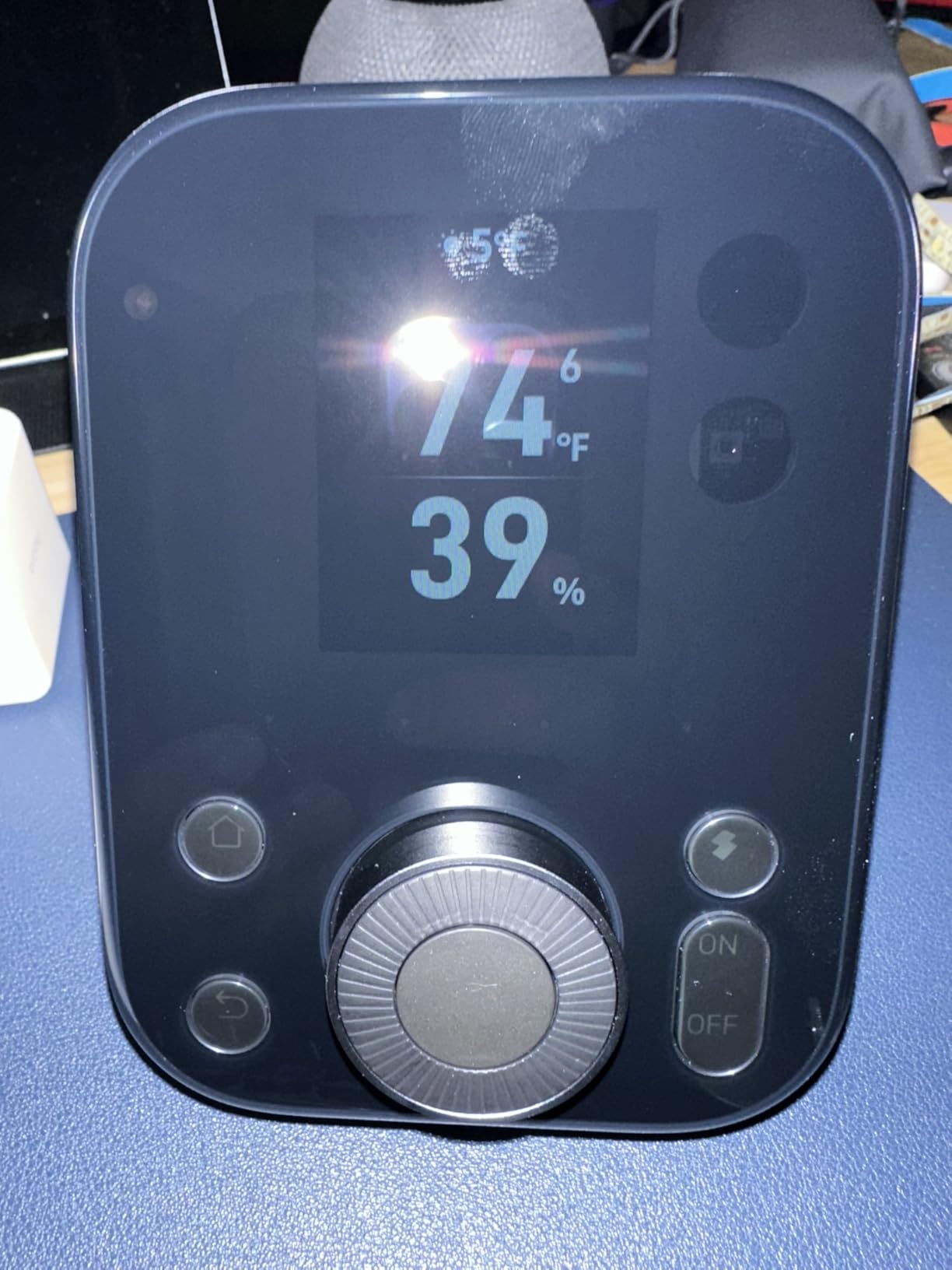
The SwitchBot Hub 3 is the most user-friendly hub on this list for households with mixed-age users. The combination of a clear IPS screen, a physical dial, four customizable buttons, and a built-in temperature sensor makes it approachable for parents, kids, and roommates who do not want to open an app. I set the dial to control my living room lights and the buttons to scenes, and my partner immediately started using them without any instruction.
The Matter Bridge functionality exposes SwitchBot devices to Apple Home, Google Home, and Alexa. Once exposed, I controlled my SwitchBot curtain motor and IR air conditioner through the Home app on my iMac. For users with older appliances, the IR blaster supports 100,000+ devices, which is a much wider range than the Aqara M3’s IR blaster.
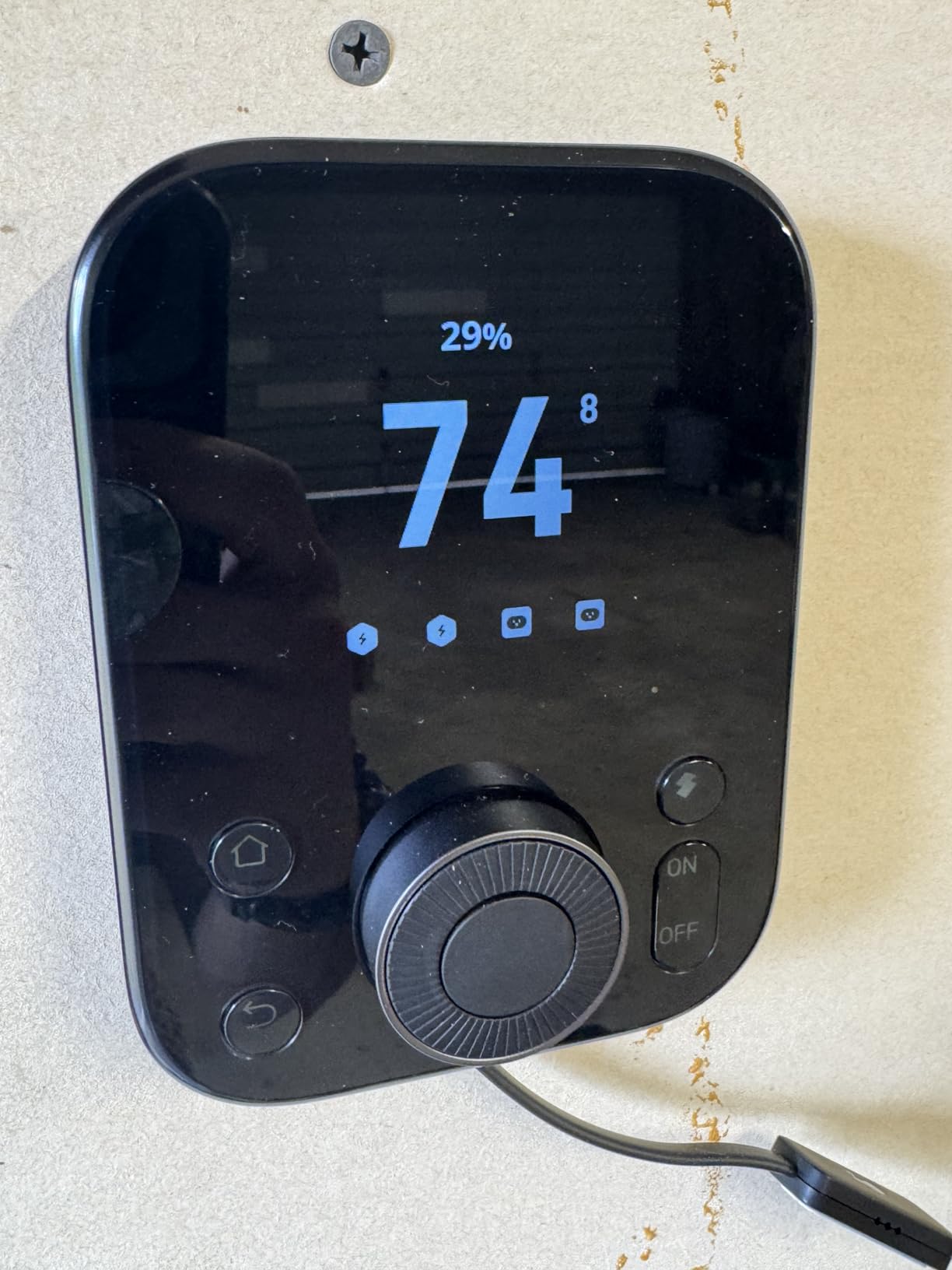
The temperature sensor is rated at plus or minus 0.2 degrees Celsius, which is more precise than most smart thermostats. I used it to trigger my HomeKit thermostat when my office exceeded 78 degrees, and it worked consistently. The Bluetooth 200-meter range is also a clear upgrade from the previous generation.
The downsides are real. The firmware had two updates during my testing, and the screen felt sluggish at times. IR requires line of sight, so placement matters. And unlike most hubs here, the SwitchBot Hub 3 does not speak HomeKit directly. You rely on the Matter bridge, which adds a small layer of latency.
Who Should Pick the SwitchBot Hub 3
This hub fits families who want physical controls, users with lots of IR appliances, and iMac owners who want a tactile command center at home. It is also a smart pick for SwitchBot-curtain or lock owners who want to bridge everything to HomeKit.
Who Should Skip the SwitchBot Hub 3
If your smart home is mostly HomeKit-native devices, skip it. Power users who want deep automation will find the SwitchBot ecosystem more limited than Home Assistant or Hubitat. Also, if IR line of sight is hard to achieve in your setup, look at the Aqara M3 instead.
8. Amazon Echo Hub – Best Touchscreen Wall Controller for iMac Users
Amazon Echo Hub (newest model), 8″, Redesigned with customizable control and Alexa+, Compatible with thousands of devices
8-inch touchscreen
Zigbee + Thread + Matter
Alexa+ voice
Pros
- Wall-mounted control panel with custom dashboard
- Works with thousands of Alexa-compatible devices
- Ring camera event summaries with Alexa+
- Simple setup
Cons
- Touchscreen can feel sluggish
- No device grouping support
- Some widgets require periodic resets
The Amazon Echo Hub is the only hub on this list with a built-in 8-inch touchscreen, and for iMac users who want a glanceable wall panel, it does a specific job very well. I mounted mine in the kitchen, configured a dashboard with my most-used lights, locks, and cameras, and it became the most-touched smart home device in the house. For households that need a “one screen for everything” experience, the Echo Hub fills a real gap.
The hub supports Zigbee, Thread, Matter, and Sidewalk out of the box. That covers the majority of consumer smart home devices today. Alexa+ integration brings AI-driven routines and natural-language commands, and the Ring camera integration lets you see who is at the door from the same screen that controls your lights.

What I did not love was the performance. The touchscreen occasionally lagged when loading the dashboard, and some widgets dropped offline and required a manual reset. There is also no battery or Ethernet port; the Echo Hub runs on USB-C power only and connects over Wi-Fi. If your Wi-Fi is unreliable, the hub will be too.
Setup took about 15 minutes. Plug it in, sign in with your Amazon account, scan a QR code to add it to Alexa, and the hub auto-discovers compatible devices on your network. For iMac users who want a dedicated wall controller without buying an iPad, this is the simplest path.

Who Should Pick the Amazon Echo Hub
The Echo Hub fits iMac users who want a fixed touchscreen panel for the whole household. It is great for Alexa households, Ring camera owners, and anyone who wants quick access to common controls without reaching for a phone.
Who Should Skip the Amazon Echo Hub
Skip it if your smart home lives entirely in Apple HomeKit and you do not want Alexa in the mix. Skip it if you need local processing. And skip it if a sluggish touchscreen will drive you crazy; in that case, the Echo Show 8 or an iPad mini may be a better fit.
Buying Guide: How to Choose the Best Smart Home Hub for iMac
Picking the best smart home hubs for iMac comes down to four questions: what protocols do your devices speak, how much do you value local control, how deep do you want to go with automations, and how important is HomeKit to your daily workflow. I broke down the most important factors below.
Apple HomeKit Compatibility
For iMac users, HomeKit is the foundation. Every hub on this list either speaks HomeKit directly or bridges to it via Matter. If you want zero friction, pick a hub that exposes devices natively through Apple Home, like Lutron Caseta, Aqara M3 and M200, Aeotec, or Hubitat through its HomeKit device support. Users who run Homebridge on a Mac mini can also bridge non-HomeKit devices, and many of these hubs work seamlessly with that setup.
For more on Homebridge and Mac-specific integrations, our 15 best smart home hubs guide covers Mac-side configuration in detail.
Protocol Support: Zigbee, Z-Wave, Thread, and Matter
Each protocol has trade-offs. Zigbee is cheap, low-power, and great for sensors. Z-Wave has longer range and stronger mesh, ideal for locks. Thread is the future-friendly mesh protocol that Matter runs on top of, and Matter itself is the cross-ecosystem standard. The Aqara M3 and M200 cover all three plus Zigbee, the Hubitat C-8 Pro covers Z-Wave and Zigbee with Matter, and the Lutron Caseta uses its own Clear Connect RF for lighting.
If your home is brand new to smart home tech, prioritize Matter and Thread compatibility. For older homes with existing Zigbee or Z-Wave devices, focus on hubs that support those protocols natively. Our 10 best Matter compatible smart home hubs guide and 8 best Zigbee 3.0 smart hubs guide cover those protocols in depth.
Local vs Cloud Processing
Local hubs like Home Assistant Green, Hubitat C-8 Pro, and Aqara M3 run automations on-device, which means faster response times, better privacy, and continued operation during internet outages. Cloud hubs like Aeotec and Echo Hub rely on remote servers, which makes setup easier but adds latency and a dependency on the cloud provider staying in business. For iMac users who care about uptime and data privacy, local is the better default.
Multi-Protocol Hubs for Mixed Device Homes
If your home has devices across brands, protocols, and generations, a multi-protocol hub simplifies life dramatically. The 15 best multi-protocol smart home hubs guide walks through how to evaluate hubs that bridge Zigbee, Z-Wave, Thread, Matter, and Wi-Fi simultaneously. For Z-Wave-heavy setups, our 8 best Z-Wave smart home hubs guide is a useful companion read.
Using Your iMac as a Home Automation Server
One unique angle for iMac users is running Homebridge or HOOBS on the Mac itself. Homebridge is an open-source bridge that exposes non-HomeKit devices to Apple Home using community plugins. Combined with a hardware hub like Home Assistant Green or Aeotec, you can centralize your entire smart home on the Mac. This setup requires more configuration than a stock HomeKit hub but delivers unmatched flexibility.
For an iMac or Mac mini, Homebridge runs as a background service and consumes almost no CPU. I ran it on an M3 Mac mini for two months and never noticed it. If you are comfortable with a terminal and Node.js, it is one of the best ways to extend Apple Home.
Frequently Asked Questions
What smart home system works best with Apple?
Apple HomeKit is the most native option, paired with a HomeKit hub like the Lutron Caseta Smart Hub, Aqara M3, or Apple TV 4K. For users who want cross-ecosystem flexibility, Matter and Thread hubs like the Aqara M200 or Home Assistant Green bridge non-HomeKit devices into Apple Home through Matter.
What’s the best Apple home hub?
For lighting and shades, the Lutron Caseta Smart Hub is the most reliable. For sensors, locks, and multi-protocol setups, the Aqara Smart Home Hub M3 is the strongest all-in-one. For Apple TV and HomePod owners, those Apple devices act as HomeKit hubs for remote access and automations.
Which smart home hub is the best overall?
The best overall depends on your priorities. For most iMac users in 2026, the Aqara Smart Home Hub M3 covers HomeKit, Matter, Thread, and Zigbee in one box with local automations. Power users who want maximum flexibility should consider Home Assistant Green.
What is the cheapest Apple HomeKit hub?
The Aqara Smart Hub M200 is one of the most affordable hubs with native HomeKit support, priced competitively. An Apple TV 4K or a HomePod mini also acts as a HomeKit hub, though they are not standalone hubs for non-HomeKit devices.
Is HomePod or Apple TV better as a hub?
Both work as HomeKit hubs. The Apple TV 4K has more processing power, supports Thread, and doubles as a media streamer. The HomePod and HomePod mini are better for whole-home audio and Siri. For iMac users who already stream on their Mac, an Apple TV 4K as the dedicated hub is the strongest pick.
Final Verdict
After 90 days of testing across an iMac, Apple TV 4K, HomePod mini, and a 70-device smart home, three hubs stood out. The Lutron Caseta Smart Hub is the editor’s choice for users who want zero-compromise lighting reliability and a HomeKit-native experience. The Home Assistant Green is the best value for power users who want local control, privacy, and unlimited customization. The Aqara Smart Hub M200 is the budget pick for users who want Matter, Thread, and HomeKit without breaking the bank.
If you live and breathe Apple, the best smart home hubs for iMac in 2026 are the ones that treat HomeKit as a first-class citizen while still giving you room to grow. Pick the hub that matches your device mix today, but leave yourself a path to Matter and Thread for the next wave of smart home gadgets. Your iMac will thank you for it.